
Introduction
This manual provides instructions for the SUNTHIN 240W Outdoor Dimmer, designed for use with LED and incandescent string lights. It features wireless remote control, multiple brightness settings, and timer functions to enhance your outdoor lighting experience.
Safety Information
- Ensure the dimmer is compatible with your string lights. This dimmer works with dimmable LED and incandescent bulbs.
- Do not exceed the maximum load of 240W for this dimmer. Overloading can cause damage or fire hazards.
- The dimmer has an IP44 waterproof rating, suitable for various weather conditions. However, avoid exposing the connection points between the dimmer and string lights to water.
- Always unplug the dimmer from the power source before installation, maintenance, or when replacing bulbs.
- Keep the remote control dry and away from extreme temperatures.
Package Contents
- 1 x SUNTHIN 240W Outdoor Dimmer Unit
- 1 x Wireless Remote Controller
Product Overview
The SUNTHIN outdoor dimmer allows you to control the brightness and timing of your string lights wirelessly. The main unit connects inline with your string lights, and the remote provides convenient operation.
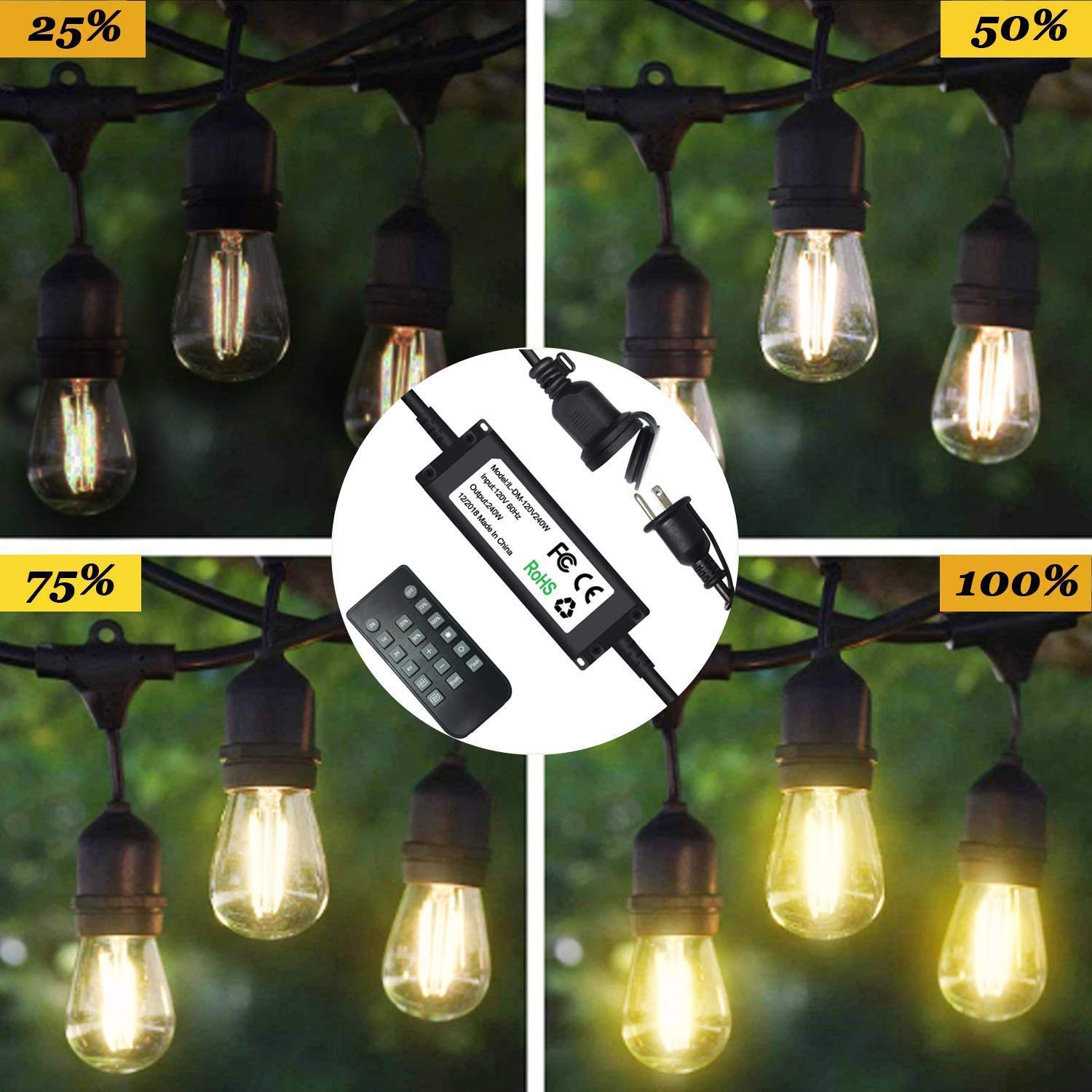
Image: The SUNTHIN outdoor dimmer unit and its remote control, illustrating various brightness levels of string lights.

Image: Detailed dimensions of the dimmer unit and remote control for reference.
Specifications
| Feature | Specification |
|---|---|
| Brand | SUNTHIN |
| Model Number | AUB07JQ2KFX8 |
| Operation Mode | ON-OFF |
| Operating Voltage | 120 Volts |
| Connector Type | Plug In |
| Control Method | Remote |
| Wattage | 350 watts (Maximum Load) |
| International Protection Rating | IP44 |
| Compatible Devices | LED string lights, incandescent string lights |
| Item Weight | 14.9 ounces |
| Package Dimensions | 9.96 x 2.87 x 2.83 inches |
Setup
- Unpack: Carefully remove the dimmer unit and remote control from the packaging.
- Check Compatibility: Ensure your string lights are dimmable and their total wattage does not exceed 240W. Refer to the compatibility chart below.
- Connect String Lights: Plug your string lights into the output receptacle of the SUNTHIN dimmer unit.
- Connect to Power: Plug the dimmer unit's input plug into a standard 120V outdoor power outlet.
- Remote Battery: Ensure the remote control has a working battery. Remove any plastic pull tabs if present.

Image: Illustration of the simple plug-and-play setup for the dimmer unit.

Image: A chart detailing the maximum number of different bulb types (S14, G40, etc.) that can be connected to the dimmer.
Operating Instructions
Use the wireless remote control to operate your SUNTHIN outdoor dimmer.
Remote Control Functions:
- ON/OFF: Press the ON button to turn lights on, and OFF to turn them off.
- Preset Brightness: Select from four preset brightness levels: 25%, 50%, 75%, or 100%.
- Stepless Dimming: Use the + and - buttons to adjust brightness from 10% to 100% in small increments.
- Timer Functions:
- Delay Off: Set the lights to turn off after 1H, 2H, or 4H.
- Cycle Settings: Use 6H or 8H cycle settings for automatic on/off operation daily.
- Flash Mode: The FLASH button activates a flashing light effect.

Image: A hand using the remote control to adjust the brightness of string lights, highlighting the stepless dimming feature.

Image: The remote control, emphasizing its 49ft operating distance and a crucial warning about the 240W maximum load.
Maintenance
- Cleaning: Wipe the dimmer unit and remote control with a dry, soft cloth. Do not use harsh chemicals or abrasive cleaners.
- Water Exposure: While the dimmer is waterproof (IP44), ensure the electrical connections between the dimmer and string lights are protected from direct water exposure to prevent damage.
- Storage: If storing the dimmer for an extended period, disconnect it from power and store it in a cool, dry place.
Troubleshooting
- Lights not turning on:
- Check if the dimmer is securely plugged into a working power outlet.
- Ensure the string lights are properly connected to the dimmer.
- Verify that the string lights themselves are functional by plugging them directly into a power outlet (bypassing the dimmer).
- Check the fuse in the dimmer unit. If blown, replace it with a spare (if provided) of the correct rating.
- Remote control not working:
- Ensure the remote control battery is correctly installed and not depleted. Replace if necessary.
- Confirm there are no obstructions between the remote and the dimmer unit.
- Ensure you are within the 50ft operating range of the remote.
- Lights not dimming or flickering:
- Confirm that your string light bulbs are explicitly labeled as dimmable. Non-dimmable bulbs may not function correctly or could be damaged.
- Ensure the total wattage of connected lights does not exceed the dimmer's maximum capacity (240W).
Warranty
Warranty information for this product is not available in the provided data. Please refer to the product packaging or contact SUNTHIN customer support for details regarding warranty coverage.
Support
For further assistance or inquiries, please contact SUNTHIN customer support through their official website or the retailer where the product was purchased. Have your model number (AUB07JQ2KFX8) ready when contacting support.
