Product Overview
The ANJANK Small Alarm Clock Radio is a versatile device designed to provide timekeeping, alarm functions, FM radio, and convenient USB charging. It features a clear digital display, adjustable brightness, and multiple alarm sound options, including the ability to wake up to your favorite radio station. Its compact design makes it suitable for various settings, such as bedrooms, offices, or travel.

Figure 1: Front view of the ANJANK Small Alarm Clock Radio displaying time and temperature.
Package Contents
Upon opening the package, please ensure all the following items are present:
- 1 x LCD Mini Alarm Clock
- 1 x USB Cable (5 ft)
- 1 x USB Adaptor
- 1 x User Manual
Setup
Powering On
The ANJANK Alarm Clock Radio can be powered in two ways:
- AC Power: Connect the provided USB cable to the alarm clock's power input jack and the USB adaptor. Plug the adaptor into a standard AC outlet (AC100-240V, 50/60Hz). This is the primary power source.
- Battery Backup: For backup power during outages or for portability, insert 3 AAA batteries (not included) into the battery compartment located on the bottom of the unit. In battery-operated mode, the screen will display for 8 seconds and then go to sleep to conserve battery life.

Figure 2: Powering options for the alarm clock, including AC adapter and AAA battery backup.
Initial Time Setting
After connecting power, the clock display will illuminate. To set the correct time:
- Press and hold the TIME SET button located on the top of the unit until the hour digits begin to flash.
- Use the + or - buttons (often integrated with volume controls) to adjust the hour.
- Press TIME SET again to move to the minute digits, then adjust using + or -.
- Press TIME SET one more time to confirm and exit time setting mode.
- To switch between 12-hour (AM/PM) and 24-hour formats, press the 12/24H button on the back of the unit.
Operating Instructions
Controls Overview

Figure 3: Detailed view of the alarm clock's controls and ports.
- Top Buttons: SLEEP, TIME SET, FM RADIO, ALARM 1 SET, ALARM 2 SET, SNOOZE/DIMMER.
- Front Display: Time, AM/PM indicator, Alarm 1/2 status, Temperature.
- Back Ports/Buttons: USB 1 Port, USB 2 Port, Alarm Volume, Radio Volume, Earphone/Headphone Jack, Power Input Jack, 12/24H button, C/F (Temperature) button.
Setting Alarms
The clock features dual alarms (Alarm 1 and Alarm 2) that can be set independently.
- Press and hold the ALARM 1 SET or ALARM 2 SET button until the alarm hour digits flash.
- Use the + or - buttons to adjust the hour.
- Press the respective ALARM SET button again to move to the minute digits, then adjust using + or -.
- Press the ALARM SET button again to select the alarm sound. You can choose from 6 built-in nature sounds (Bird, Water, Kanoon, Spirited Away, Beep, Buzzer) or your favorite FM radio station.
- Press the ALARM SET button one last time to confirm and activate the alarm. An alarm icon will appear on the display.
- To turn an alarm off, press the corresponding ALARM SET button once. The alarm icon will disappear.
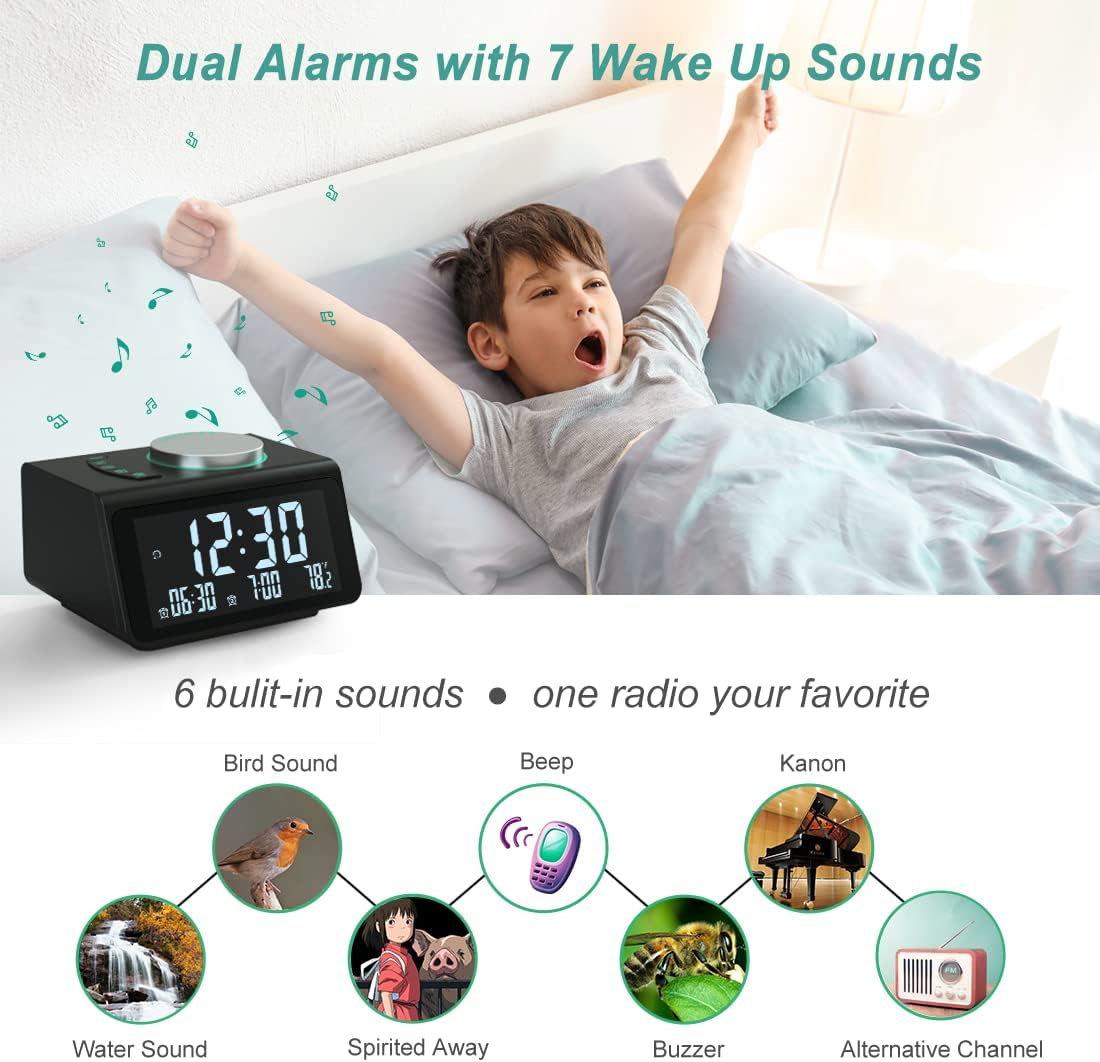
Figure 4: Dual alarm functionality with 7 wake-up sound options.
FM Radio Operation
The clock features an FM radio with a frequency range of 87.5-108MHz.
- Turning On/Off: Press the FM RADIO button to turn the radio on or off.
- Scanning Stations:
- Auto-Scan: Press and hold the FM RADIO button to automatically scan and save up to 60 available stations.
- Manual Scan: Briefly press the + or - buttons to manually tune to the next or previous frequency.
- Volume Adjustment: Use the Radio Vol knob on the back of the unit to adjust the radio volume.
- Sleep Timer: Press the SLEEP button to activate the sleep timer (10-120 minutes). The radio will play for the set duration and then automatically turn off.

Figure 5: Key features of the integrated FM radio.
Display Brightness Adjustment
The 3.2-inch LCD screen offers 5 levels of brightness to suit your preference, from fully dark to full brightness.
- Press the large SNOOZE/DIMMER button on the top of the unit to cycle through the 5 brightness levels: Full, High, Medium, Low, and Fully Dark.
- When an alarm sounds, pressing the SNOOZE/DIMMER button will activate the snooze function for 10 minutes. The display brightness will also increase with each snooze cycle to aid in waking.

Figure 6: Adjustable brightness levels of the display.
USB Charging Ports
The alarm clock is equipped with two USB charging ports (USB 1A and USB 2A) on the back, allowing you to charge your mobile devices.
- Connect your smartphone, tablet, or other 5V electronic devices to either USB port using their respective charging cables.
- These ports provide convenient charging without requiring additional wall adapters.

Figure 7: Dual USB charging ports in use.
Headphone Jack
A 3.5mm headphone jack is located on the back of the unit, allowing for private listening of the FM radio or alarm sounds.
- Plug any standard 3.5mm headphones into the headphone jack.
- The sound will automatically switch from the built-in speaker to the headphones.
Temperature Display
The clock displays the indoor temperature. You can switch between Celsius (℃) and Fahrenheit (℉) units.
- Press the C/F button on the back of the unit to toggle between Celsius and Fahrenheit.
Maintenance
- Cleaning: To clean the unit, gently wipe the surface with a soft, dry cloth. Do not use abrasive cleaners, waxes, or solvents as they may damage the finish.
- Battery Replacement: If using battery backup, replace the 3 AAA batteries when the display becomes dim or the clock loses time during power outages. Ensure correct polarity when inserting new batteries.
- Storage: If storing the unit for an extended period, remove the batteries to prevent leakage.
Troubleshooting
| Problem | Possible Cause | Solution |
|---|---|---|
| Display is dark or blank. | No AC power; batteries drained (in battery mode); unit malfunction. | Ensure AC adapter is securely plugged in. If using batteries, replace them. If problem persists, contact support. |
| Alarm does not sound. | Alarm not activated; alarm volume too low; incorrect alarm time set. | Verify alarm icon is displayed. Adjust alarm volume using the Alarm Vol knob. Re-check alarm time settings. |
| Poor FM radio reception/static. | Weak signal; antenna not extended; interference. | Extend the wire antenna fully. Try repositioning the unit. Perform an auto-scan for stations. |
| USB charging not working. | Device not compatible; cable faulty; unit not powered by AC. | Ensure the alarm clock is connected to AC power. Try a different USB cable or device. |
| Time is incorrect after power outage. | Battery backup not installed or drained. | Install fresh AAA batteries for backup. Reset the time manually. |
Specifications
| Feature | Detail |
|---|---|
| Brand | ANJANK |
| Model Number | B314 |
| Product Dimensions | 1.3 x 0.03 x 6.1 cm (0.51 x 0.01 x 2.4 inches) |
| Weight | 306.17 g (0.67 lbs) |
| Display Type | Digital LCD |
| Brightness Levels | 5 (Full, High, Medium, Low, Fully Dark) |
| FM Radio Frequency | 87.5-108MHz |
| Alarm Sounds | 6 Nature Sounds + FM Radio |
| USB Charging Ports | 2 (USB 1A, USB 2A) |
| Power Input | AC100-240V, 50/60Hz, Output 5V/2A |
| Battery Backup | 3 x AAA batteries (not included) |
| Special Features | Dual Alarms, Dual USB Charging, Temperature Display (℃/℉), Headphone Jack, Sleep Timer |
Warranty and Support
For any questions, concerns, or technical assistance regarding your ANJANK Small Alarm Clock Radio, please contact ANJANK customer support. Refer to the contact information provided in the product packaging or on the official ANJANK website for the most up-to-date support channels.
Please retain your purchase receipt for warranty purposes.