
1. Product Overview
The Comfee MDDE-10DEN3 Dehumidifier is designed to efficiently remove excess moisture from indoor air, creating a more comfortable and healthier environment. It is suitable for rooms up to approximately 40 cubic meters. This unit features a clearly designed control panel for easy operation, a 2-liter water tank, and includes essential protections such as frost and overflow protection. It utilizes R290 refrigerant for effective dehumidification.
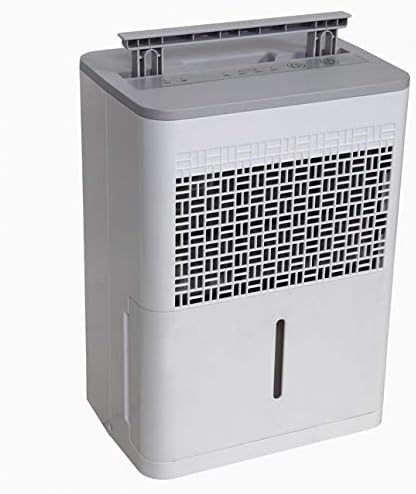
Figure 1: Front view of the Comfee MDDE-10DEN3 Dehumidifier. This image shows the compact design of the unit, with the air intake grille visible on the front and the water level indicator on the side.
2. Safety Instructions
Please read all safety instructions carefully before operating the dehumidifier to prevent injury or damage. Keep this manual for future reference.
- Ensure the power supply matches the voltage specified on the unit's rating label.
- Do not operate the dehumidifier with a damaged cord or plug.
- Do not block the air inlet or outlet. Maintain at least 20 cm (8 inches) clearance around the unit.
- Do not use the appliance in wet or damp environments, such as bathrooms or laundry rooms, where it may come into contact with water.
- Always unplug the unit before cleaning or performing any maintenance.
- Keep the unit upright during transport and operation.
- This appliance uses R290 refrigerant, which is flammable. Do not puncture the refrigerant circuit.
- Do not attempt to repair or modify the unit yourself. Contact qualified service personnel for repairs.
- Keep out of reach of children and pets.
3. Product Components
Familiarize yourself with the main parts of your Comfee MDDE-10DEN3 Dehumidifier:
- Control Panel: Located on the top of the unit, used for setting operation modes and humidity levels.
- Air Inlet Grille: Where air is drawn into the unit for dehumidification.
- Air Outlet: Where dry air is expelled.
- Water Tank: Collects condensed water. Features a water level indicator.
- Handle: For easy portability.
- Power Cord: Connects the unit to an electrical outlet.

Figure 2: Close-up view of the Comfee MDDE-10DEN3 Dehumidifier control panel. This image displays the various buttons and indicator lights, including power, humidity settings (40%, 50%, 60%), and defrost indicators.
4. Setup
- Unpacking: Carefully remove the dehumidifier from its packaging. Retain the packaging for future storage or transport.
- Placement: Place the unit on a firm, level surface in the desired room. Ensure there is at least 20 cm (8 inches) of free space around all sides of the unit for proper air circulation. Do not place it near heat sources or in direct sunlight.
- Power Connection: Plug the power cord into a grounded electrical outlet. Ensure the outlet meets the power requirements of the unit.
- Water Tank: Ensure the water tank is correctly inserted into the unit.
5. Operating Instructions
The control panel allows you to manage the dehumidifier's functions.
Figure 3: Detailed view of the control panel for operation reference.
- Power Button (①): Press to turn the unit ON or OFF.
- Humidity Setting Button (②): Press to cycle through desired humidity levels: 40%, 50%, 60%. The corresponding indicator light will illuminate. The unit will operate until the set humidity level is reached.
- Continuous Operation: If no specific humidity level is set, the unit may operate continuously.
- Defrost Indicator (③): Illuminates when the unit is in defrost mode, which occurs automatically when coil temperatures are too low. The dehumidification process will pause during defrosting.
- Full Water Tank Indicator (④): Illuminates when the water tank is full or incorrectly inserted. The unit will stop operating until the tank is emptied and reinserted correctly.
- Auto-Restart Function: In case of a power outage, the unit will automatically restart with the previously set humidity level once power is restored.
Continuous Drainage (Optional)
For continuous operation without needing to empty the water tank, a drainage hose (not included) can be connected to the continuous drainage port on the back of the unit. Ensure the hose is sloped downwards to allow gravity drainage into a suitable receptacle.
6. Maintenance
Regular maintenance ensures optimal performance and extends the lifespan of your dehumidifier.
- Emptying the Water Tank: When the "Full Water Tank" indicator illuminates, carefully pull out the water tank, empty the collected water, and reinsert it firmly until it clicks into place.
- Cleaning the Air Filter: The air filter should be cleaned every two weeks or more frequently depending on usage.
- Turn off the unit and unplug it from the power outlet.
- Remove the air filter from the back or side of the unit (refer to diagram in full manual if available).
- Wash the filter with warm, soapy water. Rinse thoroughly and allow it to air dry completely before reinserting.
- Do not operate the dehumidifier without the filter.
- Cleaning the Unit Exterior: Wipe the exterior with a soft, damp cloth. Do not use harsh chemicals or abrasive cleaners.
- Storage: If storing the unit for an extended period, ensure the water tank is empty and clean, and the filter is clean and dry. Store the unit upright in a cool, dry place.
7. Troubleshooting
Refer to the following table for common issues and their solutions.
| Problem | Possible Cause | Solution |
|---|---|---|
| Unit does not turn on. | No power; power cord loose; water tank full or not properly inserted. | Check power outlet and cord connection. Empty and reinsert water tank correctly. |
| No water collected. | Humidity level set too high; room temperature too low; air filter clogged; continuous drainage hose connected and draining. | Lower desired humidity setting. Ensure room temperature is above 5°C (41°F). Clean air filter. Check continuous drainage setup. |
| Unit runs constantly. | Humidity level not reached; unit set to continuous operation. | Allow more time for dehumidification. Set a specific humidity level if continuous operation is not desired. |
| Defrost indicator is on. | Coils are frosting up due to low ambient temperature. | This is normal operation. The unit will automatically defrost and resume dehumidification. |
If the problem persists after trying these solutions, please contact Comfee customer support.
8. Specifications
| Feature | Specification |
|---|---|
| Model Name | MDDE-10DEN3 |
| Brand | Comfee |
| Dehumidification Capacity | 10 Liters/24 hours |
| Water Tank Capacity | 2 Liters |
| Recommended Room Size | Up to approximately 40 m³ |
| Refrigerant | R290 |
| Dimensions (Package) | 44.8 x 36.3 x 34 cm |
| Item Weight | 11 Kilograms |
| Color | White/Grey |
| Operating Mode | Automatic |
9. Warranty and Support
Specific warranty information for your Comfee MDDE-10DEN3 Dehumidifier is typically provided with your purchase documentation or on the manufacturer's official website. Please refer to these resources for details regarding warranty coverage, terms, and conditions.
For technical support, service, or inquiries about replacement parts, please contact Comfee customer service. Contact information can usually be found on the Comfee website or on your product's packaging.
You can visit the official Comfee store for more information: Comfee Store


