
Introduction
This manual provides detailed instructions for the proper installation, operation, and maintenance of your Sony SRG-120DH 2.1 Megapixel Network Camera. Please read this manual thoroughly before using the product to ensure safe and optimal performance. Keep this manual for future reference.
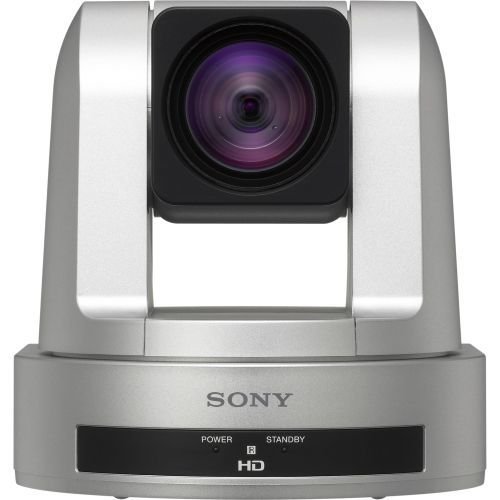
Image: Sony SRG-120DH 2.1 Megapixel Network Camera. This image displays the front view of the camera, highlighting its compact design and lens.
Safety Information
Always follow basic safety precautions when using this product to reduce the risk of fire, electric shock, and injury to persons. This includes, but is not limited to:
- Do not expose the camera to rain or moisture.
- Do not open the camera casing; refer all servicing to qualified personnel.
- Ensure proper ventilation to prevent overheating.
- Use only the power supply specified for this device.
Package Contents
Verify that all items are present in the package:
- Sony SRG-120DH Network Camera
- Power Adapter (if included)
- Mounting Bracket
- Screws and Wall Plugs
- Quick Start Guide
Note: Specific accessories may vary by region or package.
Setup
1. Mounting the Camera
- Choose a suitable location for mounting, ensuring a clear field of view and access to power and network connections.
- Use the provided mounting bracket as a template to mark drill holes on the wall or ceiling.
- Drill holes and insert wall plugs if necessary.
- Secure the mounting bracket using the provided screws.
- Attach the camera to the mounting bracket, ensuring it is firmly locked in place.
2. Connecting the Camera
- Power Connection: Connect the power adapter to the camera's power input port and then to a power outlet.
- Network Connection: Connect an Ethernet cable from the camera's LAN port to your network switch or router.
- HDMI Output (Optional): If using, connect an HDMI cable from the camera's HDMI output to a display device.
Operating
1. Initial Network Configuration
Upon first power-up, the camera will attempt to obtain an IP address via DHCP. To access the camera's web interface:
- Ensure your computer is on the same network as the camera.
- Use a network scanner tool or refer to your router's connected devices list to find the camera's IP address.
- Open a web browser and enter the camera's IP address in the address bar.
- Log in using the default username and password (refer to the Quick Start Guide or manufacturer's website for default credentials).
2. Basic Camera Controls
From the web interface, you can control various camera functions:
- Pan/Tilt/Zoom (PTZ): Adjust the camera's viewing angle and zoom level. The SRG-120DH features 12x optical zoom.
- Image Settings: Configure brightness, contrast, saturation, white balance, and exposure.
- Recording Settings: Set up recording schedules, motion detection, and storage options.
- Network Settings: Modify IP address, port settings, and streaming protocols.
Maintenance
1. Cleaning the Camera
- Gently wipe the camera lens and body with a soft, dry cloth.
- For stubborn dirt, use a cloth slightly dampened with water or a mild, non-abrasive cleaning solution.
- Do not use strong detergents, solvents, or abrasive materials, as these can damage the camera's finish or lens coating.
2. Firmware Updates
Periodically check the Sony support website for firmware updates. Firmware updates can improve performance, add new features, and address security vulnerabilities. Follow the instructions provided with the firmware update package carefully.
Troubleshooting
| Problem | Possible Cause | Solution |
|---|---|---|
| No image/video output | Power supply issue, network cable disconnected, incorrect IP address. | Check power connection. Verify network cable is securely connected. Confirm camera's IP address and network settings. |
| Poor image quality | Dirty lens, improper focus, low light conditions, incorrect image settings. | Clean the lens. Adjust focus. Ensure adequate lighting. Review image settings in the web interface. |
| Cannot access web interface | Incorrect IP address, network connectivity issue, firewall blocking access. | Verify IP address. Check network cable and router. Temporarily disable firewall to test. |
If the problem persists after trying these solutions, please contact Sony customer support.
Specifications
| Feature | Detail |
|---|---|
| Model Number | SRG-120DH |
| Effective Still Resolution | 2.1 MP |
| Video Resolution | 1080p (1920 x 1080) |
| Optical Zoom | 12x |
| Digital Zoom | 12x |
| Sensor Type | Exmor CMOS |
| Connectivity | Ethernet, HDMI |
| Minimum Focal Length | 2.8 Millimeters |
| Maximum Aperture | 2 f |
| Item Weight | 1450 Grams |
| GTIN / UPC | 027242913455 |
Warranty Information
The Sony SRG-120DH Network Camera comes with a Limited Lifetime Warranty. This warranty covers defects in materials and workmanship under normal use. For full terms and conditions, please refer to the warranty card included with your product or visit the official Sony support website.
Customer Support
For technical assistance, troubleshooting, or service inquiries, please contact Sony customer support:
- Website: Visit the official Sony support website for FAQs, drivers, and software downloads.
- Phone: Refer to your region's Sony website for local support contact numbers.
When contacting support, please have your product model number (SRG-120DH) and serial number ready.


