Introduction
This manual provides essential information for the safe and efficient operation of your Cecotec Ready Warm 6650 Crystal Connection Electric Radiator. Please read these instructions carefully before use and retain them for future reference. This electric radiator is designed to provide rapid and efficient heating for spaces up to 10 m2, featuring a modern design with tempered glass and smart connectivity.

Figure 1: The Cecotec Ready Warm 6650 Crystal Connection Electric Radiator, showcasing its sleek design and the accompanying smartphone for Wi-Fi control.
Important Safety Information
Always follow basic safety precautions when using electrical appliances to reduce the risk of fire, electric shock, and personal injury.
- Read all instructions before using this appliance.
- Do not use this heater in the immediate surroundings of a bath, a shower or a swimming pool.
- This heater is suitable for bathrooms due to its IP24 splash protection.
- Do not cover the heater. Overheating protection will automatically shut off the device if it overheats.
- Keep flammable materials such as furniture, curtains, and bedding at least 1 meter (3 feet) from the front and sides of the heater.
- Do not insert or allow foreign objects to enter any ventilation or exhaust opening as this may cause an electric shock or fire, or damage the heater.
- Unplug the heater when not in use.
- Do not operate any heater with a damaged cord or plug or after the heater malfunctions, has been dropped or damaged in any manner.
- This appliance can be used by children aged from 8 years and above and persons with reduced physical, sensory or mental capabilities or lack of experience and knowledge if they have been given supervision or instruction concerning use of the appliance in a safe way and understand the hazards involved.
- Children shall not play with the appliance. Cleaning and user maintenance shall not be made by children without supervision.
Setup and Installation
Your Cecotec Ready Warm 6650 Crystal Connection Electric Radiator can be used as a freestanding unit or wall-mounted.
Freestanding Installation
To use the radiator as a freestanding unit, attach the included feet to the base of the appliance. Ensure they are securely fastened before placing the radiator on a stable, flat surface.

Figure 2: The radiator with its feet installed, ready for freestanding use.
Wall-Mount Installation
For wall-mounting, use the provided wall support bracket. Mark the desired position on the wall, ensuring it is a safe distance from flammable materials and power outlets. Drill holes, insert wall plugs, and secure the bracket. Then, carefully hang the radiator onto the bracket.
Note: Always consult a qualified professional if you are unsure about wall mounting.
Operating Instructions
The radiator features a SmartControl LED display and a touch panel for easy operation, in addition to Wi-Fi control via the "Tuya Smart" app.

Figure 3: Detailed view of the radiator's control panel, showing the LED display and touch-sensitive buttons for various functions.
Power On/Off
- Plug the radiator into a suitable power outlet.
- Press the Power button (symbol: circle with vertical line) on the touch panel to turn the unit on or off.
Temperature and Power Level Adjustment
- Use the + and - buttons to adjust the desired temperature. The current temperature setting will be displayed on the LED screen.
- The radiator offers two power levels:
- Eco Mode (500W): For optimized energy consumption.
- Max Mode (1000W): For rapid heating.
Timer Function
- Press the Timer button (symbol: clock) to activate the programmable timer.
- Set the desired operating time (up to 24 hours, 7 days a week) using the + and - buttons.
- The radiator will automatically turn off or on according to your set schedule.
Wi-Fi Connection and App Control
The radiator can be controlled remotely via your smartphone using the "Tuya Smart" app.
- Download the "Tuya Smart" app from your smartphone's app store (iOS or Android).
- Register or log in to your Tuya Smart account.
- Ensure your radiator is powered on and in pairing mode (refer to the app's instructions for specific pairing steps, usually involving holding a button on the radiator).
- Follow the in-app instructions to add your Cecotec Ready Warm 6650 radiator.
- Once connected, you can control temperature, power levels, timer, and other settings from your smartphone.
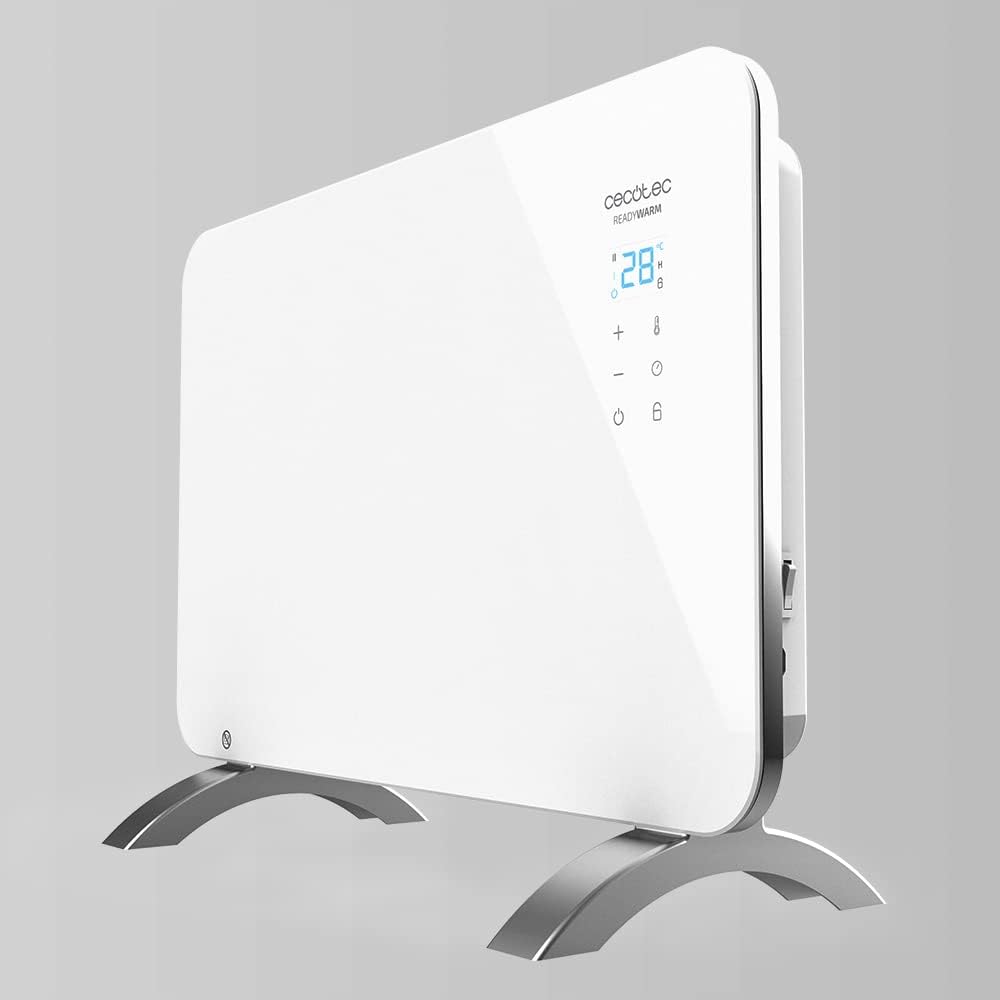
Figure 4: Controlling the radiator remotely using the "Tuya Smart" application on a smartphone.
Child Lock
- To activate or deactivate the child lock, press and hold the Lock button (symbol: padlock) on the control panel for 3 seconds.
- When activated, the control panel will be locked to prevent accidental changes.
Maintenance and Care
Regular cleaning and proper storage will ensure the longevity and optimal performance of your radiator.
Cleaning
- Always unplug the radiator and allow it to cool completely before cleaning.
- Wipe the exterior surfaces with a soft, damp cloth. Do not use abrasive cleaners or solvents.
- Ensure no water enters the internal components.
- Do not immerse the radiator in water or any other liquid.
Storage
- If storing the radiator for an extended period, clean it thoroughly.
- Store it in a cool, dry place, away from direct sunlight and extreme temperatures.
- It is recommended to store it in its original packaging to protect it from dust and damage.
Troubleshooting
Refer to the table below for common issues and their solutions.
| Problem | Possible Cause | Solution |
|---|---|---|
| Radiator does not turn on. | Not plugged in; power switch off; power outage. | Ensure the power cord is securely plugged in. Check the main power switch. Verify power supply to the outlet. |
| No heat output. | Temperature setting too low; overheating protection activated. | Increase the temperature setting. If overheating protection is active, unplug the unit, let it cool for 30 minutes, and check for obstructions. |
| Wi-Fi connection fails. | Incorrect Wi-Fi password; router too far; radiator not in pairing mode. | Double-check Wi-Fi password. Move radiator closer to router. Ensure radiator is in pairing mode as per app instructions. Restart router and radiator. |
| Control panel is unresponsive. | Child lock is activated. | Deactivate child lock by pressing and holding the lock button for 3 seconds. |
Product Specifications
Below are the technical specifications for the Cecotec Ready Warm 6650 Crystal Connection Electric Radiator.
- Brand: Cecotec
- Model Name: Ready Warm 6650 Crystal Connection
- Model Number: 1
- Color: White
- Product Dimensions: 47 x 13 x 64.5 cm (18.5 x 5.1 x 25.4 inches)
- Weight: 5.1 kg (11.24 lbs)
- Power: 500W (Eco Mode) / 1000W (Max Mode)
- Voltage: 230 Volts
- Material: Stainless Steel, Tempered Glass
- Automatic Shut-off: Yes (Overheating protection)
- Number of Speeds/Power Levels: 2
- Special Features: On/Off Timer, Wi-Fi Control, LED Display, Touch Panel, Child Lock, IP24 Splash Protection
- Recommended Use: Indoor, Bathrooms
- Heating Coverage: Up to 10 m2
- Mounting Type: Wall Mount or Freestanding (with included feet)
Warranty and Customer Support
Cecotec products are manufactured to the highest standards and are designed for reliable performance. For information regarding warranty coverage, technical support, or service, please visit the official Cecotec website or contact their customer service department.
Official Website: www.cecotec.com
Please have your product model number (Ready Warm 6650 Crystal Connection) and purchase details ready when contacting support.


