
MIFA X1
MIFA X1 True Wireless Earbuds Instruction Manual
Model: X1
Product Overview
The MIFA X1 True Wireless Earbuds offer a seamless audio experience with Bluetooth 5.0 connectivity, stereo sound, and a portable charging case. Designed for comfort and durability, these earbuds are sweatproof and suitable for various activities.
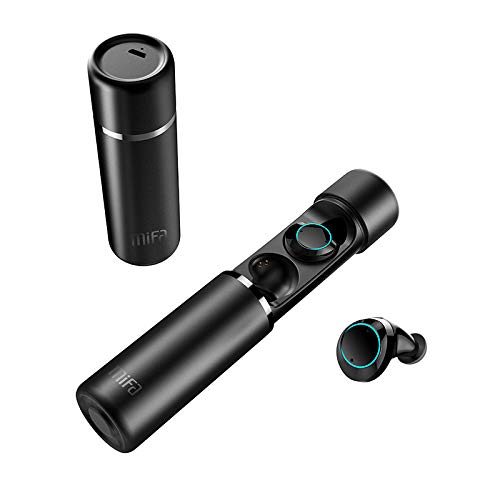
An image displaying the MIFA X1 True Wireless Earbuds. The cylindrical charging case is shown both closed and open, revealing the earbuds inside. One earbud is also shown outside the case.
Package Contents
- MIFA X1 True Wireless Earbuds
- Portable Charging Case
- Multi-sized Ear Gels (S, M, L)
- USB Charging Cable
- User Manual (this document)
Setup
1. Initial Charging
Before first use, ensure both the earbuds and the charging case are fully charged. Remove any protective films from the earbud charging contacts if present.
- Place the earbuds into the charging case.
- Connect the charging case to a power source using a standard USB charging cable.
- Charging indicators on the case and/or earbuds will show charging status.
2. Pairing with a Device
The MIFA X1 earbuds feature one-step pairing.
- Ensure Bluetooth is enabled on your smartphone or other device.
- Take both earbuds out of the charging case. They will automatically power on and enter pairing mode.
- On your device, search for Bluetooth devices and select "MIFA X1" from the list.
- Once connected, a voice prompt will confirm successful pairing.
Note: If only one earbud connects, place both back into the case, then remove them again to re-initiate pairing.
Operating Instructions
Wearing the Earbuds
- Choose the ear gels that provide the most comfortable and secure fit for optimal sound quality and stability.
- Gently insert the earbuds into your ears and rotate them slightly to ensure a snug fit.
Basic Controls (Touch Control)
| Function | Action |
|---|---|
| Power On | Take out of charging case (automatic) |
| Power Off | Place into charging case (automatic) |
| Play/Pause Music | Single tap on either earbud |
| Next Track | Double tap on right earbud |
| Previous Track | Double tap on left earbud |
| Answer/End Call | Single tap on either earbud |
| Reject Call | Press and hold either earbud for 2 seconds |
| Activate Voice Assistant (Siri, Google Assistant) | Triple tap on either earbud |
Maintenance
- Cleaning: Regularly clean the earbuds and charging case with a soft, dry, lint-free cloth. Do not use harsh chemicals or abrasive materials.
- Charging Contacts: Ensure the charging contacts on both the earbuds and the case are clean and free of debris to maintain proper charging.
- Storage: When not in use, store the earbuds in their charging case to protect them and keep them charged.
- Water Resistance: The earbuds are sweatproof, but not fully waterproof. Avoid submerging them in water or exposing them to heavy rain.
Troubleshooting
- Earbuds not pairing with each other: Place both earbuds back into the charging case, then remove them simultaneously. This should force them to re-sync.
- Earbuds not connecting to device:
- Ensure Bluetooth is enabled on your device.
- Forget "MIFA X1" from your device's Bluetooth settings and attempt to pair again.
- Ensure earbuds are charged.
- No sound from one earbud:
- Check if both earbuds are charged.
- Try placing both earbuds back in the case and taking them out again.
- Perform a factory reset (if applicable, consult MIFA support for specific instructions if this manual doesn't detail it).
- Charging issues:
- Ensure the charging cable is securely connected to both the case and the power source.
- Clean the charging contacts on the earbuds and inside the case.
- Try a different USB charging cable and power adapter.
Specifications
| Feature | Detail |
|---|---|
| Model Name | X1 |
| Connectivity Technology | Bluetooth 5.0 |
| Wireless Communication Technology | Bluetooth |
| Audio Output Mode | Stereo |
| Microphone Format | Built-In |
| Control Method | Touch |
| Ear Placement | In Ear |
| Battery Life (Earbuds) | Up to 4 hours |
| Total Battery Life (with Charging Case) | Up to 12 hours |
| Material | Plastic |
| Special Features | Microphone Included, Sweatproof |
| Manufacturer | MIFA INNOVATIONS LLC |
Warranty Information
This product typically comes with a manufacturer's warranty. Please refer to the warranty card included in your product packaging or visit the official MIFA website for detailed warranty terms and conditions. A 30-day warranty is generally provided.
Customer Support
For further assistance, technical support, or inquiries regarding your MIFA X1 True Wireless Earbuds, please visit the official MIFA website or contact their customer service department. Contact information can usually be found on the product packaging or the official brand website.
Related documentsX1


Ask a question about this manual
Ask about setup, troubleshooting, compatibility, parts, safety, or missing instructions. Manuals+ will review the question and use this page’s manual context to help answer it.