
AZDOME PG02
AZDOME Mirror Dash Cam User Manual
Model: PG02
10" Touch Screen, 1080P HD, Front and Rear Car Camera
1. Introduction and Overview
The AZDOME PG02 Mirror Dash Cam is designed to enhance your driving safety and provide reliable video evidence. This advanced system integrates a high-definition front camera and a rear camera into a sleek 10-inch touch screen mirror, offering features such as superior night vision, parking assistance, and intelligent warning systems.

Figure 1: AZDOME PG02 Mirror Dash Cam with included rear camera.
2. What's in the Box
Please verify that all items are present and in good condition upon unboxing:
- AZDOME PG02 Mirror Dash Cam Unit
- Rear Camera
- Car Charger
- User Manual
- Suction Mount
3. Product Features
3.1 Streaming Media Super Night Vision
Equipped with industry-leading 8339IC and SC2363s sensors, the dash cam provides clear 1080P front and 720P rear camera footage. WDR (Wide Dynamic Range) technology ensures excellent performance in low-light conditions, delivering optimal image quality.

Figure 2: Enhanced night vision capabilities.
3.2 Clear Imaging in Adverse Weather
The waterproof IP68 rear camera and anti-fog/dust features ensure sharp images even in rain or fog, providing reliable visibility in challenging weather conditions.
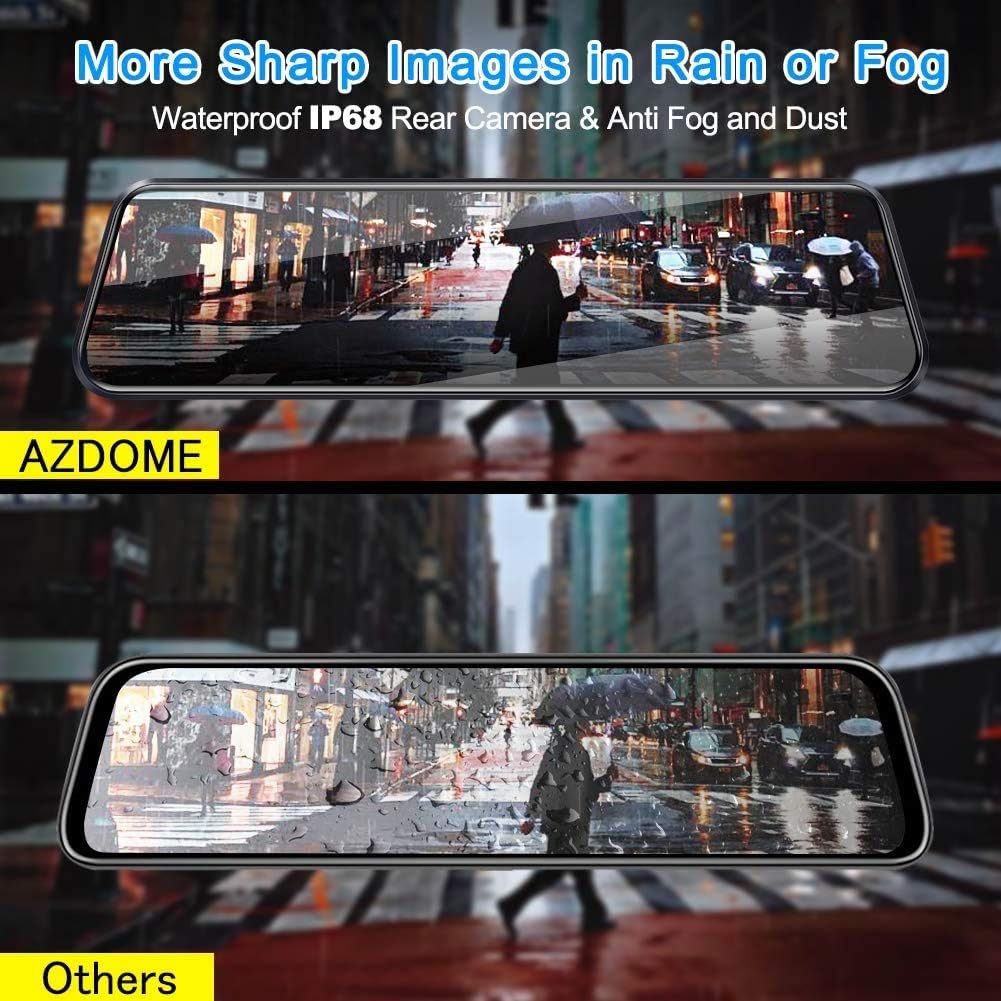
Figure 3: Superior image clarity in rain or fog.
3.3 Backup Camera with Reversing Assistance
The backup camera displays a high-resolution real-time video feed in the mirror. When reversing, the screen automatically shows guidelines, simplifying parking maneuvers.

Figure 4: Parking Assistance Mode in action.
3.4 Advanced Driver-Assistance Systems (ADAS)
The system includes a Lane Departure Warning System (LDWS) that alerts you if the car veers into another lane without signaling. It also features a Dangerous Distance Alarm, providing security alerts when sensing the proximity of other obstructions ahead.
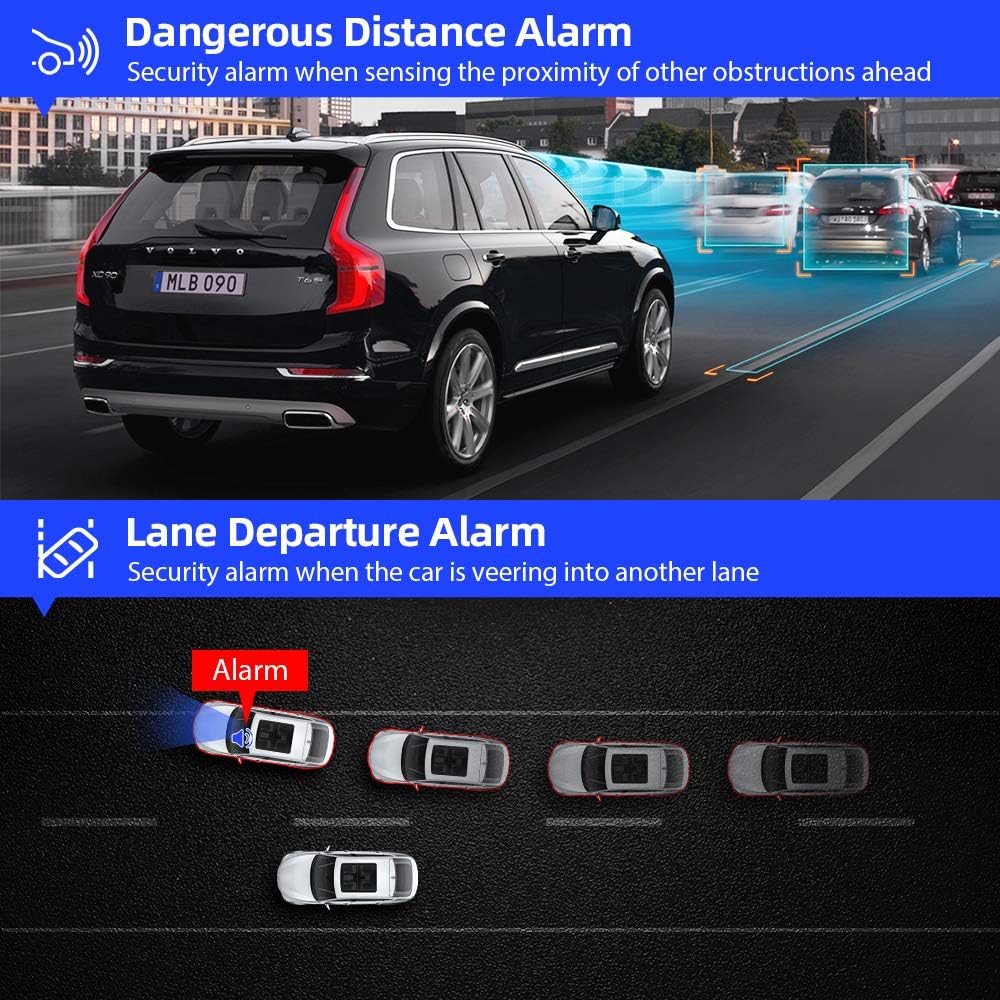
Figure 5: Visual representation of ADAS features.
3.5 Powerful Recording Functions
The dash cam offers several powerful recording features:
- G-Sensor Emergency Recording: Automatically locks and saves video footage upon detecting sudden shakes or collisions, protecting critical evidence.
- Parking Monitor: Records automatically if an impact is detected while the vehicle is parked (requires continuous power supply).
- Motion Detection: Begins recording when motion is detected in front of the camera, useful for surveillance.
- Loop Recording: Records video in 3/5/10-minute intervals, automatically overwriting the oldest unlocked footage when the memory card is full.

Figure 6: Built-in G-sensor for emergency recording.
4. Setup Guide
The AZDOME PG02 is designed for user-friendly installation. Follow these steps for proper setup:
- Mounting the Dash Cam: Secure the mirror dash cam to your existing rearview mirror using the provided straps or suction mount. Ensure it is firmly attached and does not obstruct your view.
- Connecting the Front Camera Power: Connect the Mini USB cable from the dash cam to the car charger, then plug the car charger into your vehicle's 12V power outlet.
- Installing the Rear Camera: Mount the rear camera at the back of your vehicle, typically above the license plate or inside the rear window. Ensure it has a clear view.
- Connecting the Rear Camera: Run the rear camera cable from the rear camera to the AV-IN port on the main dash cam unit.
- Connecting Reverse Trigger Wire (Optional): For automatic parking assistance display, connect the red wire (anode) from the rear camera cable to your vehicle's reverse light positive wire. The black wire is for the rear camera signal.
- Insert MicroSD Card: Insert a high-speed (Class 10 or higher) MicroSD card into the designated slot on the dash cam. Format the card through the dash cam's settings menu before first use.
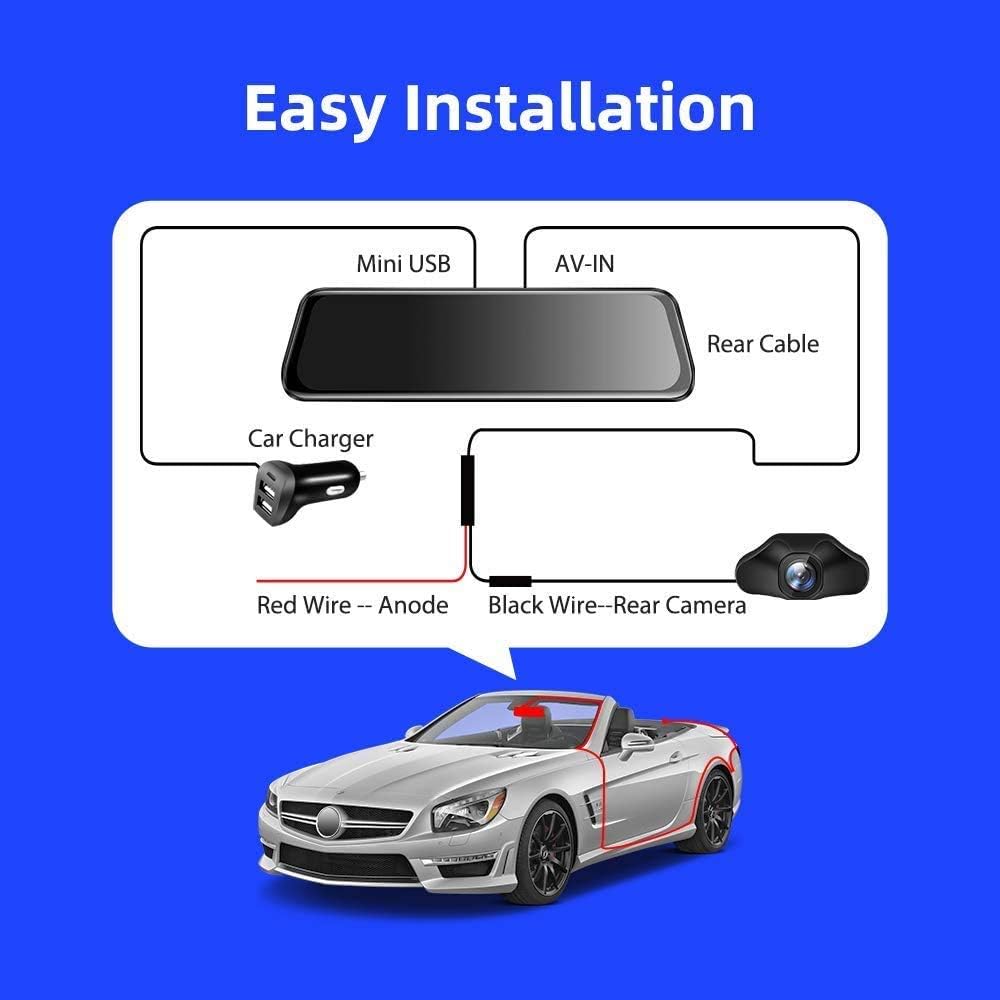
Figure 7: Simplified installation diagram.
5. Operating Instructions
The AZDOME PG02 features a responsive touch screen for easy navigation. Here are basic operating instructions:
5.1 Power On/Off
The device will typically power on automatically when your vehicle starts and power off when the engine is turned off. You can also manually power it on/off by pressing and holding the power button.
5.2 Screen Display Modes
Tap the screen to switch between front camera view, rear camera view, or dual-camera display. Swipe left/right on the screen to access different menu options or playback modes.
5.3 Recording
The dash cam automatically begins loop recording when powered on. A red dot or recording icon on the screen indicates active recording. To manually stop/start recording, tap the corresponding icon on the screen.
5.4 Accessing Settings
From the main screen, swipe to find the 'Settings' icon and tap it to adjust video resolution, loop recording duration, G-sensor sensitivity, parking monitor settings, and other preferences.
5.5 Playback
In playback mode, you can browse recorded videos and photos. Locked files (from G-sensor events) are stored in a separate folder to prevent accidental overwriting.
6. Maintenance
- Cleaning: Use a soft, dry cloth to clean the dash cam screen and lens. Avoid using abrasive cleaners or solvents.
- MicroSD Card: Regularly format your MicroSD card (at least once a month) to ensure optimal performance and prevent data corruption. Back up important files before formatting.
- Firmware Updates: AZDOME provides free firmware updates. Check the official AZDOME website periodically for the latest firmware to ensure your device has the most current features and bug fixes.
- Temperature: Avoid exposing the device to extreme temperatures for prolonged periods, as this can affect battery life and component integrity.
7. Troubleshooting
| Problem | Possible Cause | Solution |
|---|---|---|
| Device does not power on. | No power supply; faulty car charger; loose connection. | Check car charger connection and vehicle's 12V outlet. Ensure vehicle ignition is on. Try a different power source if available. |
| Screen freezes or is unresponsive. | Software glitch; full or corrupted MicroSD card. | Perform a hard reset by pressing the power button for 10 seconds. Format the MicroSD card or try a new one. |
| Poor rear camera image quality. | Dirty lens; incorrect installation; low resolution setting. | Clean the rear camera lens. Ensure proper installation and connection. Check video resolution settings in the menu. |
| Lane Departure Warning System (LDWS) not working. | Improper calibration; environmental factors (heavy rain/fog); feature disabled. | Ensure the camera is properly calibrated and aligned. Check LDWS settings in the menu to ensure it is enabled. Performance may vary in poor weather. |
| MicroSD card not formatting or recording. | Card not compatible; card corrupted; card full and not overwriting. | Use a high-speed (Class 10 or U1/U3) MicroSD card from a reputable brand. Try formatting the card on a computer. Replace the card if issues persist. |
8. Specifications
| Feature | Detail |
|---|---|
| Product Dimensions | 10.24 x 2.76 x 0.47 inches |
| Item Weight | 1.5 pounds (0.68 Kilograms) |
| Batteries | 1 Lithium Polymer battery (included) |
| Date First Available | October 24, 2018 |
| Brand | AZDOME |
| Model | PG02 |
| Orientation | Drivers Side |
| Vehicle Service Type | Car |
| Connectivity Technology | USB |
| Video Capture Resolution | 1080p (Front) |
| Mounting Type | Suction Mount |
| Control Method | Touch |
9. Warranty and Support
AZDOME stands behind the quality of its products. The AZDOME PG02 Mirror Dash Cam comes with a 2-year warranty.
We also provide FREE Firmware Upgrades for this car camera, ensuring your device remains up-to-date with the latest features and improvements.
For technical support, warranty claims, or further assistance, please refer to the contact information provided on the official AZDOME website or the product packaging.
Note: No official seller videos were available for embedding based on the provided data.
Related documentsPG02


Ask a question about this manual
Ask about setup, troubleshooting, compatibility, parts, safety, or missing instructions. Manuals+ will review the question and use this page’s manual context to help answer it.