
Introduction
The sE Electronics sE7 is a high-quality back-electret, small-diaphragm condenser microphone designed for a wide range of recording applications, including drums, guitars, pianos, and other instruments. Its cardioid polar pattern effectively captures sound from the front while minimizing off-axis noise. Featuring class-A circuitry and a transformerless output, the sE7 delivers clear and neutral audio reproduction across its frequency response, avoiding harsh highs and providing a pleasant low-end. The microphone includes a switchable -20 dB attenuation pad for handling loud sound sources without distortion and an 80 Hz low-cut filter to reduce unwanted rumble. Its robust all-metal chassis ensures durability, and gold-plated XLR terminations provide secure connections.

Image: The sE Electronics sE7 Small-Diaphragm Condenser Microphone.
What's in the Box
Your sE Electronics sE7 Small-Diaphragm Condenser Microphone Bundle includes the following components:
- sE Electronics sE7 Small-Diaphragm Condenser Microphone
- Mic Clip
- Windscreen
- 20' XLR-XLR Cable
- Pop Filter
- Pearstone 0.5 x 6" Touch Fastener Straps (Black, 10-Pack)
- Warranty Card
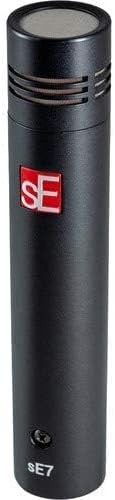
Image: sE7 Microphone with included windscreen.

Image: Included 20-foot XLR cable.
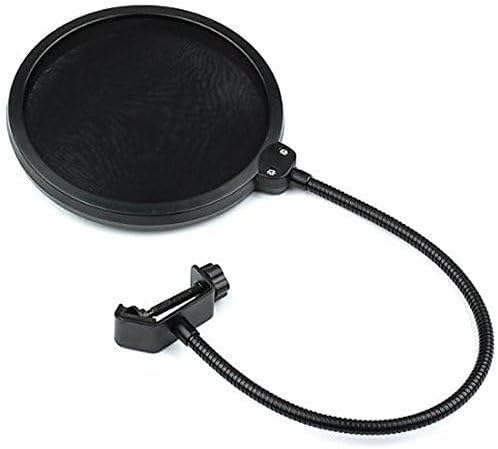
Image: Included pop filter for vocal recording.
Key Features
- High Sensitivity: The microphone has a sensitivity of 20 decibels, providing clear audio recordings.
- Small Diaphragm: The microphone features a small diaphragm design for accurate sound capture.
- XLR Connectivity: The microphone has XLR connector type for professional audio connections.
- Unidirectional Polar Pattern: The microphone has a unidirectional polar pattern for picking up sound from a specific direction.
- Includes Pop Filter: The microphone bundle includes a pop filter to protect the microphone from plosives.
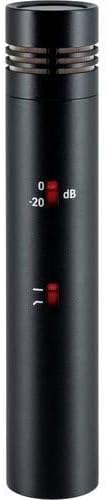
Image: The sE7 microphone showing the -20 dB pad and low-cut filter switches.
Setup
- Mounting the Microphone: Attach the sE7 microphone to a microphone stand using the provided mic clip. Ensure it is securely fastened.
- Connecting the XLR Cable: Connect one end of the XLR cable to the microphone's XLR output. Connect the other end of the XLR cable to an audio interface, mixer, or preamplifier that provides 48V phantom power. The sE7 requires phantom power to operate.
- Applying Windscreen/Pop Filter: For vocal recordings or to reduce plosives and wind noise, place the foam windscreen over the microphone capsule or position the pop filter between the vocalist and the microphone.
- Setting Attenuation Pad: If recording very loud sound sources (e.g., drums, loud guitar amps), engage the -20 dB attenuation pad switch on the microphone body to prevent input clipping.
- Engaging Low-Cut Filter: To reduce unwanted low-frequency rumble or proximity effect, engage the 80 Hz low-cut filter switch on the microphone body.
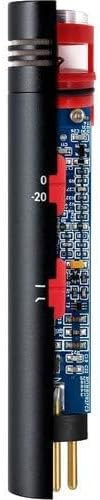
Image: Internal view of the sE7 microphone, highlighting its discrete class-A circuitry.
Operating Instructions
Once the microphone is set up and connected to your audio equipment, follow these guidelines for optimal performance:
- Microphone Placement: Experiment with microphone placement relative to the sound source. For acoustic guitars, try pointing the microphone towards the 12th fret for a balanced sound. For drums, use it as an overhead or for close-miking cymbals. For pianos, position it to capture the full range of the instrument.
- Gain Staging: Adjust the gain on your audio interface or mixer to achieve a healthy signal level without clipping. The -20 dB pad on the microphone can help manage very hot signals.
- Using the Low-Cut Filter: The 80 Hz low-cut filter is useful for reducing unwanted low-frequency noise such as stage rumble, air conditioning hum, or excessive bass from close-miking.
- Monitoring: Always monitor your audio through headphones or studio monitors to ensure the sound is being captured correctly and to identify any potential issues.

Image: Front view of the sE7 microphone, ready for use.
Maintenance
Proper maintenance will ensure the longevity and performance of your sE7 microphone:
- Cleaning: Use a soft, dry cloth to clean the microphone body. Avoid using liquid cleaners or solvents, as they can damage the finish or internal components.
- Storage: When not in use, store the microphone in its protective case or a clean, dry environment to prevent dust accumulation and physical damage.
- Cable Care: Handle XLR cables carefully. Avoid sharp bends, kinks, or excessive pulling, which can damage the internal wiring and connectors.
- Windscreen/Pop Filter: Clean the foam windscreen and pop filter regularly to remove any debris or moisture that could affect sound quality.
Troubleshooting
If you encounter issues with your sE7 microphone, consider the following:
- No Sound:
- Ensure 48V phantom power is enabled on your audio interface or mixer.
- Check all XLR cable connections for proper seating.
- Test with a different XLR cable to rule out cable failure.
- Verify that the input gain on your audio device is set appropriately.
- Distorted Sound:
- If the sound is distorted, the input signal might be too hot. Engage the -20 dB attenuation pad on the microphone.
- Reduce the input gain on your audio interface or mixer.
- Ensure the microphone is not positioned too close to a very loud sound source.
- Excessive Noise/Rumble:
- Engage the 80 Hz low-cut filter on the microphone to reduce low-frequency noise.
- Check for ground loops or interference from other electronic devices.
- Ensure the microphone is isolated from vibrations using a shock mount (if applicable) and a sturdy stand.
If these steps do not resolve the issue, please contact sE Electronics customer support.
Specifications
| Specification | Value |
|---|---|
| Item Weight | 16 ounces (1 pounds) |
| Microphone Form Factor | Small Diaphragm |
| Item Dimensions (L x W x H) | 7.8 x 5 x 3 inches |
| Power Source | Corded Electric (requires Phantom Power) |
| Material | Metal |
| Signal-to-Noise Ratio | 87 dB |
| Number of Channels | 1 |
| Frequency Response | 20 KHz (upper limit) |
| Manufacturer | sE Electronics |
| UPC | 840262241250 |
| Item Model Number | SE 7 |
| Date First Available | October 23, 2018 |
| Color | Black |
| Recommended Uses | Instrument Recording, Singing, Video Recording, Voice Recording |
| Connectivity Technology | XLR |
| Connector Type | XLR |
| Special Feature | Clip |
| Compatible Devices | Amplifier |
| Polar Pattern | Unidirectional |
| Audio Sensitivity | 20 Decibels |
Warranty and Support
The sE Electronics sE7 Small-Diaphragm Condenser Microphone comes with a Limited 2-Year Warranty, which can be extended to 3-Year with product registration. Please refer to the included warranty card for detailed terms and conditions.
For technical support, service, or warranty claims, please visit the official sE Electronics website or contact their customer service department directly. Keep your proof of purchase and product serial number handy when contacting support.


