
1. Introduction
This manual provides essential instructions for the setup, operation, and basic maintenance of your Easytry123 replacement remote control, model Easytry3662. This remote is designed to be compatible with various Goodman AC Air Conditioner models, including WMC242, WMC24-1A, WMH-18-1-KFAA, WMH12-1-2, HDP24-1B, WMH1812, WMC09-1A, and WMC09-2A.
Important Note: As a replacement unit, this remote control may not offer all functions present on your original remote. Please ensure your air conditioner model is listed for compatibility before use.
2. Product Overview
Familiarize yourself with the layout and buttons of your new remote control.
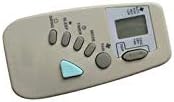
Figure 2.1: Front View of Remote Control. This image displays the front of the Easytry123 remote control, highlighting the various function buttons such as Power, Sleep, Timer, Mode, Fan, and Temperature Up/Down, along with the LCD display.

Figure 2.2: Back View of Remote Control. This image shows the back of the Easytry123 remote control, featuring the battery compartment cover, which needs to be removed for battery installation.
3. Setup
Before using your remote control, you must install the batteries.
- Locate the battery compartment on the back of the remote control (refer to Figure 2.2).
- Slide the battery compartment cover downwards or in the direction indicated by an arrow to open it.
- Insert two (2) AAA batteries, ensuring the positive (+) and negative (-) terminals align correctly with the markings inside the compartment. Batteries are not included with the remote control.
- Replace the battery compartment cover by sliding it back into position until it clicks securely.
The remote control is now ready for use.
4. Operating Instructions
This remote control is designed for ease of use. Point the remote directly at your air conditioner unit when operating.
- Power Button: Press to turn the air conditioner ON or OFF.
- Mode Button: Cycles through available operating modes (e.g., Cool, Fan, Dry, Heat, Auto).
- Temperature Buttons (▲ / ▼): Adjust the desired temperature setting up or down.
- Fan Button: Adjusts the fan speed (e.g., Low, Medium, High, Auto).
- Sleep Button: Activates or deactivates the sleep mode, which typically adjusts temperature for comfortable sleep and saves energy.
- Timer Button: Used to set a timer for the unit to turn ON or OFF automatically.
5. Maintenance
Proper care ensures the longevity and optimal performance of your remote control.
- Cleaning: Wipe the remote control with a soft, dry cloth. Do not use liquid cleaners or abrasive materials.
- Battery Replacement: Replace batteries when the remote's range decreases or if the display becomes dim. Always replace both batteries simultaneously with new AAA batteries. Do not mix old and new batteries or different types of batteries.
- Storage: If the remote will not be used for an extended period, remove the batteries to prevent leakage and damage.
6. Troubleshooting
If you encounter issues with your remote control, refer to the following common solutions:
- Remote not responding:
- Check if the batteries are inserted correctly with the correct polarity.
- Replace old batteries with new AAA batteries.
- Ensure there are no obstructions between the remote control and the air conditioner's receiver.
- Confirm you are within the effective operating range of the air conditioner.
- Certain functions do not work:
- As a replacement remote, some advanced or specific functions of your original unit may not be supported. This is normal for universal or replacement remotes.
- Verify that your air conditioner model is explicitly listed as compatible with this remote.
7. Specifications
| Brand | Easytry123 |
| Model Number | Easytry3662 |
| Compatible Devices | Air Conditioner (Goodman models: WMC242, WMC24-1A, WMH-18-1-KFAA, WMH12-1-2, HDP24-1B, WMH1812, WMC09-1A, WMC09-2A) |
| Connectivity Technology | Infrared |
| Controller Type | Button Control |
| Battery Type | AAA |
| Number of Batteries Required | 2 |
| Special Feature | Ergonomic design |
8. Support
For further assistance or inquiries regarding your Easytry123 replacement remote control, please contact the manufacturer or your point of purchase. Ensure you have your product model number (Easytry3662) available when seeking support.