
MPT MRH2603
MPT MRH2603 SDS-Plus Rotary Hammer User Manual
Model: MRH2603
Introduction
This manual provides essential information for the safe and effective operation, maintenance, and troubleshooting of your MPT MRH2603 SDS-Plus Rotary Hammer. Please read these instructions carefully before using the tool and keep this manual for future reference. The MPT MRH2603 is a versatile power tool designed for drilling, hammer drilling, and chiseling in various materials such as concrete, masonry, wood, and steel.

Image: MPT MRH2603 SDS-Plus Rotary Hammer and its complete set of accessories, including drill bits, chisels, auxiliary handle, and lubricant.
Safety Instructions
Always follow basic safety precautions to reduce the risk of fire, electric shock, and personal injury when using power tools. Keep this information accessible for all users.
- Work Area Safety: Keep the work area clean and well-lit. Cluttered or dark areas invite accidents. Do not operate power tools in explosive atmospheres, such as in the presence of flammable liquids, gases, or dust.
- Electrical Safety: Power tool plugs must match the outlet. Never modify the plug in any way. Avoid body contact with earthed or grounded surfaces such as pipes, radiators, ranges, and refrigerators.
- Personal Safety: Always wear eye protection. Use hearing protection when operating the tool for extended periods. Wear a dust mask if operations create dust. Dress properly; avoid loose clothing or jewelry.
- Tool Use and Care: Do not force the power tool. Use the correct power tool for your application. Disconnect the plug from the power source before making any adjustments, changing accessories, or storing power tools.
- Service: Have your power tool serviced by a qualified repair person using only identical replacement parts. This will ensure that the safety of the power tool is maintained.
Product Overview
Familiarize yourself with the components of your MPT MRH2603 Rotary Hammer before operation.

Image: Labeled diagram showing key components: SDS-Plus Chuck, Dial, Grease Pot, Power Switch, Lever, Carbon Brush Replacement Port, Heat Outlet, and 360° Adjustable Handle.
- SDS-Plus Chuck: For quick and secure insertion of SDS-Plus drill bits and chisels.
- Dial: Used in conjunction with the Lever to select operating modes.
- Grease Pot: Access point for lubrication.
- Power Switch: Activates and deactivates the tool.
- Lever: Used in conjunction with the Dial for mode selection.
- Carbon Brush Replacement Port: Allows access for replacing carbon brushes.
- Heat Outlet: Ventilation for cooling the motor.
- 360° Adjustable Handle: Provides additional grip and control, adjustable to various positions.
Setup
Attaching the Auxiliary Handle
The auxiliary handle provides improved control and safety. It can be rotated 360 degrees for optimal positioning.
- Loosen the auxiliary handle by twisting its base counter-clockwise.
- Slide the handle onto the front barrel of the rotary hammer.
- Rotate the handle to the desired position.
- Tighten the handle by twisting its base clockwise until secure.

Image: Illustration demonstrating the 360-degree adjustability of the auxiliary handle, allowing for comfortable use in various orientations.
Inserting SDS-Plus Bits
The SDS-Plus chuck allows for quick and tool-free bit changes.
- Clean the shank of the drill bit or chisel.
- Pull back the chuck sleeve.
- Insert the SDS-Plus bit into the chuck until it clicks into place.
- Release the chuck sleeve.
- Pull on the bit to ensure it is securely locked. A slight axial play is normal for SDS-Plus systems.
Operating Instructions
Mode Selection
The MPT MRH2603 features three operating modes: Hammer Drill, Hammer Only, and Drill Only. Select the appropriate mode using the Dial and Lever.
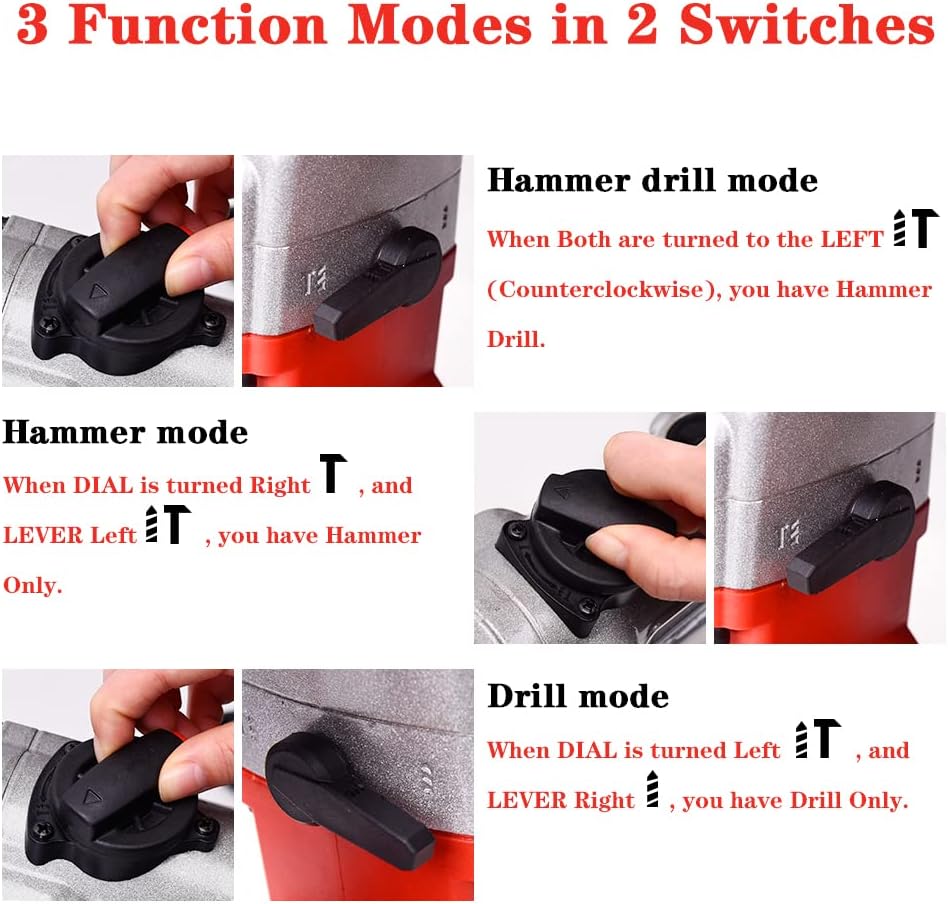
Image: Visual guide for selecting the three operating modes: Hammer Drill, Hammer Only, and Drill Only, by adjusting the Dial and Lever.
- Hammer Drill Mode: For drilling into concrete, masonry, and stone with impact.
To select: Turn both the Dial and the Lever to the LEFT (counter-clockwise).
- Hammer Only Mode: For chiseling, breaking, or demolition work.
To select: Turn the Dial to the RIGHT and the Lever to the LEFT.
- Drill Only Mode: For drilling into wood, metal, or plastic without impact.
To select: Turn the Dial to the LEFT and the Lever to the RIGHT.
Important: Always ensure the tool is unplugged before changing modes to prevent accidental activation.
General Operation
- Ensure the correct bit is installed and the desired mode is selected.
- Plug the tool into a suitable power outlet (220V-240V, 50/60Hz).
- Hold the tool firmly with both hands, using the main handle and the auxiliary handle.
- Position the bit on the workpiece.
- Press the power switch to start the tool. Apply steady, even pressure. Do not force the tool.
- When finished, release the power switch and wait for the bit to stop rotating before setting the tool down.

Image: A user operating the MPT MRH2603 rotary hammer to drill into a concrete surface, demonstrating proper grip and application.

Image: A user utilizing the MPT MRH2603 rotary hammer in chisel mode to break apart brick, highlighting its demolition capabilities.

Image: A user demonstrating the MPT MRH2603 rotary hammer's ability to drill into a rocky surface, showcasing its power and versatility.
Maintenance
Regular maintenance ensures the longevity and optimal performance of your rotary hammer.
- Cleaning: After each use, clean the tool with a dry cloth. Remove any dust or debris from the ventilation openings (heat outlet) and the chuck. Do not use water or chemical cleaners.
- Air Inlet Design: The tool features a double-layer dustproof air inlet design to reduce dust ingress and extend service life. Regularly inspect and clean this area to maintain airflow.

Image: Close-up view of the double-layer dustproof air inlet, designed to protect internal components from dust.
- Lubrication: Periodically lubricate the SDS-Plus chuck and the internal mechanism via the grease pot. Refer to the product overview for the location of the grease pot. Use only recommended lubricants.
- Carbon Brush Replacement: The carbon brushes are wear parts and will need replacement over time. Access the carbon brush replacement port (refer to product overview) to inspect and replace brushes when they are worn down. Always replace both brushes simultaneously.
- Storage: Store the tool in a dry, secure place, out of reach of children.
Troubleshooting
This section addresses common issues you might encounter with your rotary hammer.
| Problem | Possible Cause | Solution |
|---|---|---|
| Tool does not start. | No power supply; faulty power switch; worn carbon brushes. | Check power connection and outlet. Ensure power switch is fully engaged. Inspect and replace carbon brushes if necessary. |
| Reduced power or performance. | Worn carbon brushes; clogged air vents; incorrect mode selection. | Replace carbon brushes. Clean air vents. Verify correct operating mode is selected. |
| Excessive vibration or noise. | Loose bit; internal component issue. | Ensure bit is securely inserted. If problem persists, discontinue use and contact support. |
| Bit not rotating or impacting. | Incorrect mode selected; chuck malfunction. | Check mode selection (e.g., ensure not in "Hammer Only" for drilling). Ensure bit is properly seated in the chuck. |
If you encounter a problem not listed here or if the suggested solutions do not resolve the issue, please contact MPT customer support.
Specifications
| Feature | Specification |
|---|---|
| Model | MRH2603 |
| Power Input | 1050 W |
| Voltage | 220V-240V |
| Frequency | 50/60 Hz |
| No-Load Speed | 930 rpm |
| Impact Rate | 0-4500/min |
| Max. Drilling Capacity (Concrete) | 26 mm (1 inch) |
| Max. Drilling Capacity (Steel) | 12.7 mm (0.5 inch) |
| Dimensions (L x W x H) | 42.4 x 32.8 x 12.2 cm |
| Weight | 6.9 kg |
| Chuck Type | SDS-Plus |
| Number of Functions | 3 (Drill, Hammer Drill, Hammer Only) |
Support
For any questions, technical assistance, or issues encountered during the use of your MPT MRH2603 Rotary Hammer, please contact MPT customer support. Refer to the product packaging or the official MPT website for contact information.
Ask a question about this manual
Ask about setup, troubleshooting, compatibility, parts, safety, or missing instructions. Manuals+ will review the question and use this page’s manual context to help answer it.