
BUYSIGHT A953
BUYSIGHT A953 Rechargeable Spotlight Flashlight User Manual
Model: A953
Introduction
Thank you for choosing the BUYSIGHT A953 Rechargeable Spotlight Flashlight. This high-lumen, handheld LED searchlight is designed for durability and versatility, offering powerful illumination and emergency power supply capabilities. Please read this manual carefully to ensure safe and optimal use of your device.
What's in the Box
- BUYSIGHT B2201-B Rechargeable Spotlight x 1
- USB-C Cable x 1
- User Manual x 1
- Red Lens x 1
- Shoulder Strap x 1
Product Specifications
| Feature | Detail |
|---|---|
| Brand | BUYSIGHT |
| Model Number | A953 |
| Light Source | XHP-70.2 LED |
| Brightness | 1000 Lumens |
| Battery Capacity | Up to 9000mAh (Li-polymer) |
| Run Time (High Brightness) | Over 4 hours |
| Water Resistance | IPX6 Waterproof |
| Material | Acrylonitrile Butadiene Styrene (ABS) |
| Dimensions | 14.5 x 7 x 5.9 inches |
| Weight | 0.93 Pounds (approx. 14.9 ounces) |
| Special Features | Portable, Impact Resistant, Rechargeable, USB Output (Power Bank) |
Setup and Initial Use
1. Charging the Spotlight
Before first use, fully charge the spotlight. Locate the charging port on the back of the unit, typically covered by a rubber plug for waterproofing. Use the provided USB-C cable and 4.2V/1A charger (or the charger included in the package) to connect the spotlight to a power source. A red indicator light will show it's charging, turning green when fully charged.

Image: The spotlight's base with a USB port, demonstrating its power bank function by charging a smartphone. A battery indicator shows 1000 cycles rechargeable.
Video: An official BUYSIGHT video demonstrating the A953 spotlight's features, including its charging indicator (red for charging, green for fully charged) and various light modes.
2. Attaching the Shoulder Strap
Attach the adjustable shoulder strap to the designated loops on the spotlight for convenient hands-free carrying during extended use or outdoor activities.
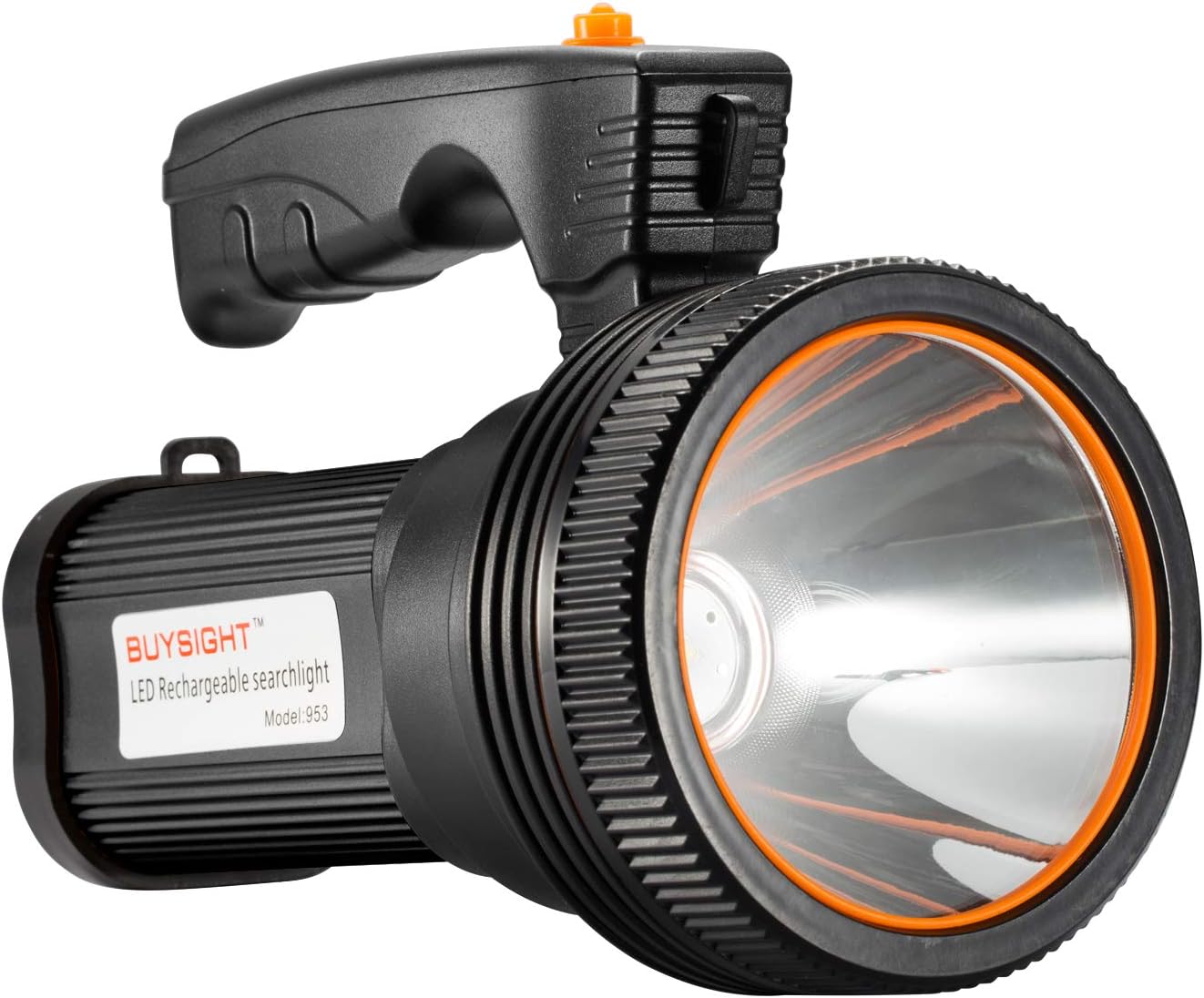
Image: The main product image of the BUYSIGHT A953 Rechargeable Spotlight, showing its ergonomic handle and points for attaching the shoulder strap.
Operating Instructions
1. Powering On/Off and Mode Selection
Press the power button on the handle to cycle through the different lighting modes: High Brightness, Low Brightness, and SOS (strobe). Press again to turn off the spotlight.

Image: The BUYSIGHT A953 spotlight illuminating a large cave, demonstrating its 1000 Lumen ultra-bright output.

Image: A graphic illustrating the performance of the BUYSIGHT A953 spotlight in High Mode (900m irradiation, 8.5 hours duration) and Low Mode (420m irradiation, 17 hours duration), highlighting its 9600mAh battery capacity.
2. Using as a Power Bank
The spotlight features a USB output port. Open the rubber cover on the back of the unit and connect your smart device using a compatible USB cable to charge it. This is ideal for emergencies when you need to power your phone or other small electronics.
3. Red Lens Application
The included red lens can be attached to the front of the spotlight. This is useful for preserving night vision, signaling, or for specific hunting and fishing applications where red light is preferred.
4. Versatile Usage Scenarios
The BUYSIGHT A953 spotlight is designed for a wide range of applications, including yard work, farm use, illuminating paths, and mountain adventures. Its robust and waterproof design ensures reliable performance in various environments.

Image: The BUYSIGHT A953 spotlight being used in different outdoor settings, such as a backyard, a farm, a walking path, and a mountain landscape, highlighting its adaptability.
Maintenance and Care
- Keep the charging port covered with the rubber plug when not in use to maintain its IPX6 waterproof rating.
- Clean the lens and body with a soft, damp cloth. Avoid abrasive cleaners or solvents.
- Store the spotlight in a cool, dry place away from direct sunlight and extreme temperatures.
- Regularly charge the battery, even if not in frequent use, to prolong its lifespan.
Troubleshooting
| Problem | Possible Cause | Solution |
|---|---|---|
| Spotlight does not turn on. | Low battery. | Charge the spotlight fully. |
| Light output is dim. | Low battery; incorrect mode. | Recharge the battery; cycle through modes to select High Brightness. |
| Device not charging from USB output. | Spotlight battery low; incompatible cable/device. | Ensure spotlight is charged; try a different USB cable or device. |
| Water ingress. | Rubber plug not sealed; extreme water pressure. | Ensure rubber plug is firmly sealed. While IPX6 is water-resistant, avoid prolonged submersion or high-pressure jets. |
Warranty and Support
BUYSIGHT offers a No-Worries Guarantee. If you receive a defective product, please contact us directly for a free replacement unit. No return is required. We are committed to providing excellent customer service and will reply within 24 hours.
For further assistance, please visit the BUYSIGHT Store on Amazon.
Ask a question about this manual
Ask about setup, troubleshooting, compatibility, parts, safety, or missing instructions. Manuals+ will review the question and use this page’s manual context to help answer it.