
1. Important Safety Instructions
Please read these instructions carefully before using the device and retain them for future reference. Incorrect use may result in electric shock or fire.
- Do not expose the device to dripping or splashing water.
- Do not place objects filled with liquids, such as vases, on the device.
- Ensure proper ventilation around the device. Do not block ventilation openings.
- Do not install near any heat sources such as radiators, heat registers, stoves, or other apparatus (including amplifiers) that produce heat.
- Only use attachments/accessories specified by the manufacturer.
- Unplug this apparatus during lightning storms or when unused for long periods.
- Refer all servicing to qualified service personnel.
2. Product Overview
The Thomson CR221I is a versatile alarm clock radio featuring dual alarms, an FM radio, a wireless charging pad, and USB charging ports. Its clear LED display and intuitive controls make it an ideal bedside companion.

Figure 1: Front view of the Thomson CR221I, highlighting the LED display and control panel.

Figure 2: Angled view of the device, illustrating the wireless charging area and speaker grille.
Main Components:
- LED Display: Shows time, alarm status, and radio frequency.
- Control Buttons: For setting time, alarms, radio, volume, snooze, and dimmer.
- Wireless Charging Pad: Located on top for compatible smartphones.
- USB Charging Ports: For charging other devices (cable not included).
- AUX Input: For connecting external audio sources.
- FM Antenna: For radio reception.
3. Setup
3.1 Power Connection
- Unpack the Thomson CR221I and its power adapter.
- Connect the power adapter cable to the DC IN port on the back of the alarm clock.
- Plug the power adapter into a standard 230V AC wall outlet.
- The display will light up, and the clock will be ready for initial setup.
Note: This device operates on corded electric power. No user-replaceable batteries are required for primary operation.
4. Operating Instructions
4.1 Setting the Time
- Press and hold the CLK/MEM button until the hour digits flash.
- Use the SKIP+ or SKIP- buttons to adjust the hour.
- Press CLK/MEM again to confirm the hour and move to minute setting.
- Use the SKIP+ or SKIP- buttons to adjust the minutes.
- Press CLK/MEM to save the time.
4.2 Setting Alarms (Alarm 1 and Alarm 2)
The device supports two independent alarms.
- Press and hold the AL1 or AL2 button until the alarm hour digits flash.
- Use the SKIP+ or SKIP- buttons to set the desired alarm hour.
- Press AL1 or AL2 again to confirm the hour and move to minute setting.
- Use the SKIP+ or SKIP- buttons to set the desired alarm minutes.
- Press AL1 or AL2 again to select the alarm source (Buzzer or FM Radio).
- Press AL1 or AL2 one more time to save the alarm setting. The corresponding alarm indicator (AL1 or AL2) will appear on the display.
4.3 FM Radio Operation
- Press the FM button to turn on the radio.
- To automatically scan and save stations: Press and hold the FM button. The radio will scan for available stations and store up to 30 presets.
- To manually tune: Briefly press SKIP+ or SKIP- to adjust the frequency step by step.
- To recall saved stations: Briefly press CLK/MEM to cycle through the preset stations.
- Adjust volume using the VOL+/VOL- buttons.
- Press the FM button again to turn off the radio.
4.4 Wireless Charging
The device features an induction charging pad for compatible smartphones.
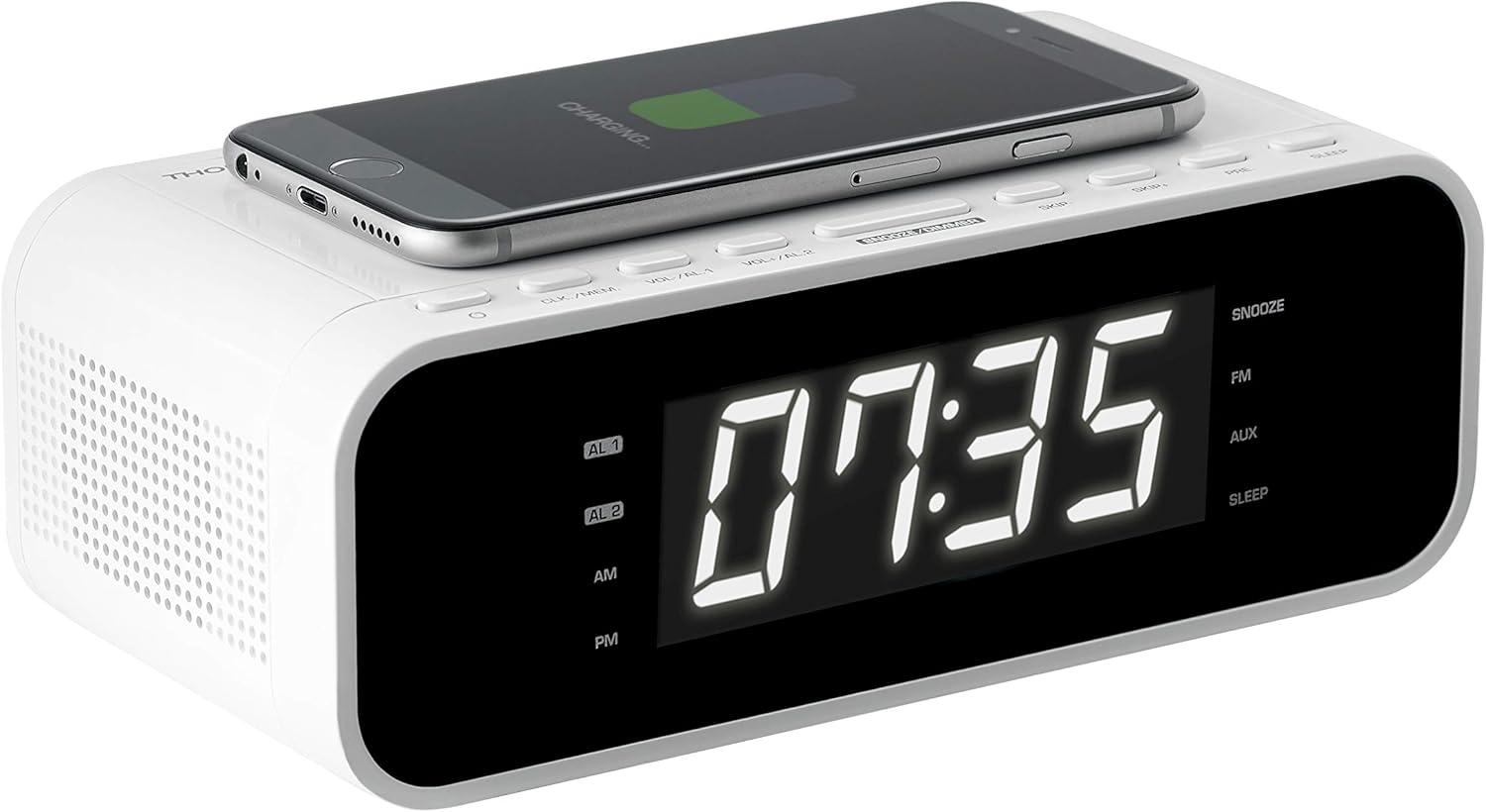
Figure 3: Smartphone placed on the wireless charging pad for inductive charging.
- Place your Qi-compatible smartphone directly onto the wireless charging pad located on the top surface of the alarm clock.
- Ensure the phone is centered on the charging symbol for optimal connection.
- The phone's display should indicate that charging has begun.
- Remove the phone once fully charged or when no longer needed.
Note: Charging speed may vary depending on the phone model and its alignment on the pad. Remove any thick phone cases that may interfere with wireless charging.
4.5 USB Charging
Two USB ports are available on the back of the unit for charging other devices.
- Connect your device's USB charging cable (not included) to one of the USB ports on the alarm clock.
- Connect the other end of the cable to your smartphone, tablet, or other USB-powered device.
- Charging will begin automatically. The USB ports provide up to 1A output.
4.6 Display Dimmer Function
The display intensity can be adjusted to suit your preference.
- Press the DIMMER button repeatedly to cycle through brightness levels: 100% (bright), 50% (medium), and 0% (off).
4.7 Snooze, Sleep, and Timer Functions
- Snooze: When an alarm sounds, press the SNOOZE button to temporarily silence the alarm for a short period (e.g., 9 minutes). The alarm will sound again after the snooze period.
- Sleep Timer: Press the SLEEP button to set a sleep timer for the radio. The radio will play for the set duration and then automatically turn off. Press repeatedly to cycle through available sleep times.
- Timer: The device may include a separate timer function for specific durations. Refer to the on-screen prompts or specific button labels for activation.
4.8 AUX Input
Connect external audio devices using the 3.5mm AUX input.
- Connect a 3.5mm audio cable (not included) from your external audio device (e.g., MP3 player, laptop) to the AUX port on the back of the alarm clock.
- Press the AUX button on the alarm clock to switch to AUX input mode.
- Control playback from your external device and adjust volume using the alarm clock's VOL+/VOL- buttons.
5. Maintenance
5.1 Cleaning
- Always unplug the device from the power outlet before cleaning.
- Use a soft, dry cloth to wipe the exterior surfaces.
- Do not use abrasive cleaners, waxes, or solvents as they may damage the finish.
5.2 Storage
- If storing the device for an extended period, unplug it and store it in a cool, dry place away from direct sunlight and extreme temperatures.
6. Troubleshooting
If you encounter issues with your Thomson CR221I, please refer to the following common problems and solutions:
| Problem | Possible Cause | Solution |
|---|---|---|
| Device does not power on. | Power adapter not connected or faulty outlet. | Ensure the power adapter is securely connected to the device and a working wall outlet. |
| Wireless charging is not working. | Phone not Qi-compatible, not aligned, or thick case. | Verify your phone supports Qi wireless charging. Reposition the phone on the charging pad. Remove any thick phone cases. |
| Display is too bright, even at lowest setting. | User preference or environmental factors. | Use the DIMMER button to cycle through 100%, 50%, and 0% brightness levels. If 0% is still too bright, consider placing the unit further away or using a light-blocking cover. |
| Poor FM radio reception. | Antenna position or interference. | Extend and reposition the FM antenna for better signal. Move the unit away from other electronic devices that may cause interference. |
| Alarm does not sound. | Alarm not set or volume too low. | Ensure the alarm is activated (AL1/AL2 indicator on display). Check the alarm volume setting. |
7. Specifications
- Brand: THOMSON
- Model: CR221I
- Power Source: Electric Corded (230 Volt)
- Display Type: Digital LED, 1 Inch screen size
- Radio Bands Supported: FM (AM Tuner Technology listed, but FM is primary for radio bands)
- Radio Presets: Up to 30 FM stations
- Special Features: Dual Alarm, Snooze, Sleep Timer, Dimmer, Wireless Charging, USB Charging
- Wireless Charging Output: Induction technology
- USB Charging Output: 1A
- Audio Input: 3.5 mm AUX
- Speaker Max Power: 5 Watt
- Hardware Interface: 3.5 mm audio, USB
- Compatible Devices: Smartphone, laptop, MP3-player, headphones, speaker, tablet
- Product Dimensions: 19 x 11 x 6 cm
- Product Weight: 500 g
- Included Components: Charging cable (Note: 'Battery' listed in source may refer to internal memory battery, not user-replaceable primary power)
8. Warranty and Support
For warranty information or technical support, please refer to the documentation provided with your purchase or contact the retailer where the product was acquired. You may also visit the official THOMSON or Bigben Interactive website for further assistance and contact details.


