Introduction
This manual provides essential information for the safe and efficient operation, maintenance, and troubleshooting of your Rodcraft RC7068 Air Grinder. Please read this manual thoroughly before using the tool to ensure proper handling and to maximize its lifespan and performance. Rodcraft has been a world leader in compressed air tools since 1974, committed to quality and continuous improvement.
Safety Information
Always observe general safety rules for power tools. Wear appropriate personal protective equipment (PPE) including eye protection, hearing protection, and gloves. Ensure the work area is well-lit and clear of obstructions. Disconnect the air supply before changing accessories or performing maintenance.
- Eye Protection: Always wear safety glasses or goggles.
- Hearing Protection: Use earplugs or earmuffs during operation.
- Hand Protection: Wear sturdy work gloves.
- Air Supply: Ensure the air compressor is properly maintained and provides clean, dry air at the recommended pressure.
- Workpiece Security: Secure the workpiece to prevent movement during grinding.
Product Overview
The Rodcraft RC7068 is a compact and powerful air-powered grinder designed for precision work in automotive service and industrial maintenance. Its robust construction ensures durability and reliable performance.

Figure 1: Main view of the Rodcraft RC7068 Air Grinder, showcasing its compact design and robust housing.

Figure 2: Front view of the RC7068 Air Grinder, highlighting the collet and spindle assembly.
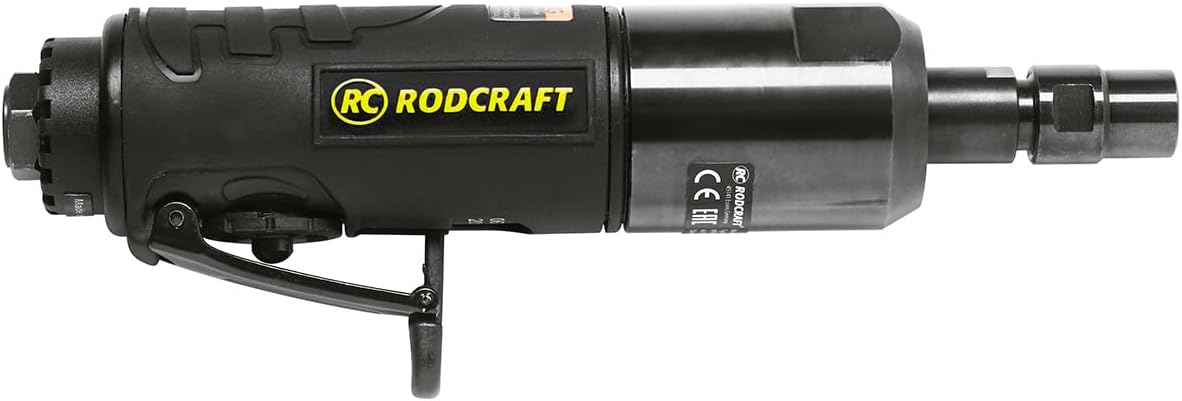
Figure 3: Side view of the RC7068 Air Grinder, showing the air inlet and trigger mechanism.
Setup
- Unpacking: Carefully remove the grinder from its packaging. Inspect for any damage that may have occurred during shipping.
- Air Supply Connection: Connect the air grinder to a clean, dry, regulated air supply using a suitable air hose. Ensure the air pressure does not exceed the maximum recommended pressure (refer to Specifications section).
- Lubrication: Before first use, and regularly thereafter, add a few drops of pneumatic tool oil into the air inlet.
- Accessory Installation:
- Ensure the air supply is disconnected.
- Insert the desired grinding accessory (e.g., grinding stone, wire brush) into the collet.
- Tighten the collet nut securely with the appropriate wrenches to prevent the accessory from slipping during operation.
Operating Instructions
- Pre-Operation Check: Before each use, check the grinder and accessory for any damage or wear. Ensure all connections are secure.
- Starting the Grinder: Connect the air supply. Hold the grinder firmly with both hands. Depress the trigger to start the tool.
- Grinding Technique: Apply light, even pressure to the workpiece. Allow the tool to do the work. Avoid excessive force, which can lead to premature wear of the accessory and the tool.
- Stopping the Grinder: Release the trigger to stop the tool. Disconnect the air supply when not in use or before changing accessories.

Figure 4: The Rodcraft RC7068 Air Grinder being used for cleaning a metal surface, demonstrating its application in automotive maintenance.
Maintenance
Regular maintenance is crucial for the longevity and optimal performance of your RC7068 Air Grinder.
- Lubrication: Add a few drops of pneumatic tool oil to the air inlet daily or before each use.
- Cleaning: Keep the tool clean and free of debris. Use compressed air to blow out dust from the air vents.
- Collet Inspection: Regularly inspect the collet and collet nut for wear or damage. Replace if necessary to ensure proper accessory grip.
- Air Filter: Ensure your air compressor's air filter is clean and functioning correctly to prevent moisture and contaminants from entering the tool.
- Storage: Store the grinder in a dry, clean environment when not in use.
Troubleshooting
| Problem | Possible Cause | Solution |
|---|---|---|
| Tool not starting or low power | Low air pressure; Clogged air inlet; Lack of lubrication; Worn motor components. | Check air pressure and supply; Clean air inlet; Lubricate tool; Contact authorized service center. |
| Excessive vibration | Damaged or unbalanced accessory; Worn collet; Internal damage. | Replace accessory; Inspect/replace collet; Contact authorized service center. |
| Air leakage | Loose fittings; Damaged O-rings or seals. | Tighten fittings; Replace O-rings/seals. |
For issues not listed or if solutions do not resolve the problem, please contact Rodcraft customer support or an authorized service center.
Specifications
| Attribute | Value |
|---|---|
| Model Number | RC7068 |
| Brand | Rodcraft |
| Power Source | Air Powered |
| Horsepower | 400 Watts |
| Item Weight | 0.95 Kilograms (2.09 pounds) |
| Product Dimensions | 0.91 x 1.36 x 5.04 inches |
| Grit Rating | 1 (Coarse, Medium, Fine) |
| Batteries Required | No |
Warranty and Support
Rodcraft products are manufactured under strict quality control and are designed for durability. The RC7068 Air Grinder is backed by Rodcraft's commitment to quality and customer satisfaction.
- Spare Part Availability: EU Spare Part Availability Duration is 1 Year.
- Quality Assurance: All products are thoroughly tested in our Technocenter to meet the requirements of CE certification and ISO standards.
- Customer Support: For technical assistance, spare parts, or service inquiries, please contact your local Rodcraft distributor or an authorized service center. Visit the official Rodcraft website for contact information and further details.
