1. Introduction
The ECOWITT GW1000 WiFi Gateway is a central component of the ECOWITT Smart Sensor Series, designed to collect data from various wireless weather sensors and make it accessible via a mobile application and cloud services. This manual provides essential information for setting up, operating, and maintaining your GW1000 WiFi Gateway.
2. Package Contents
- 1x GW1000 Wi-Fi Gateway
- 1x Cable Clip
- Integrated 3-in-1 Sensor Probe (Temperature, Humidity, Atmospheric Pressure)
Note: A USB power adapter (DC 5V 1A) is required but not included.

Image: The ECOWITT GW1000 WiFi Gateway with its integrated sensor probe and coiled cable.
3. Setup
3.1 Powering the Gateway
- Connect the GW1000 WiFi Gateway to a DC 5V 1A USB power adapter (not included) using the provided USB cable.
- Ensure the gateway powers on.
3.2 Installing the WS View App
Download the 'WS View' mobile application from your device's app store (available for iOS and Android). This app is essential for initial configuration and local data viewing.
3.3 Connecting to Wi-Fi
- Open the WS View app on your mobile device.
- Follow the in-app instructions to connect the GW1000 Gateway to your local 2.4GHz band WiFi network. The app requires location access to configure weather services; please enable this function in your mobile device settings when prompted.
3.4 Pairing External Sensors (Optional)
The GW1000 Gateway automatically receives data from compatible ECOWITT wireless sensors (sold separately). Ensure your external sensors are powered on and within range. The gateway will detect and display their data in the WS View app.

Image: Diagram illustrating the ECOWITT GW1000 WiFi Gateway, its 3-in-1 sensor probe, and USB power connection.
4. Operation
4.1 Viewing Live Data on the WS View App
Once connected to your local network, the WS View app allows you to view live sensor data collected by the GW1000 Gateway. This includes data from the built-in 3-in-1 sensor and any paired external sensors. Please note that live data is only available when your mobile device and the gateway are on the same local network.
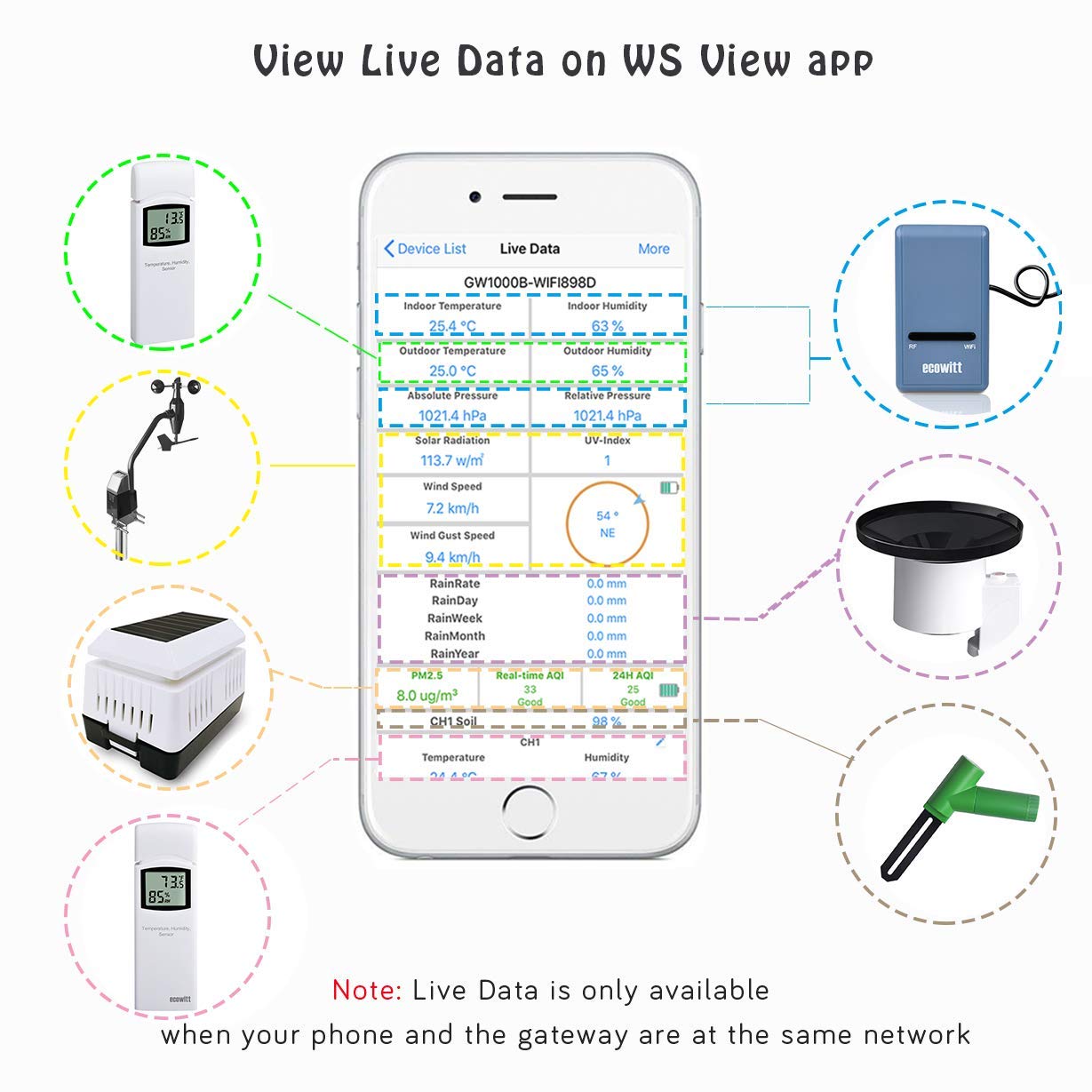
Image: A mobile phone screen displaying live weather data within the WS View application, showing various sensor readings.
4.2 Remote Monitoring via Ecowitt.net Server
For remote access, historical data, and advanced features, upload your sensor data to the free Ecowitt Weather server (ecowitt.net). This service provides:
- Live data dashboard
- Graphical display of historical data
- Email alerts based on custom thresholds
- Data storage for past year (5-minute intervals) and past 2 years (30-minute intervals)
- History records export function

Image: Various views of the Ecowitt.net web interface, demonstrating live data, historical graphs, alert settings, and a weather map.
4.3 Other Supported Weather Services
The GW1000 Gateway supports uploading outdoor sensor data to other popular weather services, including:
You can also configure custom sites using either the Wunderground or Ecowitt protocol. Please note that Wunderground typically only accepts outdoor sensor data. For comprehensive data from all sensors, the Ecowitt server is recommended.
4.4 Supported Optional Sensors
The GW1000 Gateway is compatible with a range of ECOWITT wireless sensors (sold separately) to expand your weather monitoring capabilities:
- WH32 Outdoor Temperature and Humidity Sensor
- WH40 Self-emptying Rain Gauge Sensor
- WS68 Wireless Anemometer
- WH31 Multi-channel Temperature and Humidity Sensors (up to 8)
- WH51 Soil Moisture Sensors (up to 8)
- WH41 PM2.5 Air Quality Sensors (up to 4)
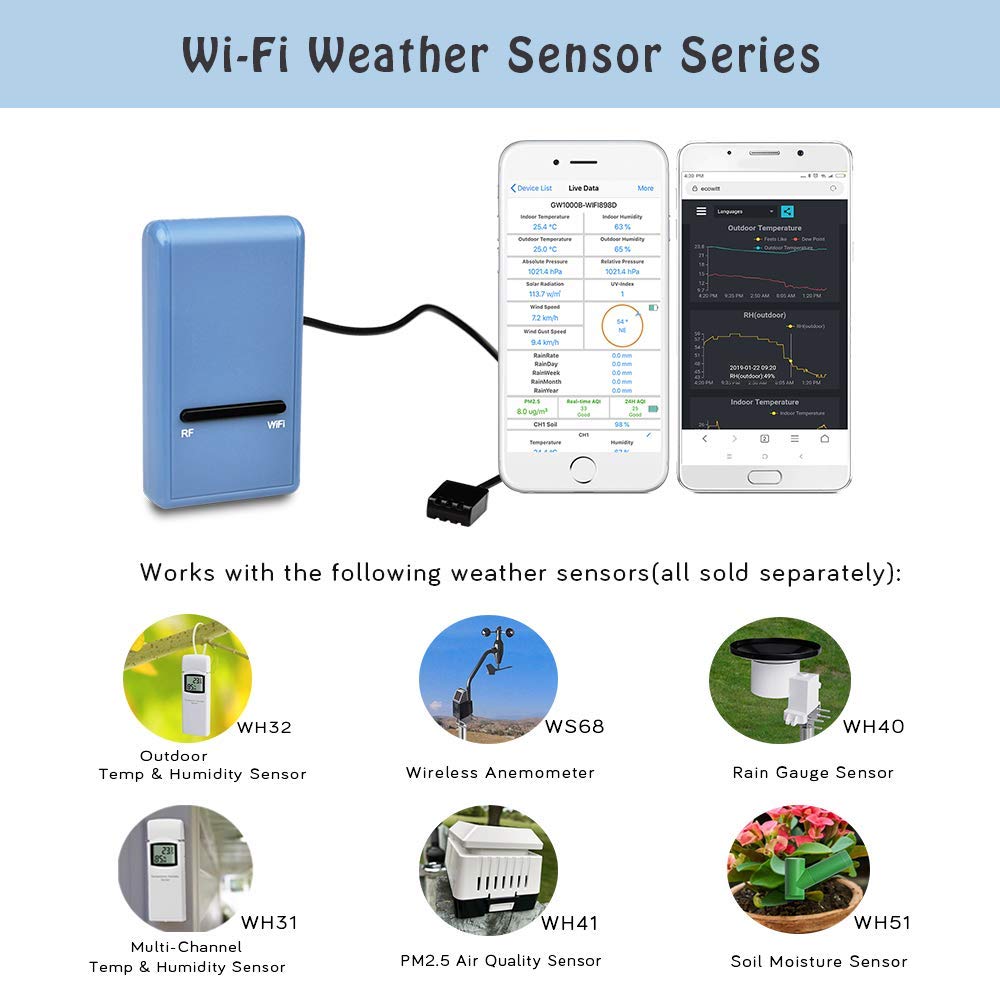
Image: An overview of the ECOWITT GW1000 WiFi Gateway and the range of compatible Wi-Fi weather sensors, including outdoor temperature/humidity, anemometer, rain gauge, multi-channel temperature/humidity, PM2.5, and soil moisture sensors.
5. Maintenance
5.1 Sensor Calibration
The WS View app allows you to manage sensor calibration settings. Refer to the app's specific instructions for calibrating individual sensors to ensure accuracy.
5.2 Sensor Management
Within the WS View app, you can manage the selection and configuration of your connected sensors.
5.3 Email Alerts
Utilize the Ecowitt.net server to set up custom email alerts for various sensor readings. This allows you to be notified when specific thresholds are met (e.g., temperature too high/low, humidity changes).
6. Troubleshooting
- WS View App Location Access: If the WS View app encounters issues during configuration, ensure that location access is enabled for the application in your mobile device's settings. This is necessary for proper weather service setup.
- Data Upload to Wunderground: If you are not seeing all sensor data on Wunderground, remember that Wunderground typically only accepts outdoor sensor data. For a complete view of all sensor data, use the Ecowitt.net server.
- Local Network Data Access: Live data viewing on the WS View app is restricted to your local network. For remote monitoring outside your home network, utilize the Ecowitt.net server.
- Software Updates: Exercise caution when performing software updates. Some users have reported data loss after updates. It is advisable to back up any critical data if such an option is available before proceeding with updates.
- Sensor Connectivity: If a sensor is not reporting data, check its power source (e.g., batteries) and ensure it is within the wireless range of the GW1000 Gateway (300ft/100m in open areas).
7. Specifications
| Feature | Specification |
|---|---|
| Power Source | DC 5V 1A (USB connection) |
| Dimensions (L x W x H) | 62 x 35 x 12 mm (2.44 x 1.38 x 0.47 inches) |
| Cable Length (3-in-1 Probe) | 1M / 3FT |
| Wireless Range (to external sensors) | 300FT / 100M (in open areas) |
| Frequency | 915Mhz |
| Temperature Range (Built-in) | 14°F - 140°F (-10°C - 60°C) |
| Temperature Resolution | 0.1°F / 0.1°C |
| Humidity Range (Built-in) | 10% ~ 99% |
| Humidity Resolution | 1% |
| Humidity Accuracy | ± 5% |
| Barometric Pressure Range (Built-in) | 300 – 1,100 hPa |
| Barometric Pressure Accuracy | ± 5 hPa |
| Connectivity | USB, Wi-Fi (2.4GHz only) |
| Special Features | Lightweight, Wireless |
8. Support
For further assistance, technical support, or to explore additional products, please visit the official ECOWITT website or contact their customer service. Information regarding warranty may also be available on the official website.


