1. Introduction
The Meike MT24II-C is a 2.4G wireless macro twin flash system designed for Canon EF-Mount DSLR cameras. This system provides versatile lighting solutions for macro photography, portraits, and other applications requiring precise illumination. It includes a hot-shoe mounted trigger (MK-GT620N) and two remote flash units (MK-R200), offering various flash modes including TTL, Manual, Multi, High-Speed Sync (HSS), and S1/S2 optical slave modes.

Image 1.1: Overview of the Meike MT24II-C Wireless Macro Twin Flash System.
2. Safety Information
- Do not disassemble or modify the product. Unauthorized modifications can lead to electric shock or malfunction.
- Keep the product away from water and moisture to prevent electric shock or fire.
- Avoid direct eye exposure to the flash light, especially at close range, as it can cause temporary vision impairment.
- Use only recommended batteries. Incorrect battery types or improper installation can cause leakage, overheating, or explosion.
- Keep out of reach of children.
- Do not operate in environments with flammable gases or liquids.
3. Package Contents
Verify that all items listed below are included in your package:
- 1 x MK-GT620N Trigger
- 2 x MK-R200 Flashes
- 2 x MK-R200 Diffusers
- 2 x MK-R200 Hot Shoe Stands
- 1 x Cold Shoe Stand
- 2 x Reflectors
- 1 x Storage Bag
- 1 x User Manual
- 18 x Color Filters
- 6 x Lens Adapter Rings (52mm, 55mm, 62mm, 67mm, 72mm, 77mm)
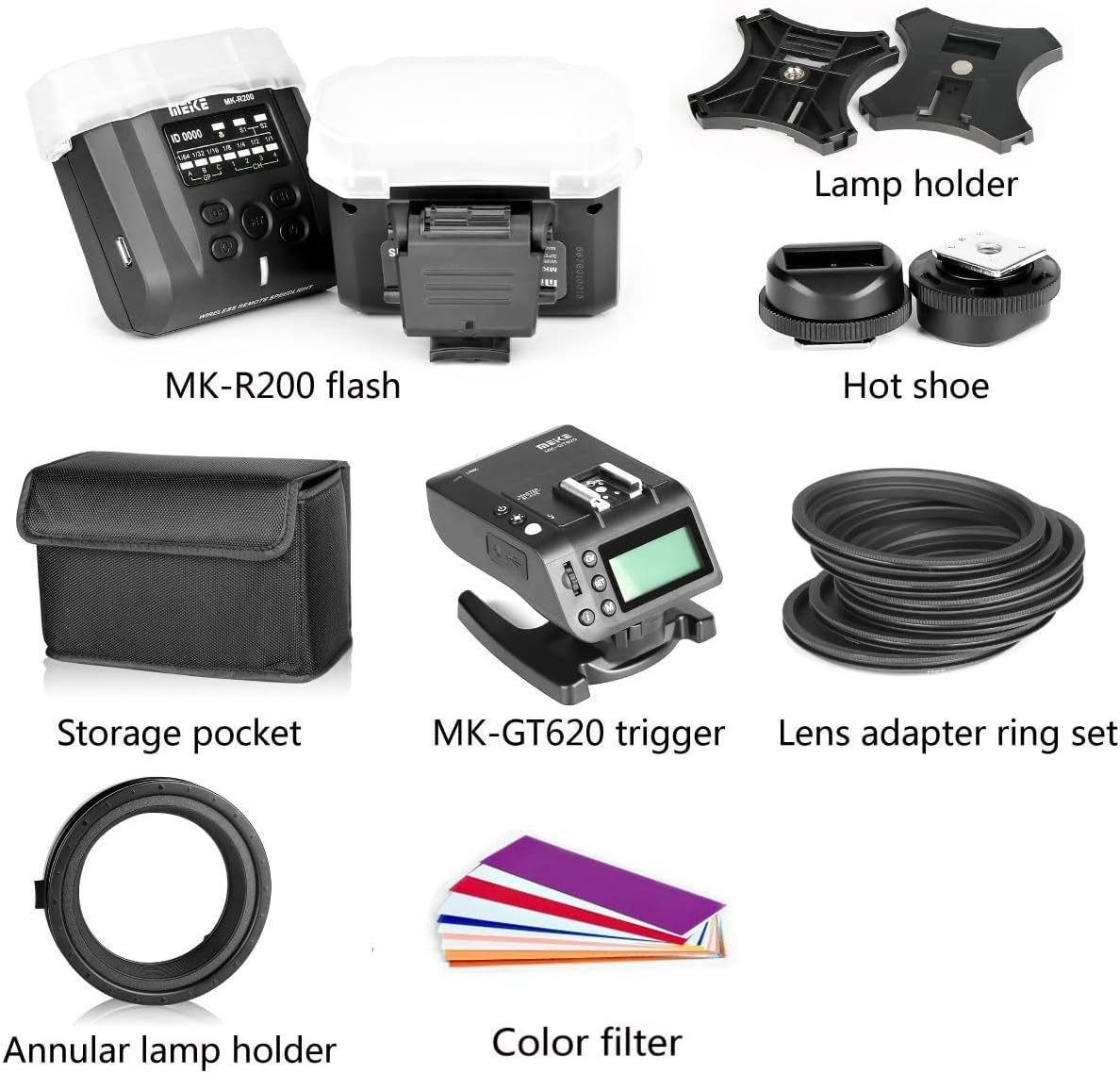
Image 3.1: All components included in the Meike MT24II-C kit.
4. Setup
4.1 Battery Installation
The MK-GT620N trigger requires 2 AA batteries. Each MK-R200 flash unit requires 2 AAA batteries. Ensure correct polarity when inserting batteries.
- Open the battery compartment cover on the back of the MK-GT620N trigger and each MK-R200 flash unit.
- Insert the batteries according to the polarity indicators (+/-).
- Close the battery compartment cover securely.
4.2 Attaching Lens Adapter Rings
Select the appropriate lens adapter ring that matches the filter thread size of your camera lens.
- Screw the chosen lens adapter ring onto the front filter thread of your camera lens.
- Attach the annular lamp holder (macro ring) to the lens adapter ring. Ensure it clicks into place securely.

Image 4.1: Attaching an MK-R200 flash to the lens adapter ring.
4.3 Mounting Flashes to the Annular Lamp Holder
The two MK-R200 flash units can be mounted onto the annular lamp holder for flexible positioning.
- Slide the mounting foot of each MK-R200 flash unit into the slots on the annular lamp holder.
- Adjust the position and angle of the flashes as needed for your desired lighting setup. The flashes can be rotated and tilted.

Image 4.2: Two MK-R200 flashes mounted on the annular lamp holder.
4.4 Mounting the Trigger to the Camera
The MK-GT620N trigger mounts directly onto your camera's hot shoe.
- Slide the mounting foot of the MK-GT620N trigger into your camera's hot shoe.
- Secure the trigger by tightening the locking mechanism (if present) on the trigger's foot.

Image 4.3: The MK-GT620N trigger mounted on a camera, controlling two MK-R200 flashes.
5. Operating Instructions
5.1 Power On/Off
- To power on the MK-GT620N trigger, press and hold the power button until the display illuminates.
- To power on each MK-R200 flash, press and hold its power button.
- To power off, press and hold the power button on each unit until the display turns off.
5.2 MK-GT620N Trigger Controls
The trigger unit allows control over the remote flash units.
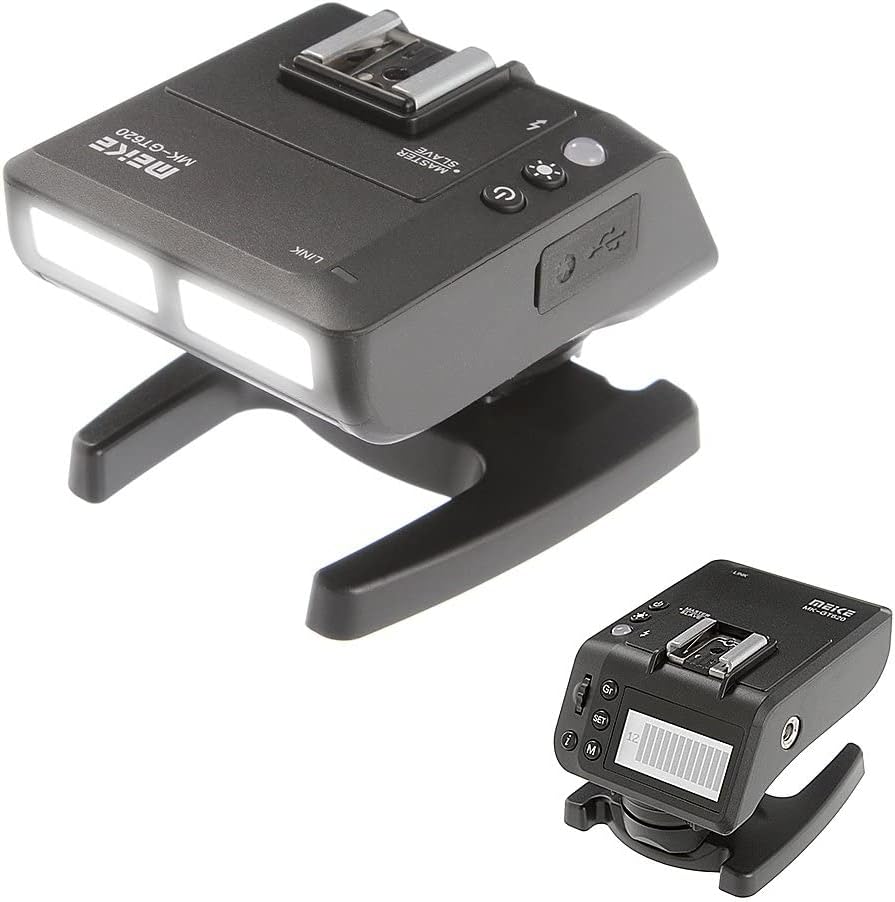
Image 5.1: The MK-GT620N trigger unit.
- Display Screen: Shows current settings for groups, channels, flash mode, and power output.
- Function Buttons: Used to navigate menus and adjust settings.
- Test Button: Fires a test flash.
- LED Assistive Light: Provides continuous light for focusing.
5.3 MK-R200 Flash Controls
Each flash unit has its own controls for individual adjustments.

Image 5.2: A single MK-R200 flash unit with its controls.
- Display Screen: Shows current group, channel, flash mode, and power output.
- Function Buttons: Used to adjust settings directly on the flash unit or confirm settings from the trigger.
- Test Button: Fires a test flash.
5.4 Operating Modes
The MT24II-C supports several flash modes:
- TTL (Through-The-Lens): Automatic flash exposure control. The camera measures the light and adjusts flash output accordingly.
- Manual (M): Allows manual setting of flash power output (e.g., 1/1 to 1/128).
- Multi (Stroboscopic): Fires a series of rapid flashes during a single exposure to capture multiple movements of a subject.
- HSS (High-Speed Sync): Enables flash synchronization at shutter speeds faster than the camera's native sync speed.
- S1/S2 Mode: Optical slave modes. S1 fires when it detects another flash. S2 ignores the pre-flash of a master flash and fires on the main flash.
5.5 Wireless Communication
The system operates on a 2.4GHz wireless frequency, allowing for reliable communication between the trigger and flash units.
- Groups (A/B/C): Assign each MK-R200 flash to a specific group (A, B, or C) to control them independently or together.
- Channels (1/2/3/4): Set the same channel on the trigger and all flash units to ensure proper communication.
- ID (0000-9999): For advanced multi-system setups, set a unique ID to avoid interference with other wireless flash systems.
5.6 LED Assistive Light
The MK-GT620N trigger and MK-R200 flashes feature an LED light that can be used for focusing in low-light conditions or as a continuous modeling light.
- Press the dedicated LED button on the trigger or flash to turn the LED light on/off.
- Adjust the brightness if the option is available.
6. Maintenance
- Cleaning: Use a soft, dry cloth to clean the exterior of the units. For stubborn dirt, a slightly damp cloth can be used, followed by a dry cloth. Do not use solvents or abrasive cleaners.
- Storage: When not in use for extended periods, remove batteries from all units to prevent leakage. Store the system in the provided storage bag in a cool, dry place, away from direct sunlight and extreme temperatures.
- Battery Care: Replace batteries when the low battery indicator appears. Dispose of used batteries responsibly according to local regulations.
7. Troubleshooting
| Problem | Possible Cause | Solution |
|---|---|---|
| Flashes do not fire. | Low batteries; Incorrect channel/ID; Trigger not securely mounted; Flash units not powered on. | Replace batteries; Ensure trigger and flashes are on the same channel/ID; Re-mount trigger; Power on flash units. |
| Flash output is inconsistent. | Low batteries; Interference; Incorrect mode settings. | Replace batteries; Change channel/ID; Verify flash mode (TTL/Manual) and settings. |
| High-Speed Sync (HSS) not working. | Camera not compatible; HSS not enabled on trigger/camera. | Check camera compatibility; Enable HSS in camera and trigger settings. |
| LED assistive light not working. | Light turned off; Low batteries. | Press LED button; Replace batteries. |
8. Specifications
MK-R200II-C Flash Specification:
- Guide Number: GN10 (ISO 100.m)
- LED Light: 0.5W, 5500K±200, Ra90
- Group and Channel: Group A/B/C and channels 1/2/3/4
- ID: Default as 0000
- S1/S2 Transmission: Indoor >20m, Outdoor >10m
- Cover Angle: Light of 24mm lens
- Recycle Time: 4s (1/1 output)
- AF Assist: LED
- Angle: -45 to 60 degrees in vertical direction
- 2.4G Wireless Distance: Stable within 15m (any angle), over 100m (open environment)
MK-GT620II-C Trigger Specification:
- Frequency: NRF24L01 2.4GHz
- Triggering Distance: 100m
- Channel/ID: 16 (0000-9999)
- Max Sync Speed: 1/8000s
- Input Interface: USB
- Compatible Flash: On-camera flash, modeling light, fill light
- LED Light: 0.5W, 5500K±200, Ra90
- Mode: 1/128 - 1/1 (8 levels) ±1/3 increments
- TTL Compensation: ±1/3 increments
- Zoom Adjustment: 18-200mm
- Antenna: Built-in PCB antenna
- Output Interface: USB port and 2.5mm jack
General Specifications:
- Brand: Meike
- Model Number: MT24C
- Compatible Mountings: Canon EF-Mount DSLR Cameras
- Item Weight: Approximately 2.49 pounds (total package)
- Package Dimensions: 9.1 x 5.8 x 5.8 inches
- Date First Available: October 21, 2018
9. Warranty and Support
Meike products are designed for reliability and performance. For warranty information, please refer to the warranty card included with your product or visit the official Meike website. For technical support, troubleshooting assistance, or service inquiries, please contact Meike customer service through their official channels.


