
Roadstar RDC-2028
Contents
Roadstar RDC-2028 Car Stereo User Manual
CD / USB / SD / Radio Car Audio Player
Introduction
This user manual provides detailed instructions for the installation, operation, and maintenance of your Roadstar RDC-2028 CD/USB/SD/Radio Car Stereo. Please read this manual thoroughly before using the product to ensure proper functionality and to prevent damage.

Image: Angled view of the Roadstar RDC-2028 Car Stereo, showing the front panel with controls and display.
Safety Information
- Do not operate the unit in a manner that distracts you from driving.
- Ensure proper wiring and installation to prevent short circuits or electrical hazards.
- Keep the unit away from moisture and extreme temperatures.
- Do not attempt to disassemble or modify the unit. Refer servicing to qualified personnel.
Product Features
- Maximum Output Power: 4 x 50W
- Tuner: AM/FM with 30 preset channels (18 FM, 12 AM)
- Playback: CD-R, CD-RW, MP3, WMA
- Detachable Front Panel
- ID3-TAG Function: Displays song titles and artist information
- Folder Selection: Easy navigation for music on USB and SD cards
- Inputs: Front Aux-in, SD Card Slot, USB Input
- Outputs: 2 x RCA
- Audio Controls: Bass, Treble, Fader, Balance
- Electronic Shock Protection (ESP)
- Real-time Clock Function
- Remote Control included
- ISO Connection
- RDS (Radio Data System)
- Preset Equalizer
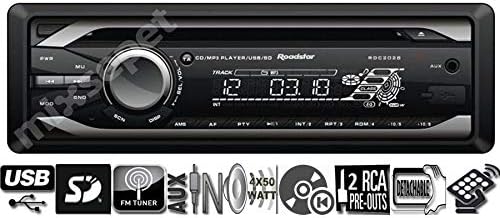
Image: Front view of the Roadstar RDC-2028 Car Stereo, highlighting key features such as USB, SD, FM Tuner, Aux-in, 4x50W output, CD/MP3 playback, 2 RCA pre-outs, detachable panel, and remote control.
Setup and Installation
Package Contents
Before installation, ensure all components are present:
- Roadstar RDC-2028 Car Stereo Unit
- Detachable Front Panel
- Remote Control
- ISO Wiring Harness
- Mounting Hardware
- User Manual (this document)
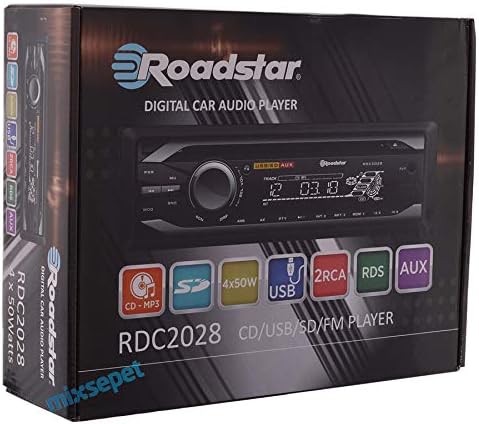
Image: The retail box of the Roadstar RDC-2028 Digital Car Audio Player, displaying the product image and key features.
Wiring Diagram
Connect the ISO wiring harness to your vehicle's corresponding connectors. Ensure correct polarity for power (constant 12V, ignition 12V, ground) and speaker connections. Incorrect wiring can damage the unit or vehicle's electrical system.
- Yellow Wire: Constant 12V (Battery)
- Red Wire: Switched 12V (Ignition/ACC)
- Black Wire: Ground
- Blue Wire: Power Antenna / Amplifier Remote Turn-on
- Speaker Wires: Connect to corresponding vehicle speakers (e.g., White/White-Black for Front Left, Grey/Grey-Black for Front Right, Green/Green-Black for Rear Left, Purple/Purple-Black for Rear Right).
Note: If your vehicle does not have ISO connectors, professional installation is recommended.
Mounting the Unit
- Insert the metal mounting sleeve into the vehicle's dashboard opening until it locks into place.
- Connect all wiring harnesses to the rear of the RDC-2028 unit.
- Carefully slide the RDC-2028 unit into the mounting sleeve until it clicks securely.
- Attach the detachable front panel by aligning it with the main unit and pressing gently until it locks.
Operating Instructions
Basic Operation
- Power On/Off: Press the PWR button.
- Volume Control: Rotate the large central knob.
- Mode Selection: Press the MODE button to switch between Radio, CD, USB, SD, and AUX modes.
- Mute: Press the MUTE button.
Radio Operation
- Band Selection: Press the BAND button to select FM1, FM2, FM3, AM1, or AM2.
- Manual Tuning: Press TUNE +/- buttons briefly.
- Automatic Seek: Press and hold TUNE +/- buttons.
- Preset Stations: Store stations by pressing and holding a numbered preset button (1-6). Recall by pressing briefly.
- RDS Functions: The unit supports RDS. Information like station name may be displayed.
CD/USB/SD Playback
- Insert Media: Insert a CD into the disc slot, or a USB drive/SD card into the respective ports. The unit will automatically switch to the corresponding mode.
- Play/Pause: Press the PLAY/PAUSE button.
- Next/Previous Track: Press the SKIP +/- buttons.
- Fast Forward/Rewind: Press and hold the SKIP +/- buttons.
- Folder Navigation: Use the FOLDER +/- buttons to navigate between folders on USB/SD media.
- ID3-TAG Display: Song title and artist information will be displayed if available on the media.
Audio Settings
- EQ Presets: Press the EQ button to cycle through preset equalizer modes (e.g., Pop, Rock, Classic, Flat).
- Bass/Treble/Balance/Fader: Press the central knob repeatedly to cycle through these settings. Rotate the knob to adjust the values.
Maintenance
- Cleaning the Unit: Use a soft, dry cloth to clean the front panel and display. Do not use abrasive cleaners or solvents.
- CD Slot: Avoid inserting foreign objects into the CD slot. Use a CD lens cleaner disc periodically if playback issues occur.
- Detachable Panel: When detaching the front panel, handle it carefully to avoid scratching or damaging the connectors. Store it in a protective case when not in use.
Troubleshooting
| Problem | Possible Cause | Solution |
|---|---|---|
| No Power | Incorrect wiring; Blown fuse; Loose connection. | Check power and ground connections. Inspect vehicle's fuse box and the unit's fuse. Ensure connections are secure. |
| No Sound | Mute activated; Incorrect speaker wiring; Volume too low. | Deactivate mute. Check speaker connections. Increase volume. |
| CD/USB/SD Playback Error | Damaged media; Incompatible file format; Dirty lens/port. | Try a different media. Ensure files are MP3/WMA. Clean CD lens or USB/SD port. |
| Poor Radio Reception | Antenna not connected; Weak signal area; Damaged antenna. | Check antenna connection. Try tuning to a stronger station. Inspect antenna for damage. |
| Remote Control Not Working | Dead battery; Obstruction; Not pointed correctly. | Replace remote battery. Remove obstructions. Point remote directly at the unit's IR receiver. |
Specifications
| Feature | Detail |
|---|---|
| Model | RDC-2028 |
| Brand | Roadstar |
| Max Output Power | 4 x 50W |
| Tuner | AM/FM (30 Presets) |
| Playback Formats | CD-R, CD-RW, MP3, WMA |
| Inputs | Front Aux-in, USB, SD Card |
| Outputs | 2 x RCA |
| Special Features | Detachable Front Panel, ID3-TAG, Folder Selection, ESP, Remote Control, RDS, Preset EQ |
| Connectivity Type | USB |
Warranty and Support
Roadstar products are designed and manufactured to the highest quality standards. This product is covered by a standard manufacturer's warranty against defects in materials and workmanship from the date of purchase.
For warranty claims or technical support, please contact your authorized Roadstar dealer or visit the official Roadstar website for contact information.
Please retain your proof of purchase for warranty purposes.
Documents and downloads
Ask a question about this manual
Ask about setup, troubleshooting, compatibility, parts, safety, or missing instructions. Manuals+ will review the question and use this page’s manual context to help answer it.