
Introduction
This manual provides detailed instructions for the Joyroom Jr-FT6 Fit-Life Series Smart Watch. It covers essential information regarding product setup, operation, maintenance, and troubleshooting to ensure optimal performance and user experience. The Jr-FT6 is designed to integrate seamlessly into your daily life, offering features such as Bluetooth calling, comprehensive health monitoring, and various sports modes.
What's in the Box
Upon opening the package, please verify that all components are present:
- Joyroom Jr-FT6 Smart Watch
- Magnetic Charging Cable
- User Manual (this document)
- Additional Watch Strap

Image: The package contents for the Joyroom Jr-FT6 Smart Watch, showing the watch, charging cable, user manual, and an additional strap.
Product Overview
The Joyroom Jr-FT6 Smart Watch features a vibrant display and intuitive controls, designed for ease of use and comprehensive functionality.
Key Features:
- Display: 1.85-inch hyperbolic hi-res screen with a 60Hz refresh rate and 320x385 resolution for detailed visuals.
- Navigation: Rotatable digital crown for easy interface navigation and watch face switching.
- Communication: One-step wireless calling functionality to make and answer calls directly from the watch.
- Durability: IP68 water resistance, providing protection against sweat and rain.
- Fitness Tracking: Over 107 sports modes to monitor various physical activities.
- Health Monitoring: 24-hour real-time monitoring of heart rate, blood oxygen, blood pressure, and stress levels.
- Battery: Ultra-long battery life with a 300mAh capacity.
- Smart Functions: Includes notifications, weather updates, music control, theme customization, remote camera control, 'Find Phone' feature, voice assistant integration, and QR code display.

Image: The watch display showcasing its high resolution and refresh rate.
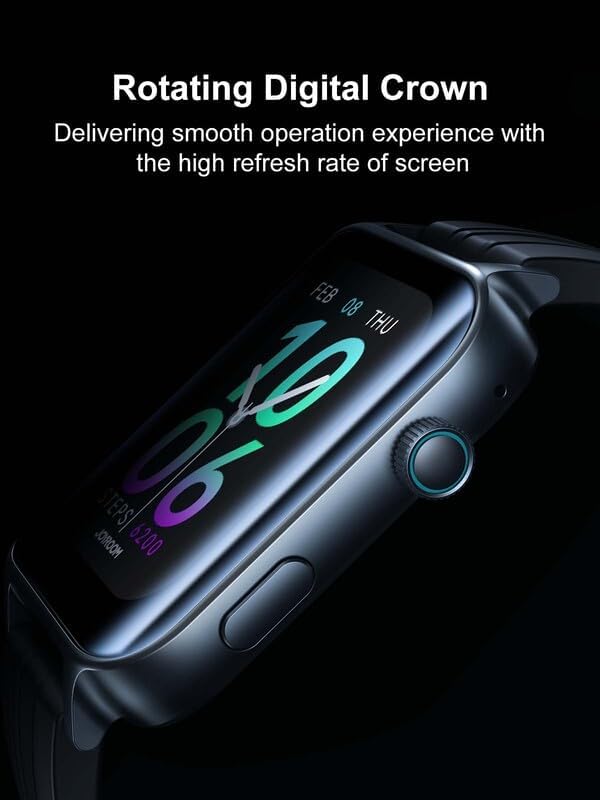
Image: The rotatable digital crown on the side of the watch.

Image: Health monitoring features including heart rate, blood oxygen, blood pressure, and stress.

Image: The watch charging, highlighting its 300mAh battery for extended use.

Image: Demonstrating the one-step wireless calling feature.

Image: The watch submerged in water, demonstrating its IP68 water resistance.

Image: The watch tracking activity during rock climbing, indicating its support for over 107 sports modes.

Image: The watch displaying various versatile functions such as notifications, weather, and music control.
Setup Guide
1. Charging the Device
Before initial use, fully charge your Joyroom Jr-FT6 Smart Watch. Connect the magnetic charging cable to the charging contacts on the back of the watch and plug the USB end into a standard USB power adapter (not included) or a computer USB port. The watch display will indicate charging status. A full charge typically takes approximately 2 hours.
2. Power On/Off
- Power On: Press and hold the side button (digital crown) for a few seconds until the Joyroom logo appears.
- Power Off: From the watch face, swipe down to access quick settings or navigate to the settings menu. Select 'Power Off' and confirm. Alternatively, press and hold the side button until the power off option appears.
3. App Installation and Pairing
To unlock the full potential of your smart watch, download and install the companion application on your smartphone.
- Download the App: Scan the QR code displayed on the watch screen during initial setup, or refer to the user manual for the app name to search in your smartphone's app store (e.g., Google Play Store for Android, Apple App Store for iOS).
- Enable Bluetooth: Ensure Bluetooth is enabled on your smartphone.
- Pairing: Open the downloaded app on your smartphone. Follow the in-app instructions to search for and connect to your Joyroom Jr-FT6 Smart Watch. Confirm the pairing request on both your watch and smartphone.
Operating Instructions
1. Navigating the Interface
- Touch Screen: Swipe left, right, up, or down to navigate through menus and screens. Tap to select an item.
- Digital Crown: Rotate the digital crown to scroll through lists, adjust settings, or change watch faces. Press the digital crown to return to the watch face or to confirm a selection.
2. Bluetooth Calling
Once paired with your smartphone, you can make and answer calls directly from your watch.
- Answering Calls: When an incoming call is received, the watch will display the caller ID. Tap the green answer icon on the screen to accept the call.
- Making Calls: Access the 'Dialer' or 'Contacts' function on your watch. You can dial a number directly or select a contact to initiate a call.
3. Sports Modes
The watch supports over 107 sports modes for tracking various activities.
- Selecting a Mode: Navigate to the 'Sports' menu on your watch. Browse through the available activities and tap to select your desired sport.
- Starting/Ending: Follow on-screen prompts to start and end your workout. The watch will record relevant data such as duration, calories burned, and heart rate.
4. Health Monitoring
The watch continuously monitors your health metrics.
- Accessing Data: Swipe to the health monitoring widgets or open the dedicated health app on the watch to view real-time heart rate, blood oxygen, blood pressure, and stress levels.
- Data Sync: All health data is synced to the companion app on your smartphone for detailed analysis and historical tracking.
5. Notifications and Other Functions
Ensure the companion app has the necessary permissions on your smartphone to receive notifications.
- Notifications: Swipe down from the watch face to view recent notifications from your paired smartphone.
- Music Control: Control music playback on your smartphone directly from the watch.
- Weather: View current weather conditions and forecasts.
- Remote Camera: Use the watch as a remote shutter for your smartphone's camera.
- Find Phone: Activate this feature to make your paired smartphone ring, helping you locate it.
Maintenance
1. Water Resistance (IP68)
The Joyroom Jr-FT6 Smart Watch is IP68 water-resistant, meaning it is protected against dust ingress and can withstand immersion in water up to 1.5 meters for up to 30 minutes. It is suitable for daily use, such as washing hands, sweating, and exposure to rain. However, it is not recommended for hot showers, saunas, or diving, as steam and high water pressure may compromise the seals.
2. Cleaning
Regularly clean your watch and strap to prevent skin irritation and maintain functionality.
- Wipe the watch screen and body with a soft, damp, lint-free cloth.
- For the strap, use mild soap and water, then rinse thoroughly and dry completely before wearing.
- Avoid using harsh chemicals or abrasive materials.
3. Battery Care
- Use only the provided magnetic charging cable.
- Avoid exposing the watch to extreme temperatures, which can degrade battery life.
- Do not leave the watch uncharged for extended periods.
Troubleshooting
If you encounter issues with your Joyroom Jr-FT6 Smart Watch, refer to the following common solutions:
| Problem | Possible Solution |
|---|---|
| Watch does not power on | Ensure the watch is fully charged. Connect it to the charger for at least 30 minutes. If it still doesn't turn on, perform a hard reset by pressing and holding the side button for 10-15 seconds. |
| Unable to pair with smartphone | Ensure Bluetooth is enabled on your smartphone and the watch. Make sure the watch is within range. Restart both the watch and your smartphone. Clear previous Bluetooth connections on your phone if necessary. |
| Notifications are not received | Check if the companion app has notification permissions enabled on your smartphone. Ensure the app is running in the background. Verify that 'Do Not Disturb' mode is not active on either device. |
| Inaccurate health data | Ensure the watch is worn snugly on your wrist, not too tight or too loose. Clean the sensor on the back of the watch. Note that smart watch health data is for reference and not for medical diagnosis. |
| Short battery life | Reduce screen brightness, disable unnecessary features (e.g., continuous heart rate monitoring if not needed), and limit background app refresh. Ensure the watch is fully charged before use. |
Specifications
The following are the technical specifications for the Joyroom Jr-FT6 Fit-Life Series Smart Watch:
| Feature | Detail |
|---|---|
| Model Name | Jr-FT6 |
| Brand | Joyroom |
| Screen Size | 1.85 Inches |
| Screen Resolution | 320 x 385 |
| Operating System | Android Wear 2.0 |
| Memory Storage Capacity | 512 MB |
| Special Features | Blood Pressure Monitor, Heart Rate, Wireless Charging |
| Connectivity Technology | Bluetooth |
| Wireless Communication Standard | Bluetooth |
| GPS | No GPS |
| Item Shape | Rectangular |
| Battery Capacity | 300 mAh |
| Water Resistance | IP68 |
| Product Dimensions | 10 x 2 x 1 cm; 50 g |
Warranty and Support
For warranty information and customer support, please refer to the official Joyroom website or contact your local retailer. Keep your purchase receipt as proof of purchase for any warranty claims.