
Product Overview
The Vitafit VT571 Digital Kitchen Food Scale is designed for precise measurement of food ingredients. It features a clear LED display, a durable tempered glass surface, and a slim, elegant design for easy storage.
- High Capacity: Measures up to 10 kg (22 lbs).
- Precision: Minimum weighing of 2g, with 1g exact increments.
- Multiple Units: Displays measurements in grams (g), kilograms (kg), ounces (oz), and pounds:ounces (lb:oz).
- Clear Display: Large and bright LED display (50x30mm) with white digits for easy readability.
- Tare Function: Allows for measurement of multiple ingredients in the same bowl.
- Energy Efficient: Features an auto-off function, low battery, and overload indications.

Image: Top view of the Vitafit VT571 Digital Kitchen Food Scale, showcasing its sleek design and LED display.
Setup
- Battery Installation:
Locate the battery compartment on the underside of the scale. Open the compartment cover and insert 3 AAA batteries, ensuring correct polarity (+/-). Close the cover securely.

Image: The underside of the scale, highlighting the battery compartment and non-slip rubber feet.
- Placement:
Place the scale on a hard, flat, and level surface. Uneven surfaces can affect measurement accuracy.
Operating Instructions
- Power On/Off:
Press the ON/OFF/TARE button (power symbol) to turn the scale on. The display will show '0' or '0.0' when ready. Press and hold the ON/OFF/TARE button for a few seconds to turn the scale off.

Image: A close-up of the scale's surface, showing the ON/OFF/TARE button and the UNIT button, along with various unit displays.
- Unit Conversion:
Press the UNIT button to cycle through the available measurement units: g, kg, oz, and lb:oz.
- Weighing Ingredients:
Place the item to be weighed directly onto the center of the scale platform. The weight will be displayed on the LED screen. Wait a few seconds for the reading to stabilize.
- Tare Function (Add & Weigh):
To weigh multiple ingredients in the same container or to subtract the weight of a container:
- Place the empty container on the scale.
- Press the ON/OFF/TARE button. The display will reset to '0'.
- Add the first ingredient to the container. The scale will display its weight.
- To add another ingredient, press the ON/OFF/TARE button again to reset the display to '0', then add the next ingredient. Repeat as needed.

Image: The scale in use, demonstrating the tare function with a bowl containing ingredients, and a hand pressing the tare button.
- Auto-Off Function:
The scale will automatically turn off after approximately 2 minutes of inactivity to conserve battery life.
Maintenance
- Cleaning:
The tempered glass surface is easy to clean. Wipe the scale with a damp cloth. Do not immerse the scale in water or use abrasive cleaning agents. Ensure the bottom side of the unit does not get wet.
- Storage:
Due to its slim design (23x17x2.2cm), the scale can be easily stored in a kitchen drawer or cabinet when not in use.
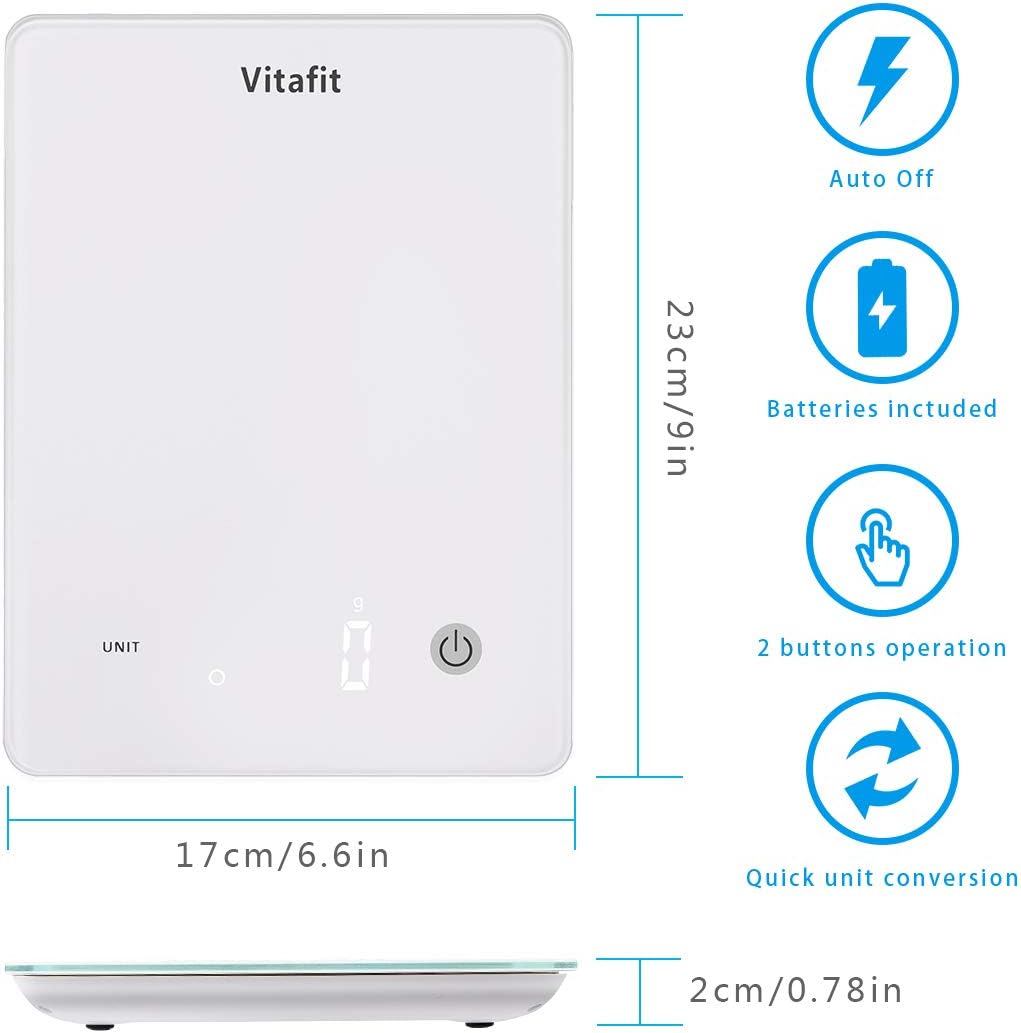
Image: Diagram showing the dimensions of the Vitafit VT571 scale (23cm x 17cm x 2cm) and icons for auto-off, batteries included, 2-button operation, and quick unit conversion.
- Battery Replacement:
When the 'Lo' indicator appears on the display, it is time to replace the batteries. Refer to the 'Battery Installation' section under Setup.
Troubleshooting
- Inaccurate Readings:
- Ensure the scale is placed on a hard, flat, and level surface.
- Avoid placing the scale near strong air currents or vibrations.
- Wait a few seconds for the reading to stabilize after placing an item.
- 'Lo' Display:
Indicates low battery. Replace the 3 AAA batteries.
- 'O-Ld' Display:
Indicates overload. The weight on the scale exceeds its maximum capacity (10 kg / 22 lbs). Remove the item immediately to prevent damage.
- Scale Does Not Turn On:
Check if the batteries are installed correctly and are not depleted. Replace if necessary.
Specifications
| Feature | Specification |
|---|---|
| Brand | Vitafit |
| Model | VT571 |
| Color | White |
| Weight Capacity | 10 kg (22 lbs) |
| Minimum Weighing | 2 g |
| Readout Accuracy | 1 g |
| Measurement Units | g, kg, oz, lb:oz |
| Display Type | LED, Digital |
| Material | Tempered Glass |
| Dimensions (L x W x H) | 23 cm x 17 cm x 2.2 cm (9 in x 6.6 in x 0.78 in) |
| Power Source | 3 x AAA Batteries |
| Special Features | Auto Shut Off, Backlit Display, Tare Function |
| UPC | 659103933120 |
Warranty Information
This Vitafit Digital Kitchen Food Scale is covered by a 5-year warranty from the date of purchase. This warranty covers manufacturing defects and material flaws under normal use. Please retain your proof of purchase for warranty claims.
The warranty does not cover damage caused by misuse, accident, unauthorized modification, or failure to follow the instructions in this manual.
Customer Support
For any questions, technical assistance, or warranty claims, please contact Vitafit customer support through the retailer's platform or visit the official Vitafit website for contact details.

