
Jamo S 810 SUB
Contents
Jamo Studio Series S 810 Subwoofer User Manual
Model: S 810 SUB
1. Introduction
The Jamo Studio Series S 810 Subwoofer is engineered to deliver powerful and accurate bass, enhancing the audio experience of your home theater or stereo system. Featuring a 10-inch polyfiber woofer and a 150-watt Class D amplifier, this slim-line subwoofer is designed for optimal performance in various listening environments.
2. Safety Information
Please read all safety instructions before operating this product. Retain this manual for future reference.
- Power Source: Connect the subwoofer only to the type of power source indicated on the unit.
- Ventilation: Ensure adequate ventilation. Do not block ventilation openings.
- Water and Moisture: Do not expose the unit to rain, moisture, or excessive humidity.
- Heat: Keep the unit away from heat sources such as radiators, heat registers, stoves, or other heat-producing appliances.
- Cleaning: Clean only with a dry cloth.
- Servicing: Do not attempt to service this product yourself. Refer all servicing to qualified service personnel.
3. Package Contents
Verify that your package contains the following items:
- 1 Jamo Studio Series S 810 Subwoofer
- 1 Power Cord
- User Manual (this document)
4. Setup
4.1 Unpacking
Carefully remove the subwoofer from its packaging. Retain the packaging materials for future transport or storage.
4.2 Placement
The Jamo S 810 Subwoofer's slim design allows for flexible placement. It can be positioned vertically against a wall or horizontally under furniture. Experiment with different locations in your room to find the position that yields the best bass response. Placing the subwoofer in a corner often maximizes bass output.

Image: Jamo S 810 Subwoofer positioned vertically against a wall, showcasing its slim profile and the bottom-mounted power connection.
4.3 Connections
The S 810 Subwoofer features Line In (RCA) and LFE inputs for connection to your AV receiver or amplifier.
- Power Off: Ensure your AV receiver/amplifier and the subwoofer are turned off before making any connections.
- Connect Audio Cable:
- If your receiver has an LFE output, connect a single RCA cable from the receiver's LFE output to the subwoofer's LFE input.
- If your receiver has stereo RCA subwoofer outputs (left and right), connect an RCA cable from one of these outputs to the subwoofer's LINE IN (L/R) input.
- Connect Power: Plug the included power cord into the subwoofer's AC input, then plug the other end into a suitable wall outlet.

Image: Rear control panel of the Jamo S 810 Subwoofer, illustrating the power switch, AC input, volume, low pass filter, phase switch, and line-in connections.
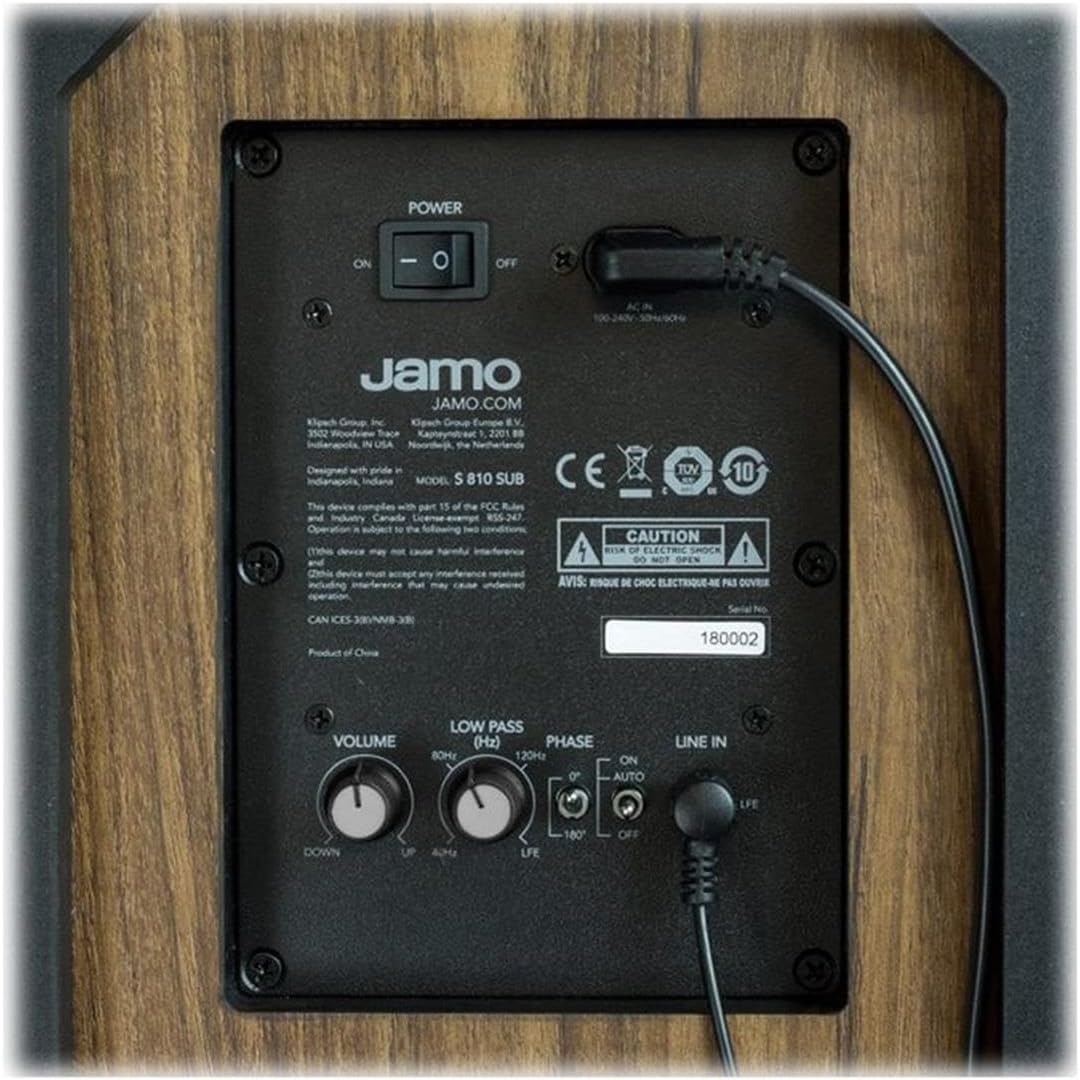
Image: Close-up view of the Jamo S 810 Subwoofer's rear control panel with the power cable connected, showing the input and adjustment controls.
4.4 Initial Power-up
After all connections are made, turn on your AV receiver/amplifier, then switch the subwoofer's power to the 'ON' position. The subwoofer has an 'AUTO' power mode which will automatically turn the unit on when an audio signal is detected and off after a period of inactivity.
5. Operating Instructions
The Jamo S 810 Subwoofer features several controls on its rear panel to fine-tune its performance with your audio system.
5.1 Volume Control
The VOLUME knob adjusts the output level of the subwoofer. Start with the volume at a low setting and gradually increase it until the bass blends seamlessly with your main speakers without overpowering them.
5.2 Low Pass Filter (LOW PASS)
The LOW PASS knob (adjustable from 80Hz to 120Hz) controls the upper frequency limit of the subwoofer. This ensures that the subwoofer only reproduces low-frequency sounds, preventing overlap with your main speakers. Adjust this control to match the low-frequency extension of your main speakers. If your receiver has a built-in crossover, set the subwoofer's LOW PASS to LFE (bypassing the subwoofer's internal crossover) and manage the crossover frequency through your receiver.
5.3 Phase Control (PHASE)
The PHASE switch (0°/180°) helps to integrate the subwoofer's output with your main speakers. If the bass sounds weak or hollow, try flipping the phase switch. The correct phase setting will result in the most impactful and coherent bass response.
6. Maintenance
To ensure the longevity and optimal performance of your Jamo S 810 Subwoofer, follow these maintenance guidelines:
- Cleaning: Use a soft, dry cloth to clean the cabinet. Avoid abrasive cleaners, solvents, or harsh chemicals.
- Grille Care: The fabric grille can be gently vacuumed to remove dust.
- Ventilation: Periodically check that the ventilation openings are clear of dust and debris.
- Avoid Extreme Conditions: Do not expose the subwoofer to extreme temperatures, direct sunlight, or high humidity.
7. Troubleshooting
If you encounter issues with your Jamo S 810 Subwoofer, refer to the following troubleshooting guide:
| Problem | Possible Cause | Solution |
|---|---|---|
| No power/No indicator light | Power cord not connected; Power switch off; Faulty outlet | Ensure power cord is securely connected; Turn power switch to ON; Test outlet with another device. |
| No sound from subwoofer | Audio cable not connected; Volume too low; Receiver settings incorrect; Subwoofer in AUTO standby mode | Check audio cable connections; Increase subwoofer volume; Verify receiver's subwoofer output is enabled; Send an audio signal to wake up from AUTO mode. |
| Distorted or boomy bass | Volume too high; Incorrect phase setting; Improper placement; Crossover frequency too high | Reduce volume; Toggle phase switch (0°/180°); Adjust subwoofer placement; Lower the LOW PASS frequency. |
| Humming or buzzing noise | Ground loop; Loose connections; Interference | Ensure all components are on the same electrical circuit; Check all cable connections; Try a different power outlet; Use a ground loop isolator if necessary. |
8. Specifications
Detailed technical specifications for the Jamo Studio Series S 810 Subwoofer:
| Feature | Detail |
|---|---|
| Model Name | S 810 SUB |
| Speaker Type | Subwoofer |
| Subwoofer Diameter | 10 Inches |
| Speaker Maximum Output Power | 150 Watts |
| Product Dimensions (D x W x H) | 18.9" x 12.2" x 24.41" |
| Item Weight | 29 Pounds |
| Power Source | Corded Electric |
| Included Components | 1 subwoofer |
| Manufacturer | Jamo |
| UPC | 008634003435 |
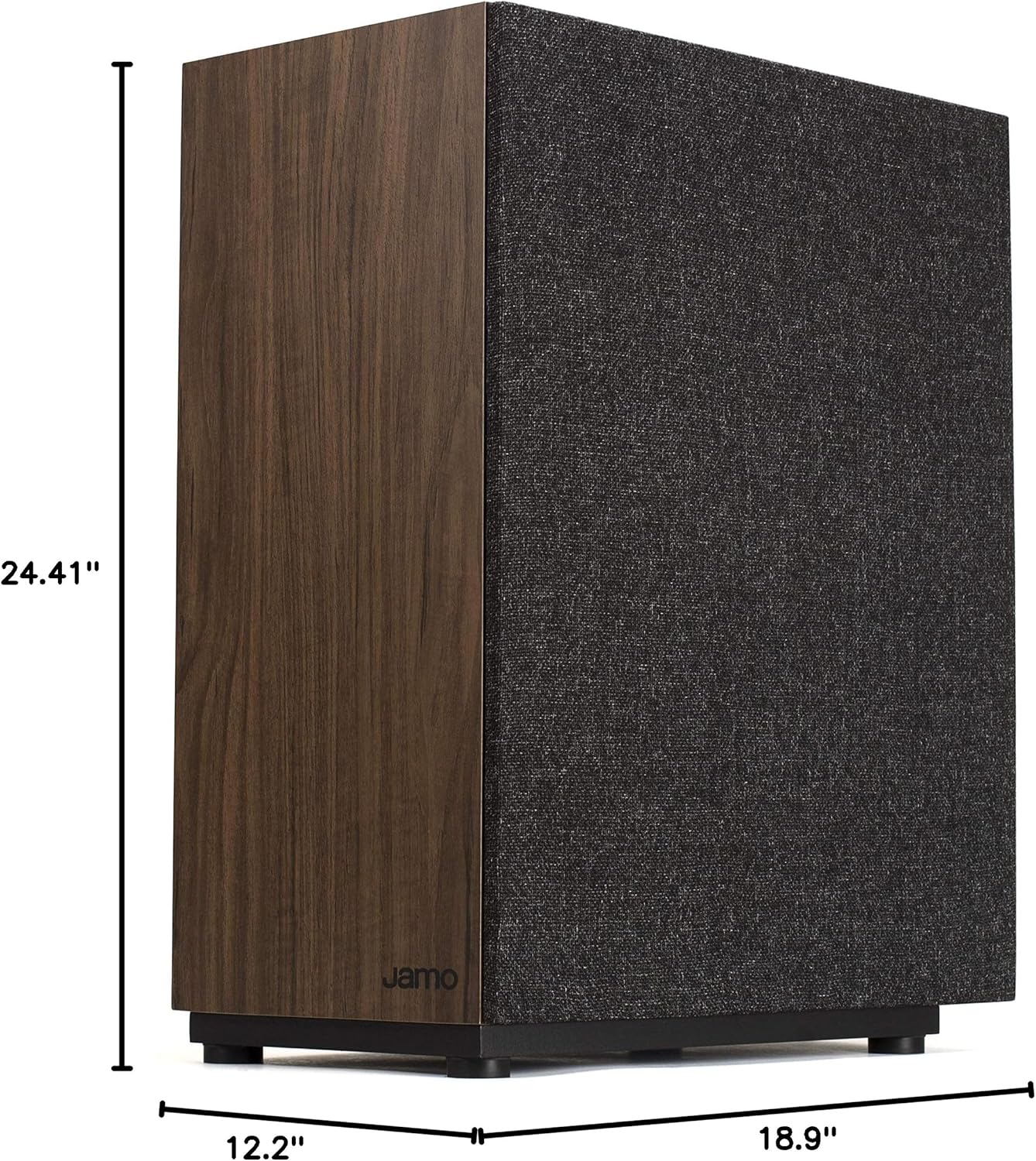
Image: Dimensions of the Jamo S 810 Subwoofer, illustrating its height, width, and depth.
9. Warranty and Support
Jamo products are designed for reliability and performance. This product is covered by a manufacturer's warranty. For specific warranty terms and conditions, please refer to the warranty card included with your product or visit the official Jamo website. For technical support, product registration, or service inquiries, please visit www.jamo.com.
Documents and downloads
Ask a question about this manual
Ask about setup, troubleshooting, compatibility, parts, safety, or missing instructions. Manuals+ will review the question and use this page’s manual context to help answer it.