
Introduction
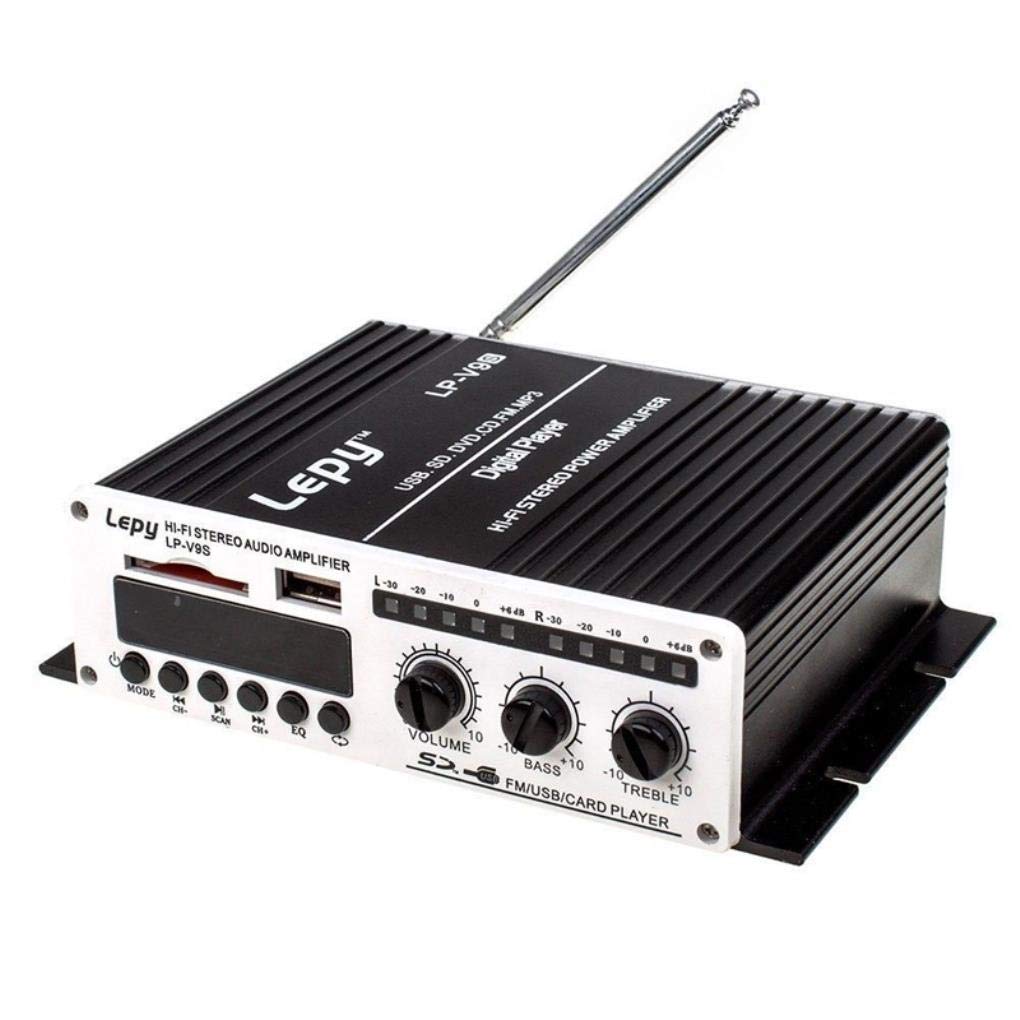
Welcome to the user manual for your new Lepy LP-V9S Digital Amplifier. This compact stereo amplifier is designed to provide high-fidelity audio output for various sources, including DVD, CD, FM radio, and MP3 players. Please read this manual thoroughly before operating the device to ensure proper use and optimal performance.
Safety Information
Important Safety Instructions
- Read these instructions.
- Keep these instructions.
- Heed all warnings.
- Follow all instructions.
- Do not use this apparatus near water.
- Clean only with a dry cloth.
- Do not block any ventilation openings. Install in accordance with the manufacturer's instructions.
- Do not install near any heat sources such as radiators, heat registers, stoves, or other apparatus (including amplifiers) that produce heat.
- Protect the power cord from being walked on or pinched, particularly at plugs, convenience receptacles, and the point where they exit from the apparatus.
- Only use attachments/accessories specified by the manufacturer.
- Unplug this apparatus during lightning storms or when unused for long periods of time.
- Refer all servicing to qualified service personnel. Servicing is required when the apparatus has been damaged in any way, such as power-supply cord or plug is damaged, liquid has been spilled or objects have fallen into the apparatus, the apparatus has been exposed to rain or moisture, does not operate normally, or has been dropped.
Package Contents
Please check the package for the following items:
- Lepy LP-V9S Digital Amplifier
- Power Adapter
- Remote Control
- FM Antenna (attached)

The image displays the Lepy LP-V9S digital amplifier unit, its power adapter, and the included remote control, providing a complete view of the product package contents.
Product Overview
Front Panel
The front panel typically includes controls for power, master volume adjustment, input selection, and possibly tone controls.
Rear Panel
This image shows the rear panel of the Lepy LP-V9S amplifier. From left to right, it features RCA stereo audio input jacks, red and black spring-clip terminals for speaker connections (labeled +R -R +L -L and SPEAKER IMPEDANCE 4-8Ω), an antenna input, and a DC12V2A power input jack.
Rear Panel Connections:
- AUDIO INPUT (RCA): Connect your audio source devices (e.g., DVD player, CD player, MP3 player) using RCA cables.
- SPEAKER OUTPUTS (+R -R +L -L): Connect your passive speakers to these terminals. Ensure correct polarity (+ to + and - to -) for each channel. The amplifier supports speakers with an impedance of 4-8Ω.
- ANT (FM Antenna): Connect the included FM antenna for radio reception.
- DC12V2A: Power input jack. Connect the provided 12V DC power adapter here.
Setup
Connecting Speakers
- Ensure the amplifier is powered off and unplugged.
- Identify the positive (+) and negative (-) terminals on your speakers and on the amplifier's rear panel.
- Connect the positive (+) wire from your right speaker to the +R terminal on the amplifier.
- Connect the negative (-) wire from your right speaker to the -R terminal on the amplifier.
- Repeat the process for the left speaker, connecting to the +L and -L terminals.
- Ensure all connections are secure and there are no loose strands of wire that could cause a short circuit.
Connecting Audio Source
- Using an RCA audio cable, connect the output jacks of your audio source (e.g., CD player, MP3 player) to the "AUDIO INPUT" RCA jacks on the rear panel of the amplifier. Match the red plug to the red jack (right channel) and the white/black plug to the white/black jack (left channel).
Connecting Power
- Connect the DC plug of the provided power adapter to the "DC12V2A" input jack on the amplifier's rear panel.
- Plug the power adapter into a suitable wall outlet.
Operating Instructions
Powering On/Off
Press the power button on the front panel or the remote control to turn the amplifier on or off. The power indicator light will illuminate when the unit is on.
Volume Adjustment
Rotate the master volume knob on the front panel clockwise to increase volume and counter-clockwise to decrease it. You can also adjust the volume using the remote control.
Input Selection
Use the input selector button on the front panel or the remote control to cycle through available audio inputs (e.g., AUX, FM, USB/SD if available).
FM Radio Operation
If your unit includes an FM tuner, ensure the FM antenna is connected. Select the FM input. Use the tuning controls on the front panel or remote to scan for and select radio stations.
Using the Remote Control
The included remote control provides convenient access to various functions, including power, volume, input selection, mute, and FM tuning (if applicable). Ensure the remote has working batteries and is pointed towards the amplifier's front panel sensor.
Maintenance
Cleaning
Wipe the amplifier's exterior with a soft, dry cloth. Do not use liquid cleaners or solvents, as they may damage the finish or internal components.
Storage
When not in use for extended periods, unplug the amplifier from the power outlet and store it in a cool, dry place away from direct sunlight and excessive dust.
Troubleshooting
| Problem | Possible Cause | Solution |
|---|---|---|
| No power | Power adapter not connected; Outlet not working; Amplifier off | Ensure power adapter is securely connected and plugged into a working outlet. Press the power button. |
| No sound | Incorrect input selected; Volume too low; Speaker wires loose/incorrectly connected; Audio source not playing | Select the correct input. Increase volume. Check speaker wire connections and polarity. Ensure your audio source is playing and its volume is up. |
| Distorted sound | Volume too high; Speaker impedance mismatch; Poor audio source quality | Reduce volume. Ensure speakers are 4-8Ω. Check audio source quality and connections. |
| Poor FM reception | Antenna not connected or positioned correctly; Weak signal | Ensure FM antenna is securely connected and fully extended. Try repositioning the antenna for better reception. |
Specifications
- Model: Lepy LP-V9S
- Output Power: 2 x 20W (RMS)
- Channels: 2.0 CH
- Input Impedance: 47K Ohm
- Speaker Impedance: 4-8 Ohm
- Frequency Response: 20Hz-20KHz
- Power Supply: DC 12V 2A (Adapter included)
- Inputs: RCA Stereo Audio, FM Antenna
- Features: Hi-Fi Stereo, Digital Amplifier, FM Radio, Remote Control
Warranty and Support
For warranty information and technical support, please refer to the documentation provided at the time of purchase or contact your retailer. Keep your proof of purchase for any warranty claims.


