Introduction
Thank you for choosing the Platinet PM1061B Bluetooth In-Ear Earphones. These earphones are designed to provide a high-quality audio experience with the convenience of wireless connectivity and a built-in microphone for hands-free calls. They also feature a Micro SD card slot for direct music playback. This manual will guide you through the setup, operation, and maintenance of your new earphones.

Image: Platinet PM1061B Bluetooth In-Ear Earphones in black, showing the earbud design and cable.
Product Features
- Bluetooth V4.2 Technology: Enjoy wireless freedom and seamless audio streaming from your devices.
- Integrated Microphone: For hands-free calling with clear voice pickup.
- Micro SD Card Slot: Play music directly from a Micro SD card (up to 32GB, as per review).
- In-Ear Design: Special silicone ear tips for a secure and comfortable fit, reducing external noise.
- 10mm Diaphragms: High-quality sound drivers designed to suppress external sounds.
- Multi-function Control Buttons: Easily manage music playback and calls.
Package Contents
Please check the package for the following items:
- Platinet PM1061B Bluetooth In-Ear Earphones
- USB Charging Cable
- Silicone Ear Tips (multiple sizes)
- User Manual (this document)
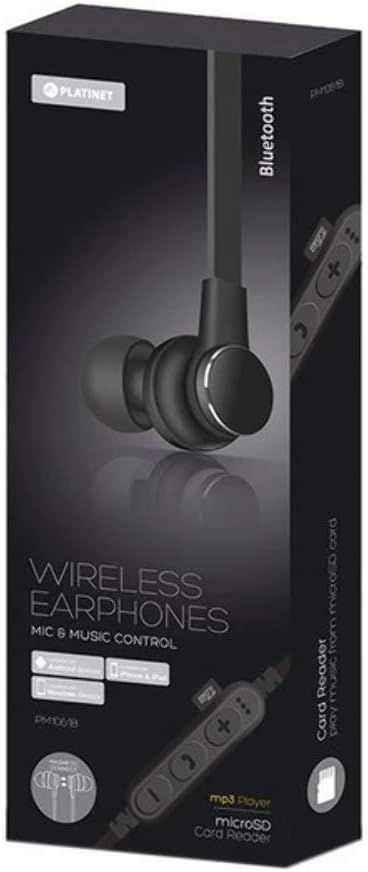
Image: Retail packaging for Platinet PM1061B Wireless Earphones, showing the black earphones and control panel.
Setup
1. Charging the Earphones
Before first use, fully charge your earphones.
- Connect the USB charging cable to the charging port on the earphone control unit.
- Connect the other end of the USB cable to a USB power adapter (not included) or a computer's USB port.
- The LED indicator will typically show red during charging and turn blue or off when fully charged.
- Charging time usually takes 1-2 hours.
2. Powering On/Off
- To Power On: Press and hold the Multi-function button (usually the center button) for approximately 3-5 seconds until the LED indicator flashes blue and you hear a power-on prompt.
- To Power Off: Press and hold the Multi-function button for approximately 3-5 seconds until the LED indicator flashes red and you hear a power-off prompt.
3. Bluetooth Pairing
Pair your earphones with your Bluetooth-enabled device (smartphone, tablet, computer).
- Ensure the earphones are fully charged and powered off.
- Press and hold the Multi-function button for about 5-7 seconds until the LED indicator flashes red and blue alternately. This indicates pairing mode.
- On your device, enable Bluetooth and search for available devices.
- Select "PM1061B" or a similar name from the list of found devices.
- Once paired, the LED indicator on the earphones will flash blue slowly, and you will hear a confirmation prompt.
- If prompted for a password, enter "0000".
Note: The earphones will automatically try to reconnect to the last paired device when powered on.
4. Inserting a Micro SD Card
The earphones support direct music playback from a Micro SD card.
- Locate the Micro SD card slot on the control unit.
- Gently insert a Micro SD card (with music files in MP3 format) into the slot until it clicks into place.
- The earphones will automatically switch to Micro SD card playback mode if a card is detected.
- To remove, gently push the card in again until it springs out.
Operating Instructions
Music Playback (Bluetooth Mode)
- Play/Pause: Press the Multi-function button once.
- Next Track: Press and hold the "+" (Volume Up) button.
- Previous Track: Press and hold the "-" (Volume Down) button.
- Volume Up: Short press the "+" button.
- Volume Down: Short press the "-" button.
Music Playback (Micro SD Card Mode)
- Once a Micro SD card is inserted, the earphones will automatically play music from it.
- Play/Pause: Press the Multi-function button once.
- Next Track: Press and hold the "+" (Volume Up) button.
- Previous Track: Press and hold the "-" (Volume Down) button.
- Volume Up: Short press the "+" button.
- Volume Down: Short press the "-" button.
Call Management
- Answer Call: Press the Multi-function button once when a call comes in.
- End Call: Press the Multi-function button once during a call.
- Reject Call: Press and hold the Multi-function button for about 2 seconds when a call comes in.
- Redial Last Number: Double-press the Multi-function button.
Maintenance
- Cleaning: Use a soft, dry cloth to clean the earphones. Do not use abrasive cleaners or solvents.
- Ear Tips: Regularly remove and clean the silicone ear tips with mild soap and water. Ensure they are completely dry before reattaching.
- Storage: Store the earphones in a cool, dry place away from direct sunlight and extreme temperatures.
- Water Resistance: These earphones are not waterproof. Avoid exposure to water, rain, or excessive moisture.
- Charging: Do not overcharge the earphones. Disconnect them once fully charged.
Troubleshooting
| Problem | Possible Cause | Solution |
|---|---|---|
| Earphones do not power on. | Low battery. | Charge the earphones fully. |
| Cannot pair with device. | Earphones not in pairing mode; Bluetooth disabled on device; device too far. | Ensure earphones are in pairing mode (flashing red/blue). Enable Bluetooth on your device. Move device closer to earphones (within 10 meters). Try unpairing and re-pairing. |
| No sound or low volume. | Volume too low on earphones or device; earphones not connected; incorrect audio source. | Increase volume on both earphones and device. Ensure earphones are properly paired. Check if Micro SD card is inserted and playing. |
| Micro SD card not playing. | Card not inserted correctly; unsupported file format; corrupted card. | Re-insert the Micro SD card. Ensure music files are in MP3 format. Try a different Micro SD card. |
| Poor call quality. | Weak Bluetooth connection; environmental noise. | Move closer to your paired device. Reduce background noise. |
Specifications
| Model Name | PM1061B |
| Connectivity Technology | Wireless (Bluetooth V4.2) |
| Form Factor | In-Ear |
| Special Features | Noise Cancellation (implied by "suppress external sounds"), Integrated Microphone, Micro SD Card Reader |
| Material | Plastic |
| Water Resistance Level | Not Water Resistant |
| Included Components | 1 pair of earplugs (ear tips) |
| Manufacturer | Platinet |
Warranty and Support
For warranty information and customer support, please refer to the documentation provided with your purchase or visit the official Platinet website.
Manufacturer: Platinet


