
GQ EMF-390
GQ EMF-390 Multi-Field EMF Meter User Manual
Advanced Electromagnetic Radiation Detector
1. Introduction
The GQ EMF-390 is an advanced multi-function digital EMF meter designed for detecting Electromagnetic Fields (EMF), Electric Fields (EF), and Radio Frequencies (RF). This portable device is suitable for general-purpose testing, detection, and scientific applications, including monitoring radiation from power lines, Wi-Fi, cell phones, 2G/3G/4G/5G cell towers (low-medium band), microwaves, and smart meters. It also features a built-in RF Spectrum Power Analyzer.

Figure 1: GQ EMF-390 Multi-Field EMF Meter
This manual provides detailed instructions for setting up, operating, maintaining, and troubleshooting your EMF-390 meter to ensure accurate and effective use.
Video 1: Overview of the GQ EMF-390 meter, highlighting its capabilities as an all-in-one EMF, ELF, and RF detector.
2. Key Features
- Multiple high-sensitivity sensors for detecting Power line, Smart meter, Cell phone, Microwave, and other sources.
- Ability to identify and recognize common possible sources such as Power line, Cell Tower, Microwave, and Static.
- Provides safety suggestions to help users understand the current radiation situation instantly.
- Detects 5G network signals and Radio Frequencies (RF) up to 10GHz.
- Built-in RF Spectrum Analyzer and GQ RF Browser for real-time RF monitoring and detailed signal analysis.
- Integrated flash memory for data logging, capturing real-time data every second with timestamps.
- USB port for communication, external power supply, and charging the internal rechargeable 3.7V battery.
- Open communication protocol for remote data acquisition and system integration.
3. Package Contents
Upon unboxing your GQ EMF-390, please ensure all the following items are present:
- GQ EMF-390 Multi-Field EMF Meter
- USB-C Charging Cable
- Protective Carrying Pouch
- Quick Start Guide
- Safety Reference Card
- Rechargeable 3.7V Lithium-Ion Battery (pre-installed or separate)

Figure 2: Contents included with the GQ EMF-390 meter.
4. Setup
4.1. Battery Installation and Charging
The EMF-390 uses a rechargeable 3.7V Lithium-Ion battery. If the battery is not pre-installed, open the battery compartment on the back of the device and insert the battery, observing the correct polarity. For initial use, it is recommended to fully charge the device.
- Connect the provided USB-C cable to the meter's USB port.
- Connect the other end of the USB cable to a USB power adapter (not included) or a computer's USB port.
- The battery icon on the display will indicate charging status. A full charge typically takes a few hours.
Video 2: Instructions on how to recharge the battery of GQ GMC/EMF models using an outlet or computer.
4.2. Powering On/Off
To power on the device, press and hold the TOP button (S4) located on the right side of the meter until the display illuminates. To power off, press and hold the same button until the display turns off.
5. Operating the EMF-390
5.1. Understanding the Display and Controls
The EMF-390 features a clear display that shows various readings and indicators. Familiarize yourself with the layout and button functions:

Figure 3: Detailed view of the GQ EMF-390 display and its various indicators.
Button Functions: The meter has four buttons on the right side. Their functions can vary depending on the current screen or whether they are pressed briefly or held down.
- TOP Button (S4): Used to power on/off, enter the menu system, select items within menus, and sometimes change settings.
- BOTTOM Button (S1): Used to exit menus and cycle through different display screens.
- Middle Buttons (S2 & S3): Functions vary by mode. They can be used to alter units, switch between EMF/RF modes, move cursors, or zoom in/out on graphs. Experiment with these buttons in different screens to understand their specific actions.
5.2. Sensor Orientation and Accuracy
The EMF-390 utilizes multiple sensors, and understanding their directional properties is crucial for accurate readings:
- Electromagnetic Fields (EMF) Sensor: This is a 3-axis sensor, meaning it can measure magnetic fields regardless of the meter's orientation in space.
- Electric Field (EF) and Radio Frequency (RF) Sensors: These sensors are directional. For accurate EF and RF readings, the meter's orientation relative to the source is important.
For EF and RF measurements: Imagine the meter as a small airplane. The front of the meter (opposite the buttons) is the 'nose' where the RF sensor is primarily located. To get optimal readings, point the 'nose' of the meter directly towards the source of the radiation. Additionally, the 'roll' (tilting left or right) of the meter can affect RF readings, especially for polarized signals. If you are not getting expected readings, try rotating the meter 90 degrees along its longitudinal axis.
5.3. Measurement Modes
The EMF-390 can display readings in various modes:
5.3.1. EMF/EF Measurement
In this mode, the meter displays readings for Electromagnetic Fields (EMF) in milliGauss (mG) and Electric Fields (EF) in Volts per meter (V/m). A real-time graph shows fluctuations in these fields.

Figure 4: Real-time graph displaying EMF and EF measurements.
5.3.2. RF Measurement and GQ RF Browser
The RF mode measures Radio Frequencies in mW/m² (milliwatts per square meter) or nW/cm² (nanowatts per square centimeter). The unique GQ RF Browser feature provides a visual representation of RF radiation, allowing you to see high-speed RF signals and estimate digital RF transmission data in bytes.

Figure 5: GQ RF Browser detecting a cell phone text message signal.

Figure 6: Display showing digital RF data transmission in bytes per second.

Figure 7: GQ RF Browser detecting smart meter RF pulses.
Video 3: Demonstrating RF level testing of a Bluetooth device using the GQ EMF-390.
5.3.3. RF Spectrum Analyzer
The built-in 2.5GHz Spectrum Analyzer allows you to visualize different RF signals simultaneously, helping to identify sources like microwave ovens and Wi-Fi networks.
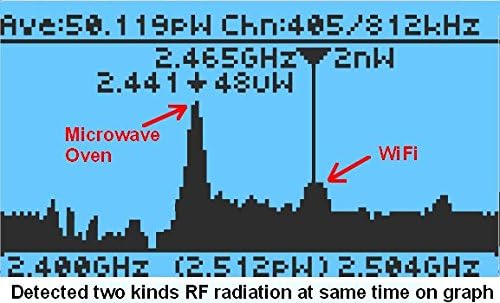
Figure 8: Spectrum Analyzer displaying detected RF radiation from a microwave oven and Wi-Fi simultaneously.
5.4. Data Logging and PC Software
The EMF-390 can log real-time data every second with a timestamp. This history data can be downloaded to a PC using the free software available from the manufacturer's website. This feature is useful for long-term monitoring and analysis.
Video 4: Guide on how to download stored data from the EMF-390 using the Windows EMF-PRO software.
5.5. Practical Applications
The compact size and versatile features of the EMF-390 make it suitable for various practical applications, from home environment checks to on-the-go measurements.
Video 5: Demonstration of the EMF-390 testing RF radiation levels during a flight.
6. Maintenance
6.1. Cleaning
To clean the device, use a soft, dry cloth. Do not use abrasive cleaners, solvents, or harsh chemicals, as these can damage the casing or display. Keep the device free from dust and moisture.
6.2. Battery Care
To prolong battery life:
- Avoid fully discharging the battery frequently.
- Store the device in a cool, dry place when not in use for extended periods.
- Recharge the battery periodically if stored for a long time to prevent deep discharge.
7. Troubleshooting
| Problem | Possible Cause | Solution |
|---|---|---|
| Device does not power on. | Low or depleted battery. | Charge the device using the USB-C cable. Ensure the charging indicator is active. |
| Inaccurate or no RF/EF readings. | Incorrect meter orientation. | Ensure the meter's 'nose' (front, opposite buttons) is pointed directly at the source. For RF, try rotating the meter 90 degrees ('roll') to align with signal polarization. |
| Display is frozen or unresponsive. | Software glitch. | Perform a soft reset by pressing and holding the power button until the device turns off, then power it back on. If issue persists, contact support. |
| Cannot connect to PC for data download. | Driver issue or incorrect software. | Ensure you have downloaded the correct PC software from the GQ Electronics website. Try a different USB port or cable. |
8. Specifications
| Feature | Detail |
|---|---|
| Brand | GQ |
| Model Number | EMF-390 |
| Power Source | Battery Powered (Rechargeable Lithium Ion) |
| Item Weight | 10 Ounces (approx. 283 grams) |
| Product Dimensions | 5.5 x 3 x 1 inches (approx. 14 x 7.6 x 2.5 cm) |
| Maximum RF Frequency Range | Up to 10 GHz |
| RF Spectrum Analyzer Range | Up to 2.504 GHz (five bands) |
| EMF Measurement Unit | milliGauss (mG) |
| EF Measurement Unit | Volts per meter (V/m) |
| RF Measurement Unit | milliwatts per square meter (mW/m²) |
| Data Logging | Built-in flash memory, real-time data logging with timestamp |
| Connectivity | USB port for communication and charging |
| Country of Origin | USA |
9. Warranty and Support
The GQ EMF-390 meter is designed and developed by GQ Electronics, USA. For warranty information, technical support, and to download the latest PC software or full user guide, please visit the official GQ Electronics website. Keep your purchase receipt for warranty claims.
For direct inquiries, you may refer to the contact information provided on the product packaging or the official GQ Electronics website.
Related documentsEMF-390


Ask a question about this manual
Ask about setup, troubleshooting, compatibility, parts, safety, or missing instructions. Manuals+ will review the question and use this page’s manual context to help answer it.