
1. Product Overview
The Fluval 407 Performance Canister Filter is designed for aquariums up to 100 gallons. It features Fluval eTEC (Efficient Technology) for pump performance and quiet operation, while maintaining low energy consumption. The filter is constructed for durability and includes features to simplify maintenance.
Key features include:
- Efficient eTEC technology for pump performance and quiet operation.
- Durable motor for consistent pumping power and pressure.
- Precision-crafted pump, operating up to 25% quieter than previous generations.
- EZ-Lift media baskets with a center handle for easy media stack removal.
- Vertical pre-filter cartridge for increased surface area and mechanical filtration.

2. What's Included
The Fluval 407 Performance Canister Filter package contains the following components:
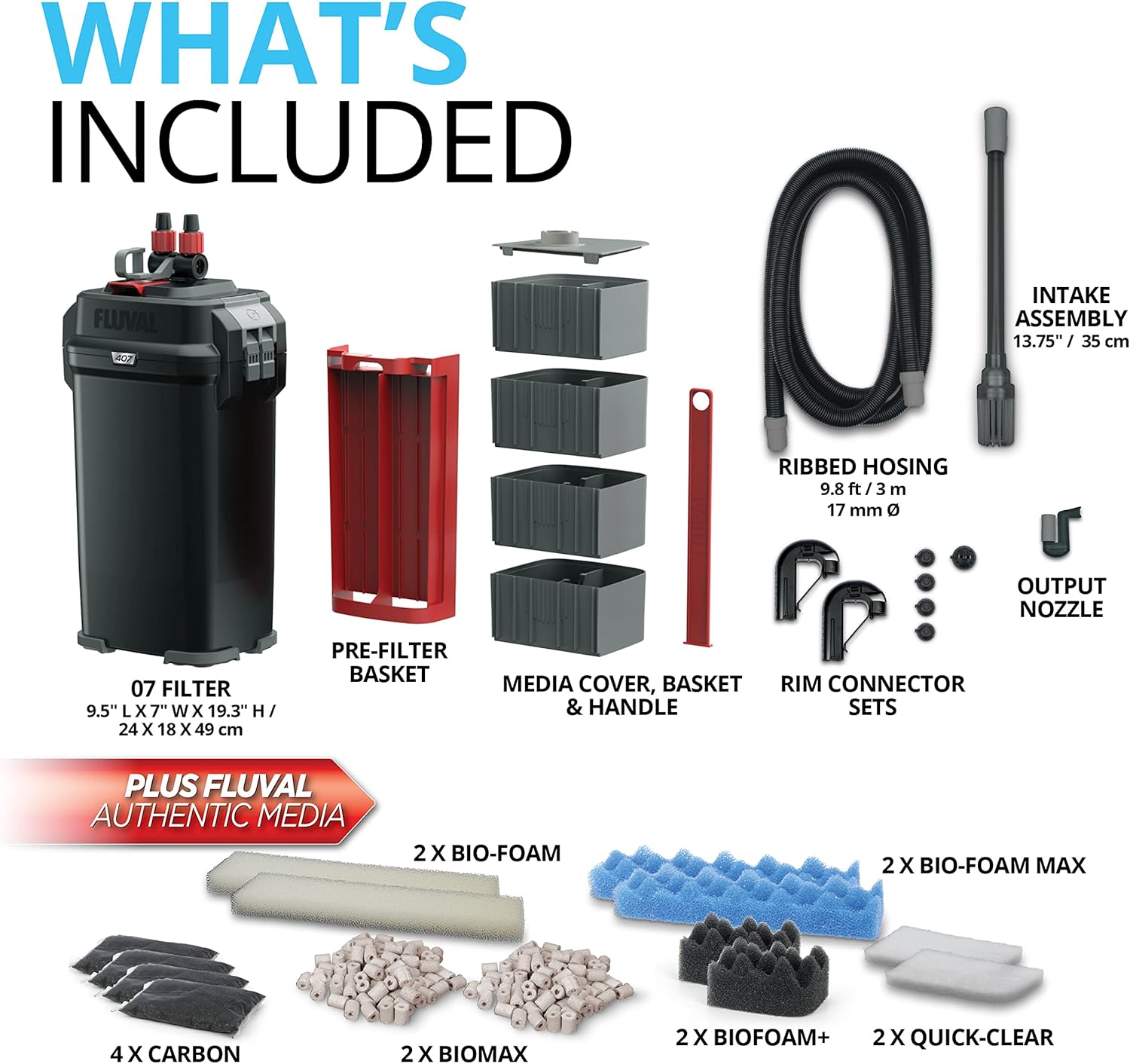
- 07 Filter Unit (9.5" L x 7" W x 19.3" H / 24 x 18 x 49 cm)
- Pre-Filter Basket
- Media Cover, Basket & Handle
- Ribbed Hosing (9.8 ft / 3 m, 17 mm diameter)
- Intake Assembly (13.75" / 35 cm)
- Output Nozzle
- Rim Connector Sets
- Rubber Hose Connectors
- AquaStop valve
- Intake tube, Intake strainer, Intake Stem with intake strainer
- Instruction manual
- Suction cup 1" / 30 mm
- Authentic Fluval Media:
- 2 x Bio-Foam Max
- 2 x Bio-Foam
- 4 x Carbon (2.46 oz / 70 g)
- 2 x Quick-Clear
- 2 x Bio-Foam+
- 2 x Biomax
3. Setup Instructions
Follow these steps to set up your Fluval 407 Canister Filter:
- Prepare Filter Media: Rinse all new filter media with tank water before placing them into the media baskets.
- Arrange Media Baskets: Place the prepared media into the baskets in the desired order. The EZ-Lift media baskets with the center handle allow for easy removal and arrangement.
- Connect Hosing: Attach the ribbed hosing to the AquaStop valve and secure it. Connect the intake and output tubes to the appropriate rim connectors and secure them to your aquarium.
- Prime the Filter: Ensure the filter is filled with water and submerged in the aquarium. Use the quick primer handle to initiate water flow and remove air from the system.
- Power On: Once the filter is primed and water is flowing, plug in the unit. Verify that the impeller is turning properly and water is circulating.
- Check for Leaks: Carefully inspect all connections for any leaks. Make necessary adjustments to ensure a watertight seal.

4. Operating the Filter
The Fluval 407 filter operates continuously to maintain water quality in your aquarium. Its eTEC technology ensures efficient filtration with minimal noise and energy consumption.

The filter's motor generates consistent pumping power and pressure, ensuring effective water circulation and filtration. The precision-crafted pump is designed to run quietly, reducing operational noise.

The 407 model has a maximum flow rate of 1450 Liters Per Hour (383 US Gal/h) and consumes approximately 23 Watts of power.
5. Maintenance
Regular maintenance is crucial for optimal filter performance and water quality. Clean or replace filter media as needed, typically every 2-4 weeks, depending on aquarium conditions and bioload.
- Disconnect Power: Always unplug the filter from the power source before performing any maintenance.
- Close AquaStop Valve: Turn the AquaStop valve to the closed position to prevent water flow from the aquarium.
- Remove Motor Head: Use the Lift-Lock motor head clamps to release and remove the motor head from the canister.
- Access Media Baskets: Utilize the EZ-Lift media baskets' center handle to remove the entire media stack from the canister. This design minimizes mess and eliminates the need to empty the canister of water beforehand.
- Clean/Replace Media: Rinse mechanical media (foams) in old aquarium water to preserve beneficial bacteria. Replace chemical media (carbon, Quick-Clear) as directed by the manufacturer. Biological media (Bio-Foam+, Biomax) should only be rinsed gently if heavily soiled.
- Clean Impeller: Inspect and clean the impeller and its housing for any debris or blockages.
- Reassemble: Reassemble the media baskets, place them back into the canister, and secure the motor head with the Lift-Lock clamps.
- Restart Filter: Reopen the AquaStop valve, prime the filter if necessary, and plug it back into the power source.
6. Troubleshooting
This section addresses common issues you might encounter with your Fluval 407 Canister Filter.
| Problem | Possible Cause | Solution |
|---|---|---|
| No water flow or reduced flow |
|
|
| Loud noise or rattling |
|
|
| Water leaking from connections |
|
|
7. Specifications
| Feature | Detail |
|---|---|
| Brand | Fluval |
| Model Name | Performance Canister Filter - 407 |
| Item Model Number | A449 |
| Size | 407 |
| Color | Black |
| Material | Plastic |
| Power Source | Corded Electric |
| Voltage | 230 Volts (AC) |
| Maximum Flow Rate | 1450 Liters Per Hour (383 US Gal/h) |
| Item Weight | 4.4 Kilograms (9.7 Pounds) |
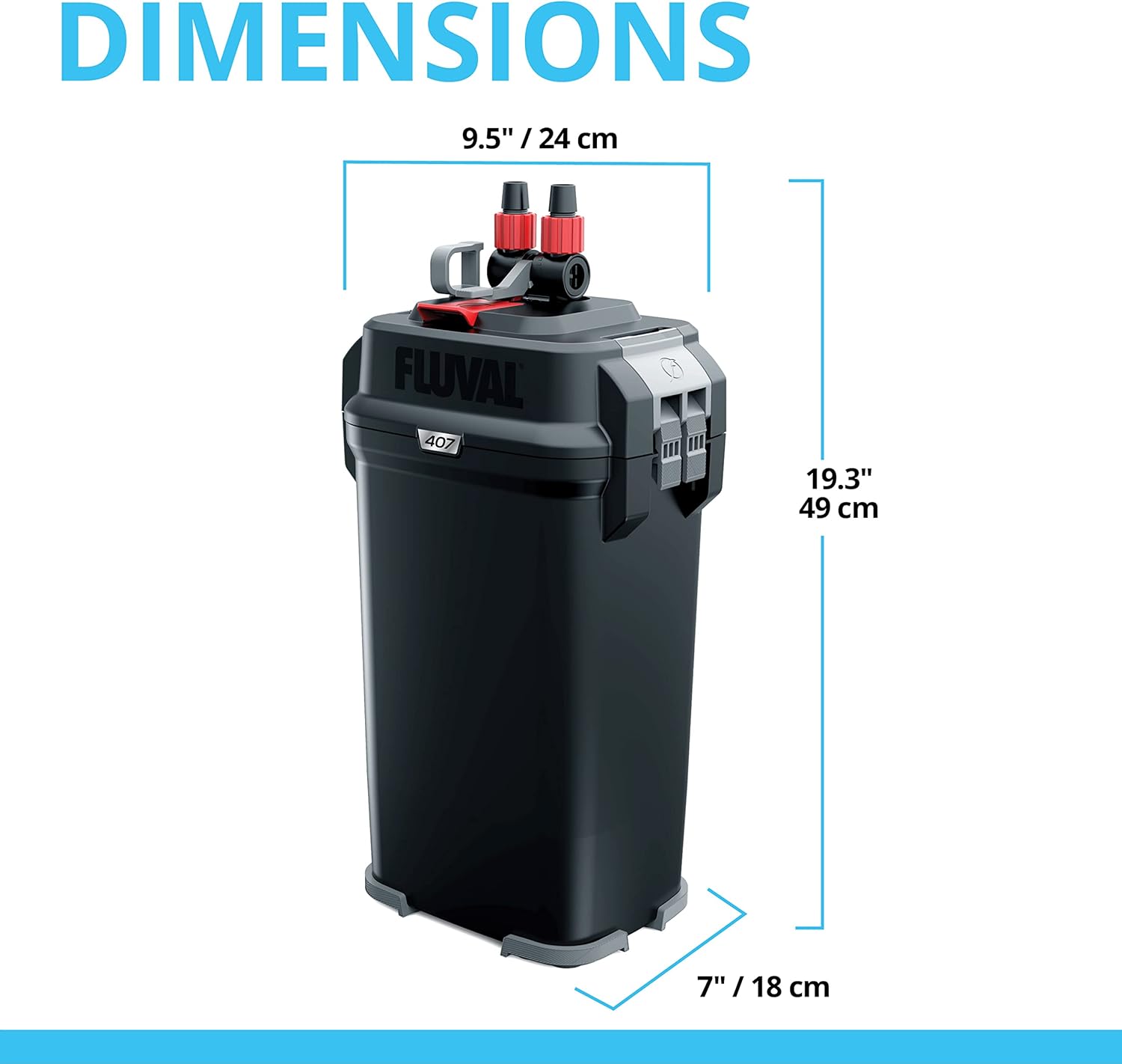
| Product Dimensions (LxWxH) | 7.09 x 9.45 x 19.29 inches (18 x 24 x 49 cm) |
| Country of Origin | Italy |
| UPC | 015561104494 |

8. Compatible Accessories
The Fluval 407 filter is compatible with various Fluval accessories to enhance water clarity and filtration.

9. Warranty Information
For detailed warranty information, please refer to the manufacturer's official website. The warranty covers defects in materials and workmanship under normal use.
10. Customer Support
For further assistance, technical support, or to purchase replacement parts, please visit the official Fluval website or contact their customer service department.
You can also find more information and products at the Fluval Store on Amazon.


