
Introduction
This manual provides essential information for the proper setup, operation, and maintenance of your Minelab Gold Monster 1000 metal detector. The Gold Monster 1000 is designed for high-performance gold detection, featuring fully automatic operation and advanced VLF technology.
The detector utilizes an intermediate 45 kHz frequency combined with a high-speed 24-bit signal processor to enhance sensitivity to gold across a wide range of nugget sizes, while minimizing noise and false signals.
Package Contents
- Minelab Gold Monster 1000 Control Box and Shaft Assembly
- GM 10 (10" x 6" Double-D) Search Coil
- GM 05 (5" Double-D) Search Coil
- Li-Ion Battery
- Battery Charger
- Headphones
- PRO Gold Gold Panning Kit
- User Manual (this document)
Setup
1. Assembling the Detector
The Gold Monster 1000 features a modular design for easy assembly. Follow these steps to set up your detector:
- Attach the Shafts: Connect the lower, middle, and upper shaft sections. Ensure they are securely locked into place. The detector length is adjustable from 944mm to 1382mm (37.2" to 54.4").
- Mount the Control Box: Slide the control box onto the upper shaft and secure it.
- Attach the Search Coil: Select either the GM 10 (10" x 6" Double-D) or GM 05 (5" Double-D) search coil. Attach the coil to the lower shaft using the provided bolt and washers. Ensure the coil cable is wrapped snugly around the shaft to prevent snagging and false signals.
- Connect the Coil Cable: Plug the search coil cable into the corresponding port on the control box. Tighten the connector securely.
- Install the Battery: Insert the Li-Ion battery into its compartment on the control box. Ensure it is properly seated. The detector can also operate with 8 x AA batteries (not included) as an alternative power source.
- Adjust the Armrest: Position the armrest for comfortable operation.

Image: Fully assembled Minelab Gold Monster 1000 metal detector with the GM 10 search coil attached, showing the control box, shaft, and armrest.

Image: Close-up of the Minelab Gold Monster 1000 control box, displaying the screen and control buttons.
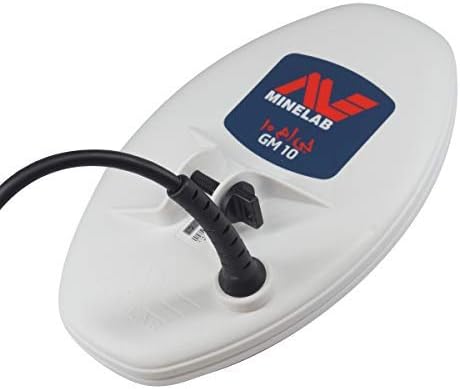
Image: The Minelab GM 10 (10" x 6" Double-D) search coil, a component of the Gold Monster 1000 detector.
2. Charging the Battery
Before first use, fully charge the Li-Ion battery. Connect the charger to the battery and a power outlet. The charging indicator on the battery or charger will show its status.
3. Connecting Headphones
For optimal audio clarity and to conserve battery life, connect headphones to the 3.5mm (1/8") audio output jack on the control box. The detector includes an internal speaker, but headphones are recommended for better target identification.

Image: Minelab branded headphones, suitable for use with the Gold Monster 1000 metal detector.
Operating Instructions
The Minelab Gold Monster 1000 is designed for fully automatic operation, simplifying the gold detection process.
1. Power On and Automatic Setup
- Power On: Press and hold the Power button until the display illuminates.
- Automatic Noise Cancel: Upon startup, the detector performs an automatic noise cancelation to optimize performance in your current environment.
- Automatic Ground Balance (Easy-Trak): The detector continuously monitors and adjusts to ground mineralization, providing stable operation without manual ground balancing.
2. Detect Modes
The Gold Monster 1000 offers two primary detect modes:
- Gold (Iron Reject): This is the recommended mode for gold prospecting. It automatically rejects common iron trash, allowing you to focus on gold signals.
- Deep All-Metal: This mode provides maximum depth and sensitivity by detecting all metals. Use this mode when searching for very deep targets or in areas with minimal iron interference.
Switch between modes using the dedicated button on the control box.
3. Discrimination: Gold Chance Indicator
The Gold Chance Indicator provides a visual representation of the likelihood of a detected target being gold (high/low). This helps in distinguishing gold from other metals, especially in the Gold (Iron Reject) mode.
4. Sensitivity Adjustment
Adjust the detector's sensitivity to match ground conditions and target size:
- Manual (1–10): Allows precise control over sensitivity. Lower settings reduce interference in noisy environments; higher settings increase detection depth and sensitivity to small targets.
- Auto (11): The detector automatically adjusts sensitivity for stable performance.
- Auto+ (12): Provides maximum automatic sensitivity for challenging conditions, potentially increasing detection depth for very small gold.
Use the sensitivity adjustment buttons on the control box to cycle through these settings.
5. Volume Adjustment
Adjust the audio volume from 1 to 6 using the dedicated buttons on the control box to suit your preference and environment.
6. Searching Technique
Sweep the search coil slowly and steadily over the ground, keeping it as close to the surface as possible. Listen for clear, repeatable signals. When a target is detected, narrow down its location by sweeping the coil in different directions over the signal area.
Maintenance
Proper maintenance ensures the longevity and optimal performance of your Minelab Gold Monster 1000.
- Cleaning: After each use, wipe down the detector with a damp cloth to remove dirt and dust. Avoid using harsh chemicals or abrasive cleaners.
- Coil Care: The search coils are waterproof to 1 meter (3 feet). They can be rinsed with fresh water. Ensure the coil connector is clean and dry before reattaching.
- Control Box: The control box is rain/splash-proof, but not fully submersible. Protect it from heavy rain and direct water exposure.
- Battery Care: Store the Li-Ion battery in a cool, dry place. Recharge it periodically if not used for extended periods to maintain battery health.
- Storage: Store the detector in a clean, dry environment, away from extreme temperatures.
- Cable Inspection: Regularly inspect all cables and connectors for signs of wear or damage.
Troubleshooting
If you encounter issues with your Gold Monster 1000, refer to the following common troubleshooting tips:
- No Power:
- Ensure the battery is fully charged and correctly installed.
- Check battery terminals for corrosion.
- If using AA batteries, ensure they are new and correctly oriented.
- Excessive Noise/False Signals:
- Perform an automatic noise cancelation (usually on startup).
- Reduce the sensitivity setting.
- Ensure the coil cable is tightly wrapped around the shaft and securely connected.
- Move away from sources of electromagnetic interference (power lines, cell phones, other detectors).
- Check for loose coil connections.
- No Target Response:
- Verify the detector is powered on and the volume is audible.
- Check coil connection.
- Ensure the search coil is sweeping close to the ground.
- Increase sensitivity if conditions allow.
- Inaccurate Discrimination:
- Ensure you are in the correct detect mode (e.g., Gold (Iron Reject) for gold).
- Ground conditions can affect discrimination; ensure automatic ground balance is functioning.
If problems persist, contact Minelab customer support or your authorized dealer.
Specifications
| Feature | Specification |
|---|---|
| Key Technology | Ultra-wide dynamic range 45kHz VLF |
| Detect Modes | Gold (Iron reject), Deep All-Metal |
| Discrimination | Gold Chance Indicator (high/low) |
| Ground Balance | Automatic (Easy-Trak) |
| Noise Cancel | Automatic (On start-up) |
| Sensitivity Adjust | Manual (1–10), Auto (11), Auto+ (12) |
| Volume Adjust | Manual 1–6 |
| Visual Display | Monochrome LCD |
| Detector Length | 1382mm–944mm (54.4"–37.2") |
| Detector Weight (with 10" x 6" coil) | 1.33kg (2.94lbs) (excluding battery) |
| Audio Output | Internal speaker or headphones 3.5mm (1/8") |
| Coils (standard) | GM 10 (10" x 6" Double-D), GM 05 (5" Double-D) |
| Waterproof/Splashproof | Coils waterproof to 1m (3'), Control box rain/splash-proof |
| Battery Options | Li-Ion (included), 8 × AA Batteries (not included) |
| Operating Frequency | 45 KHz |
| International Protection Rating | IP54 (Control box) |
Warranty and Support
The Minelab Gold Monster 1000 comes with a 2-year warranty covering the control box and search coils from the date of purchase. This warranty covers defects in materials and workmanship under normal use.
For warranty claims, technical support, or service inquiries, please contact your authorized Minelab dealer or visit the official Minelab website for contact information.
Keep your proof of purchase for warranty validation.


