
1. Introduction
This manual provides instructions for the Easytry123 replacement infrared remote control, model Easytry3192. This remote is designed to function with specific JVC car stereo CD receiver models. Please review this document carefully to ensure proper setup and operation.
2. Compatibility
This replacement remote control is intended for use with the following JVC car stereo CD receiver models:
- JVC KD-G430
- JVC KD-AR560
- JVC KD-G510
- JVC KD-AR760
- JVC KD-G710
- JVC KD-AR390
Important: Before use, compare your original remote control with the image below to confirm visual similarity. Functionality may vary slightly from the original remote. If your specific model is not listed above, this remote may not be compatible.

Image 2.1: Front view of the Easytry123 replacement remote control. This image displays the power, sound, source, navigation, and volume buttons.
3. Setup
3.1 Battery Installation
The remote control requires two (2) AAA batteries for operation. Follow these steps to install the batteries:
- Locate the battery compartment cover on the back of the remote control.
- Slide the cover downwards or press the latch (if present) to open the compartment.
- Insert two AAA batteries, ensuring the positive (+) and negative (-) terminals align correctly with the markings inside the compartment.
- Slide the battery compartment cover back into place until it clicks securely.
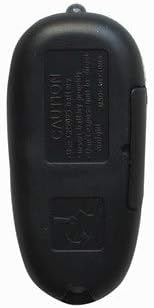
Image 3.1: Back view of the Easytry123 replacement remote control. The battery compartment is visible on the lower half of the remote's back.
4. Operating Instructions
Point the remote control directly at the infrared receiver on your JVC car stereo system. Ensure there are no obstructions between the remote and the stereo.
4.1 Basic Functions
- POWER (⑁/ATT): Turns the stereo system on or off, or activates/deactivates the attenuation function.
- SOUND: Accesses sound settings or audio adjustments.
- SOURCE: Cycles through available audio sources (e.g., CD, Radio, AUX).
- VOL + / VOL -: Increases or decreases the audio volume.
- Navigation Buttons (▲ U, ◄ R, ► F, ▼ D): Used for menu navigation, track skipping, or tuning depending on the current mode of the stereo.
5. Maintenance
5.1 Cleaning
To clean the remote control, use a soft, dry cloth. Do not use liquid cleaners, abrasive pads, or chemical solvents, as these may damage the remote's surface or internal components.
5.2 Battery Care
- Replace batteries when the remote's performance degrades or it stops responding.
- Remove batteries if the remote will not be used for an extended period to prevent leakage.
- Dispose of used batteries according to local regulations.
6. Troubleshooting
6.1 Remote Not Responding
- Check Batteries: Ensure batteries are installed correctly with the correct polarity (+/-) and are not depleted. Replace with fresh AAA batteries if necessary.
- Line of Sight: Verify there are no obstructions between the remote control and the car stereo's infrared sensor.
- Distance: Ensure you are within the effective operating range of the remote control (typically within 15-20 feet).
- Compatibility: Reconfirm that your JVC stereo model is listed as compatible with this remote.
6.2 Limited Functionality
As a replacement remote, some advanced or specific functions of your original JVC remote may not be fully replicated. This is normal for universal or replacement remotes. Focus on the primary functions listed in Section 4.1.
7. Specifications
| Feature | Specification |
|---|---|
| Model Number | Easytry3192 |
| Connectivity Technology | Infrared (IR) |
| Power Source | 2 x AAA Batteries (not included) |
| Compatible Devices | JVC Car Stereo Systems (specific models listed in Section 2) |
| Max Number of Supported Devices | 1 |
| Special Feature | Ergonomic, Replacement Remote |
8. Warranty and Support
For any questions, concerns, or support regarding your Easytry123 replacement remote control, please contact the seller directly through your purchase platform. Please refer to your purchase documentation for specific warranty information.