
Introduction
This manual provides detailed instructions for the safe and effective use of your U`King 90W RGBW LED Par Stage Light. Please read this manual thoroughly before operation and retain it for future reference. This LED Par Light is designed for various applications including parties, weddings, clubs, bars, and live shows, offering versatile lighting effects with RGBW color mixing, sound activation, and DMX 512 control capabilities.
Safety Information
- Ensure the power supply voltage matches the rated voltage of the device.
- Do not operate the device if the power cord is damaged.
- Avoid direct eye exposure to the light source.
- Keep the device away from water, moisture, and high temperatures.
- Only qualified personnel should perform repairs or maintenance.
- Ensure proper ventilation to prevent overheating.
Product Overview
The U`King 90W RGBW LED Par Stage Light features 9 high-power RGBW LEDs, offering a wide spectrum of colors and dynamic lighting effects. It supports multiple control modes for flexible operation.
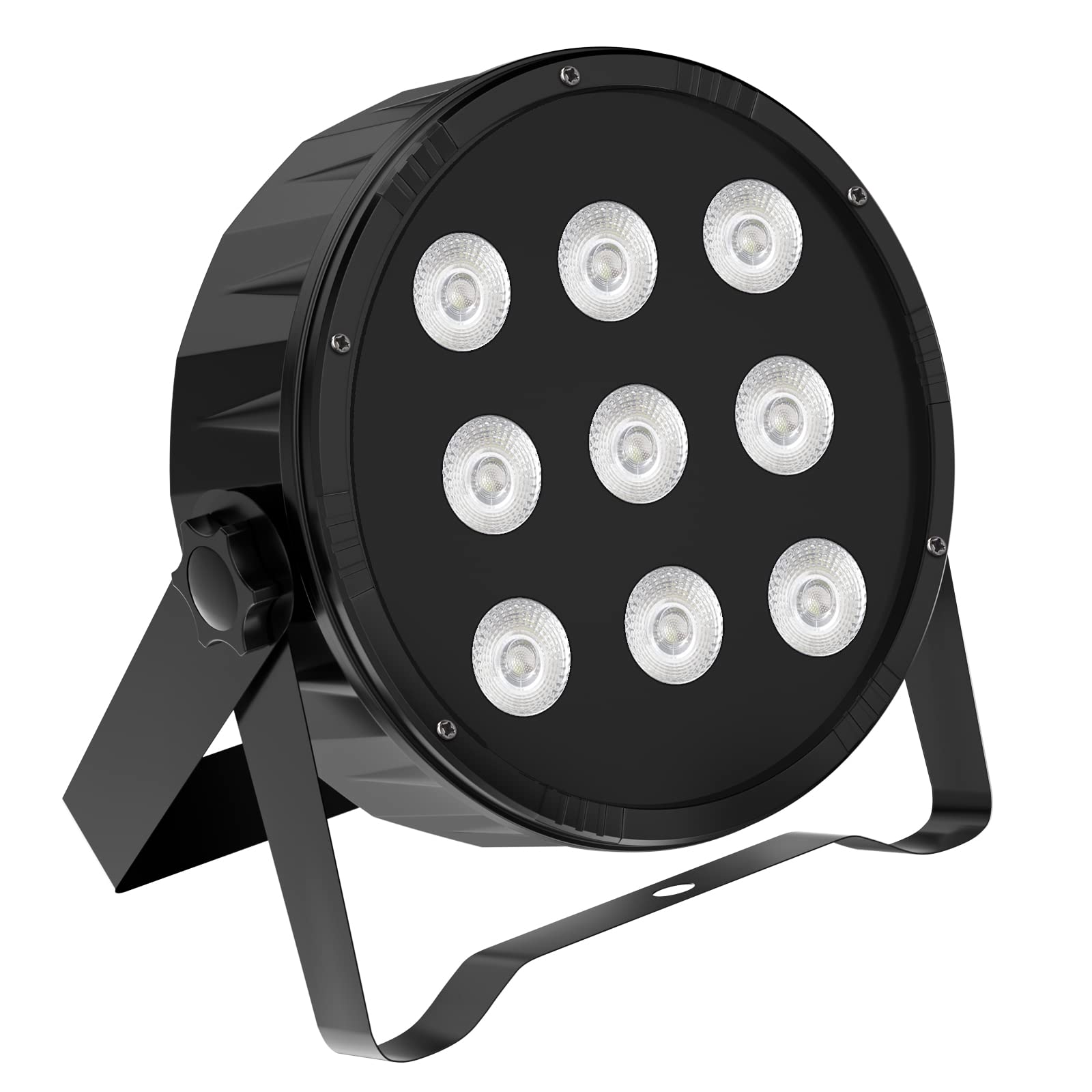
Figure 1: Front view of the U`King 90W RGBW LED Par Stage Light.

Figure 2: Rear panel of the U`King LED Par Light, showing DMX input/output, power input, digital display, and control buttons.
Setup
- Unpacking: Carefully remove the light fixture from its packaging. Inspect for any damage during transit.
- Mounting: The light can be placed on a flat surface or mounted using its adjustable bracket. Ensure the mounting surface or structure can support the weight of the fixture. For ceiling mounting, use appropriate hardware and ensure secure installation.
- Power Connection: Connect the power cable to the 'POWER-IN' socket on the rear panel and then to a suitable power outlet (110-220V).
- DMX Connection (Optional): If using DMX control, connect a DMX cable from your DMX controller to the 'DMX IN' port. For multiple lights, daisy-chain them by connecting 'DMX OUT' of the first light to 'DMX IN' of the next.
Operating Instructions
The U`King LED Par Light offers several operating modes:

Figure 3: Operating modes of the U`King LED Par Light.
Control Panel
The rear panel features a digital display and four buttons (MENU, UP, DOWN, ENTER) for navigating and selecting modes and settings.
- MENU: Cycles through the main menu options.
- UP/DOWN: Adjusts values or navigates within a menu option.
- ENTER: Confirms selection or saves settings.
Operating Modes
- Auto Mode: The light cycles through pre-programmed patterns and colors automatically. Use the control panel to select different auto programs.
- Sound Activated Mode: The light reacts to ambient sound, changing colors and patterns based on the music's rhythm and volume. Adjust sensitivity via the control panel.
- DMX 512 Control: Connect to a DMX controller to achieve precise control over color, dimming, strobe, and other effects. Set the DMX address using the control panel. Refer to the DMX channel chart (not provided in this manual, typically found in a separate DMX guide or product sheet) for specific channel functions.
- Master/Slave Mode: Link multiple lights together. Set one light as the 'Master' and others as 'Slave'. The slave units will mirror the master's operation.
- Remote Control: The light can be controlled remotely for easy operation. (Remote control details are typically provided with the remote itself).
Color Effects

Figure 4: Examples of various color outputs from the RGBW LEDs.
The RGBW LEDs allow for a wide range of color mixing. Individual Red, Green, Blue, and White intensities can be adjusted in DMX mode, or pre-set colors and color-changing effects can be selected in auto or sound-activated modes.
Video Demonstrations
Video 1: Demonstration of U`King Par Lights for Wedding Uplighting with RGBW 9LED Stage Light Controlled by DMX. This video showcases various color changes and effects suitable for event lighting.
Video 2: Demonstration of U`King 9 LED Par Lights in action, displaying different color outputs and dynamic lighting sequences.
Maintenance
- Cleaning: Regularly clean the lens and housing with a soft, lint-free cloth. Do not use abrasive cleaners or solvents.
- Inspection: Periodically check all cables, connections, and mounting hardware for wear or damage. Replace any damaged components immediately.
- Ventilation: Ensure the cooling fan and vents are free from dust and obstructions to maintain optimal operating temperature.
- Storage: When not in use, store the light in a dry, dust-free environment.
Troubleshooting
| Problem | Possible Cause | Solution |
|---|---|---|
| Light does not turn on | No power supply; Damaged power cable; Internal fault | Check power connection and outlet; Replace power cable; Contact support |
| No DMX control | Incorrect DMX address; Faulty DMX cable; Controller issue | Verify DMX address setting; Check DMX cable connections; Test with another DMX controller |
| Light flickers or behaves erratically | Unstable power; DMX signal interference; Overheating | Ensure stable power supply; Check DMX connections and termination; Ensure proper ventilation |
| Sound activation not working | Microphone obstructed; Low sound input; Incorrect sensitivity setting | Clear microphone area; Increase sound volume; Adjust sound sensitivity via control panel |
Specifications
| Feature | Detail |
|---|---|
| Brand | U`King |
| Model | 90W RGBW LED Par Stage Light |
| Light Source Type | LED |
| Power Source | Corded Electric |
| Material | Acrylonitrile Butadiene Styrene (ABS), Aluminum |
| Finish Type | Powder Coated |
| Product Dimensions | 8.3"L x 8.3"W x 3.1"H |
| Item Weight | 2.93 pounds |
| Bulb Features | Remote control, RGBW, Sound activated |
| UPC | 728458370710 |
Warranty and Support
For warranty information and technical support, please refer to the contact details provided with your purchase or visit the official U`King website. Keep your proof of purchase for any warranty claims.


