
1. Product Overview
The John Deere Select Series 125 Lb Electric Broadcast Spreader (Model LP35439) is designed for year-round application of various loose materials, including fertilizer, weed killer, sand, lime, and de-icer. Its 125 lb capacity hopper is suitable for medium to large-sized tasks.
This electric spreader is compatible with John Deere 300, 500, and 700 Series Tractors, including X300, X500, and X700 Select Series Tractors, and X700 Signature Series. Please note the following compatibility requirements and restrictions:
- X300 Tractors require front wheel weights for proper operation.
- Not compatible with X300R Rear Discharge Tractors.
- Not compatible with the 3-point hitch, weather enclosure, cabs, or rear receiver hitch when used on X700 Series Tractors.
2. Safety Information
Always prioritize safety when operating the electric spreader. Read and understand all instructions before assembly or operation. Failure to follow safety guidelines can result in serious injury or property damage.
- Read the Tractor Manual: Familiarize yourself with your tractor's operation and safety procedures.
- Wear Protective Gear: Always wear appropriate eye protection, gloves, and sturdy footwear.
- Keep Clear: Ensure bystanders, especially children and pets, are kept at a safe distance from the operating area.
- Secure Mounting: Verify that the spreader is securely attached to the tractor before use.
- Electrical Safety: Ensure all electrical connections are secure and free from damage. Disconnect power before performing any maintenance or adjustments.
- Material Handling: Use caution when handling spreading materials. Some materials may be irritating or hazardous.
- Slope Operation: Exercise extreme caution when operating on slopes. Avoid sudden turns or stops that could lead to loss of control.
- Storage: Store the spreader in a dry, secure location, out of reach of children.
3. Package Contents
Before beginning assembly, ensure all parts are present. Refer to the packing list included with your spreader. Typical contents include:
- Spreader Hopper Assembly
- Mounting Frame and Hardware
- Wiring Harness with Control Switch
- Instruction Manual
4. Assembly and Setup
Follow these steps to assemble and mount your electric spreader to your John Deere tractor.
- Unpack Components: Carefully remove all parts from the packaging and lay them out on a clean, flat surface.
- Assemble Mounting Frame: Attach the mounting frame components according to the diagrams in your specific assembly guide. Ensure all bolts are tightened securely.
- Mount Spreader to Tractor: Position the assembled spreader onto the rear of your compatible John Deere tractor. Secure it using the provided mounting hardware. Ensure the spreader is level and stable.
- Connect Electrical Wiring: Route the wiring harness from the spreader to the tractor's electrical system. Connect the power lead to the designated 12V power source on your tractor. Ensure the control switch is accessible from the operator's seat.
- Initial Check: Before filling, briefly turn on the spreader to ensure the motor and agitator function correctly.
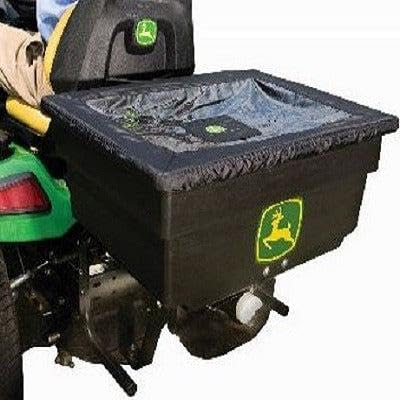
Image: The John Deere Select Series 125 Lb Electric Spreader (LP35439) shown mounted on the rear of a John Deere tractor, ready for operation. The black hopper features the John Deere logo, and a protective cover is visible over the opening.
5. Operation
Operating your electric spreader effectively requires proper material loading and setting adjustments.
- Fill the Hopper: With the spreader turned off and the flow control closed, carefully pour the desired spreading material (fertilizer, seed, etc.) into the hopper. Do not overfill beyond the 125 lb capacity.
- Set Spread Rate: Adjust the spreader dial or flow control lever to the recommended setting for your specific material and desired application rate. Consult the material manufacturer's guidelines for optimal settings.
- Start Spreading: Engage the tractor's PTO (if applicable) or ensure the tractor is running. Activate the spreader motor using the on/off switch, typically located on the control lever. Begin driving at a consistent speed.
- Maintain Consistent Speed: For an even application, maintain a steady ground speed throughout the spreading process.
- Turn Off Spreader: Before making turns or stopping, disengage the spreader motor using the control switch to prevent over-application in one area.
- Empty and Clean: After each use, empty any remaining material from the hopper and thoroughly clean the spreader to prevent corrosion and material buildup.
6. Maintenance
Regular maintenance ensures the longevity and optimal performance of your electric spreader.
- Clean After Each Use: Thoroughly rinse the hopper and spreader mechanism with water after each use, especially when spreading corrosive materials like fertilizer or ice melt. Allow all components to dry completely before storage.
- Inspect Wiring: Periodically check the wiring harness for any signs of wear, cuts, or loose connections. Repair or replace damaged wiring immediately.
- Lubrication: Refer to your specific product manual for any recommended lubrication points on the motor or agitator shaft.
- Storage: Store the spreader in a dry, covered area to protect it from weather elements. If storing for an extended period, ensure it is clean and dry.
- Motor Care: The electric motor is a critical component. Avoid submerging it in water. If the motor shows signs of reduced performance or failure, inspect connections and consult the troubleshooting section or contact customer support.
7. Troubleshooting
If you encounter issues with your electric spreader, refer to the following common problems and solutions:
- Spreader Not Turning On:
- Check all electrical connections, ensuring they are secure and free from corrosion.
- Verify the tractor's power source is active (e.g., ignition on).
- Inspect the control switch for damage or malfunction.
- Check for blown fuses in the tractor's electrical system or the spreader's wiring harness.
- Uneven Spreading:
- Ensure the spreader is mounted level on the tractor.
- Verify the spread rate setting is appropriate for the material.
- Maintain a consistent tractor speed during operation.
- Check for clumps or blockages in the hopper or agitator mechanism.
- Motor Stops or Runs Weakly:
- Check for obstructions around the agitator or motor shaft.
- Ensure the electrical connections are providing sufficient power.
- If the motor frequently stops or fails, it may indicate an internal issue. Contact John Deere customer support for assistance.
8. Specifications
| Product Dimensions | 27 x 21 x 26 inches |
| Item Weight | 45 pounds |
| Manufacturer | John Deere |
| Model Number | LP35439 |
| ASIN | B07J5QNM4C |
| Hopper Capacity | 125 Lb |
9. Warranty and Support
For warranty information, technical support, or to order replacement parts, please contact your authorized John Deere dealer or visit the official John Deere website. Keep your purchase receipt and model number (LP35439) readily available when seeking support.
John Deere Official Website: www.deere.com