
Flame Boss FB400-U
Flame Boss Smart BBQ Smoker Temperature Controller 400 Universal WiFi User Manual
Model: FB400-U
Introduction
The Flame Boss Smart BBQ Smoker Temperature Controller 400 Universal WiFi is designed to provide precise and consistent temperature control for your BBQ smoker. This device integrates advanced WiFi technology and a patented variable speed fan to maintain your desired cooking temperature, ensuring perfectly cooked meals every time. Control and monitor your cook from anywhere using the dedicated mobile app.
Product Overview and Components
The Flame Boss 400 system includes all necessary components for immediate setup and operation. Familiarize yourself with the parts before beginning installation.
- WiFi controller with integrated 12 CFM blower
- Grill adapters (various sizes for compatibility)
- (1) High temperature meat probe
- (1) High temperature pit probe
- Power supply

Figure 1: Complete Flame Boss 400 Universal WiFi Kit Components.
This image displays all items included in the Flame Boss 400 Universal WiFi kit: the main controller unit with integrated blower, two temperature probes (one for meat, one for the pit), the power adapter, and various grill adapters for different smoker types.
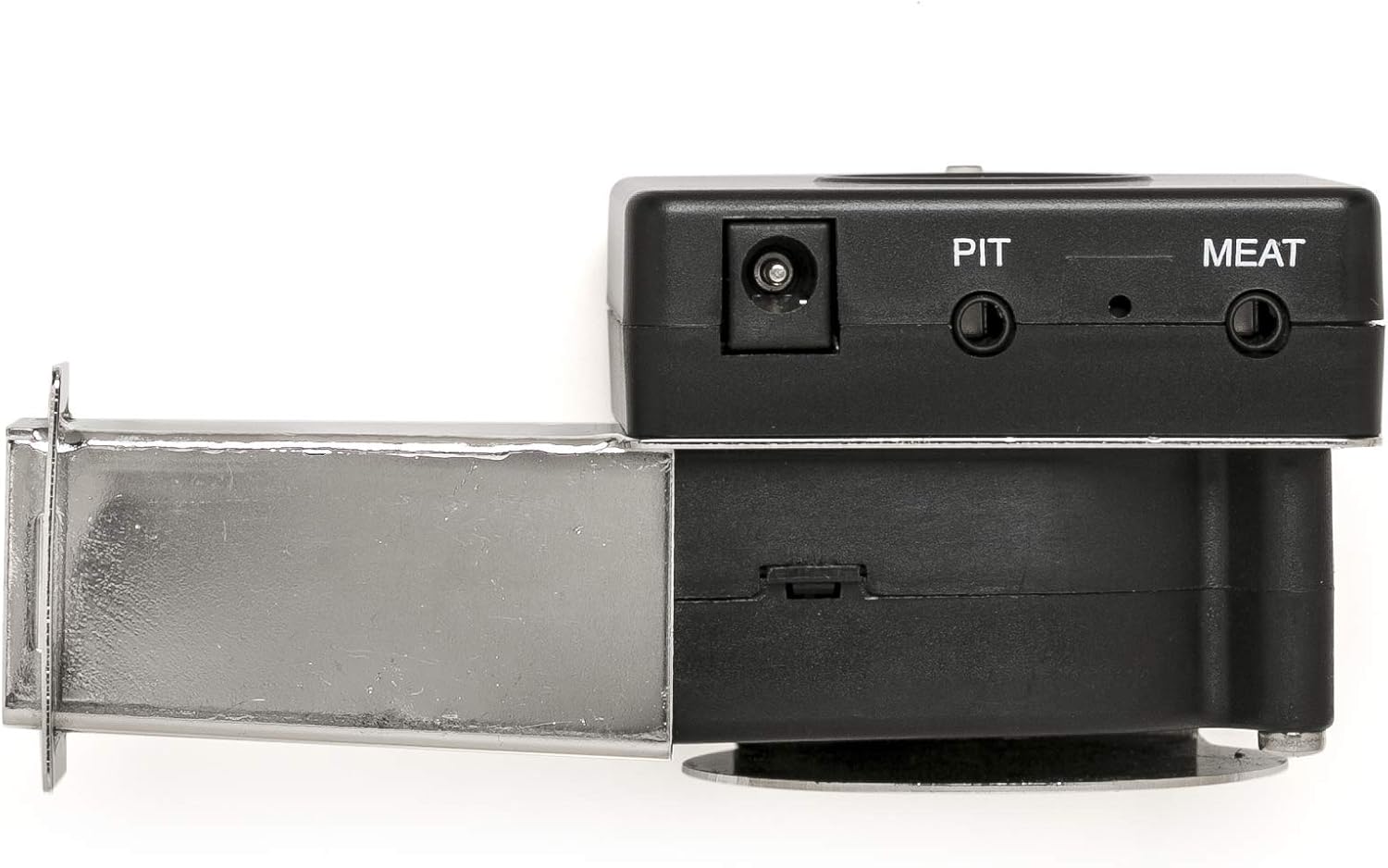
Figure 2: Flame Boss 400 Controller Ports.
A close-up view of the Flame Boss 400 controller's top side, clearly showing the power input jack, the "PIT" port for the pit temperature probe, and the "MEAT" port for the meat temperature probe.
Compatibility
The Flame Boss 400 Universal WiFi model is designed for a wide range of steel smokers. Please note the following compatibility details:
- Does NOT fit: Big Green Egg, Ceramic, Kamado-style smokers, gas grills, or electric ovens. A separate Ceramic/Kamado version is available for these types of grills.
- Fits Many: Drum, Barrel, Cabinet, and Offset Style Charcoal Grills and Smokers.
- Examples of compatible smokers include:
- Weber Smokey Mountain (all sizes)
- Char-Griller offset & barrel smokers
- Char-Broil charcoal grills and smokers
- Most drum smokers (e.g., Ugly Drum Smokers)
This design does not support the use of a Y-cable for multiple meat probes.
Setup
Follow these steps to set up your Flame Boss 400 controller for the first time:
- Physical Installation:
Attach the Flame Boss controller to your smoker using the appropriate grill adapter. Ensure a secure fit to prevent air leaks that could affect temperature control.

Figure 3: Controller Attached to Smoker.
This image shows the Flame Boss 400 controller securely mounted to the side of a smoker, with the pit and meat probes plugged into the unit and extending into the cooking chamber.
- Connect Probes:
Insert the high-temperature pit probe into the "PIT" port and the high-temperature meat probe into the "MEAT" port on the controller. Position the pit probe inside your smoker to accurately measure the ambient cooking temperature, and insert the meat probe into the thickest part of your food, avoiding bone.
- Power On:
Connect the power supply to the controller and plug it into a standard electrical outlet. The device will power on automatically.
- Mobile App Installation:
Download the official Flame Boss mobile app from the iOS App Store or Google Play Store. The app is essential for configuring WiFi, setting temperatures, and monitoring your cook.
- WiFi Configuration:
Open the Flame Boss app and follow the on-screen instructions to connect your controller to your home WiFi network. This process typically involves joining the controller's temporary WiFi network from your phone, then selecting your home network within the app and entering its password. All device configuration, including WiFi setup, is managed through the app.
Operation
Once set up, the Flame Boss 400 provides intuitive control over your smoking process via the mobile app.
- Monitoring Temperatures:
The Flame Boss app allows you to view real-time graphs of your cooking sessions, monitoring both pit and food temperatures. You can see the set temperature, actual pit temperature, and individual meat probe temperatures.

Figure 4: Flame Boss App Interface (Brisket Cook).
This screenshot illustrates the Flame Boss mobile application's main display during a "Brisket" cook, showing the set temperature, current pit temperature, fan output, and readings from two meat probes. A graph at the bottom visualizes temperature trends over time.
- Adjusting Pit Temperature:
You can easily adjust the desired pit temperature directly from your smartphone or connected device within the app. The patented software and variable speed blower will then work to precisely maintain this temperature.
- Setting Alarms and Alerts:
Set alarms for your desired cook time or when a specific internal meat temperature is reached. The app can send text alerts if the cook temperature is too high or too low, or when your cook is finished.
- Automatic Pit Temperature Adjustment:
Utilize the meat alarm feature to automatically adjust the pit temperature when your desired meat temperature is reached, allowing for advanced cooking techniques like holding temperatures.
- Voice Command Control:
The Flame Boss 400 is compatible with most voice assistants, allowing for convenient voice command control of your device.
Maintenance
Proper maintenance ensures the longevity and accuracy of your Flame Boss 400 controller and probes.
- Cleaning Probes: After each use, allow probes to cool completely. Wipe them clean with a damp cloth. Do not immerse the probe connectors or the main controller unit in water.
- Controller Care: Keep the controller unit clean and dry. Avoid exposing it to direct rain or extreme moisture. Store in a cool, dry place when not in use.
- Cable Management: Ensure probe cables are not kinked or pinched, as this can damage the internal wiring and affect accuracy.
Troubleshooting
If you encounter issues with your Flame Boss 400, consider the following common solutions:
- Connectivity Issues (WiFi):
Ensure your Flame Boss controller is within range of your 2.4 GHz WiFi network. Verify your WiFi password is entered correctly in the app. If connection drops, try restarting your home router and the Flame Boss unit. A strong WiFi signal is crucial for consistent connectivity.
- Inaccurate Temperature Readings:
Check that probes are fully inserted into their respective ports on the controller. Ensure probes are clean and free of debris. Avoid placing the pit probe directly over hot coals or in direct contact with food. If a probe consistently reads inaccurately or stops working, it may need replacement. Contact customer support for assistance.
- Temperature Fluctuations/Runaway Temps:
Verify that your smoker's vents are properly sealed and that the grill adapter is securely fitted to prevent air leaks. Ensure there is sufficient fuel (charcoal) for the duration of your cook. The variable speed fan will work to maintain temperature, but significant air leaks or insufficient fuel can hinder its effectiveness.
- App Not Responding:
Close and reopen the Flame Boss app. Ensure your smartphone has a stable internet connection. Check for app updates in your device's app store.
For further assistance, refer to the Flame Boss support website or contact their customer service.
Specifications
| Feature | Detail |
|---|---|
| Brand | Flame Boss |
| Model Number | FB400-U |
| Power Source | AC |
| Color | Fits Steel Smokers (Black unit with chrome adapter) |
| Outer Material | Ceramic, Steel |
| Inner Material | Stainless Steel |
| Item Weight | 0.4 Kilograms (14.1 ounces) |
| Product Dimensions | 5.91 x 5.91 x 3.15 inches |
| Fuel Type (for compatible smokers) | Charcoal |
| UPC | 851247005248 |
Warranty and Support
Flame Boss products are designed for durability and performance. For information regarding product warranty, please refer to the official Flame Boss website or the documentation included with your purchase.
Extended protection plans may be available for purchase separately to cover your device beyond the standard warranty period. These plans typically offer additional coverage for repairs or replacements.
- 3-Year Protection Plan: Available for extended coverage.
- 4-Year Protection Plan: Available for extended coverage.
For technical support, troubleshooting assistance, or inquiries about parts and accessories, please contact Flame Boss customer service directly. Contact information can typically be found on their official website or within the mobile application.
Related documentsFB400-U


Ask a question about this manual
Ask about setup, troubleshooting, compatibility, parts, safety, or missing instructions. Manuals+ will review the question and use this page’s manual context to help answer it.