
1. Product Overview
Thank you for choosing the Pulsar PZ5063X1 Men's Solar Analog Watch. This manual provides essential information for the proper use and maintenance of your timepiece. The PZ5063X1 is a sophisticated solar-powered watch designed for reliability and style.
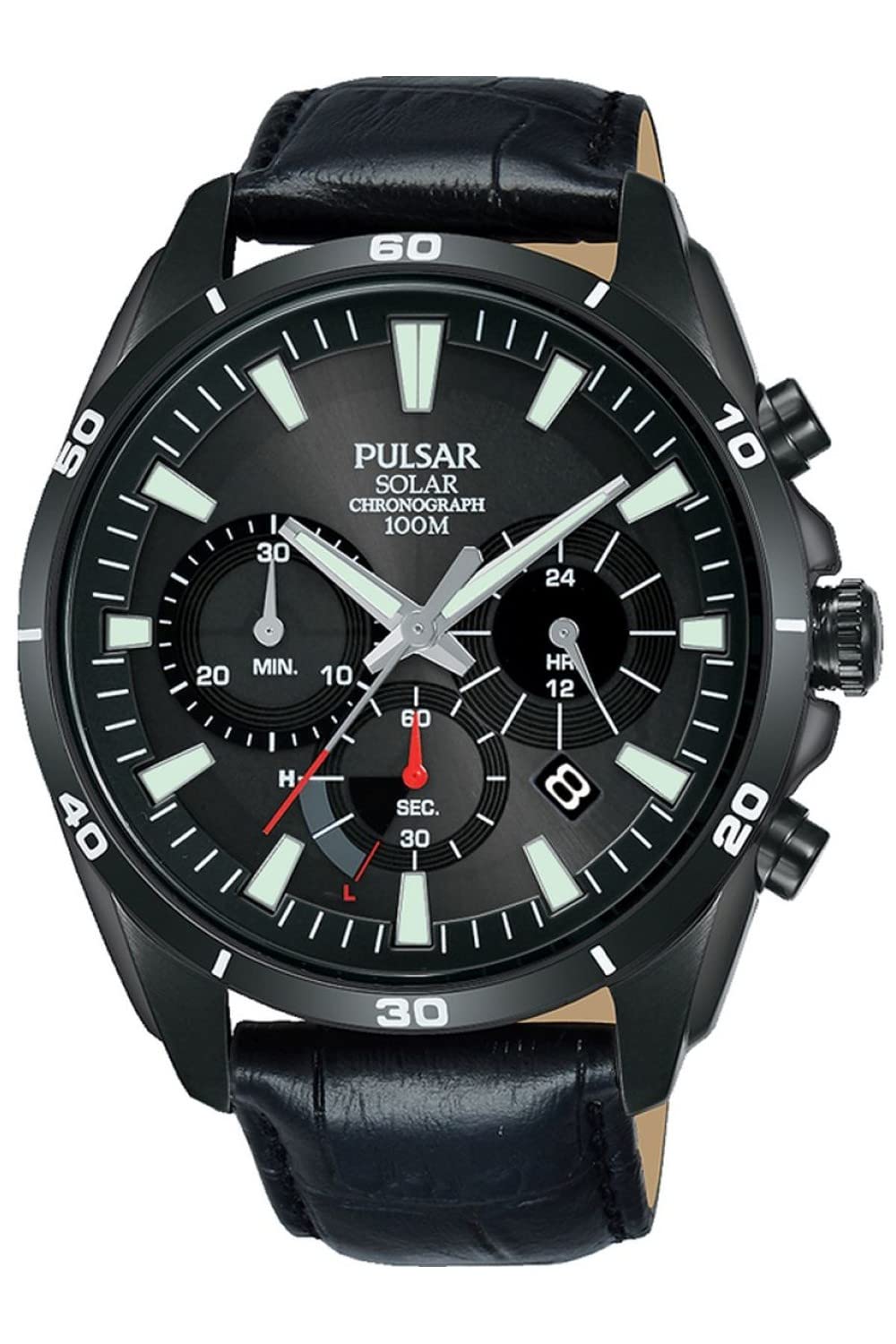
Image: Pulsar PZ5063X1 men's watch, featuring a black dial with white markings, a silver-tone stainless steel case, and a black leather strap. The watch includes a chronograph function and a date display.
Key Features:
- Solar Movement: Equipped with a solar cell that converts light into electrical energy, eliminating the need for battery replacement.
- Durable Case: 44mm round silver-tone stainless steel case with a black dial and a distinct white design.
- Leather Strap: Features a black leather strap with a buckle clasp.
- Water Resistance: Water-resistant up to 10 ATM (100 meters), suitable for swimming and snorkeling.
- Chronograph Function: Includes a stopwatch feature for measuring elapsed time.
2. Setup
Initial Charging:
As a solar-powered watch, your Pulsar PZ5063X1 requires initial charging to begin operation. Expose the watch dial to direct sunlight or strong artificial light for several hours. The watch will start functioning once it has accumulated sufficient charge. Avoid covering the dial for extended periods to ensure continuous operation.
Setting the Time and Date:
- Pull the crown out to the second click position.
- Rotate the crown to set the hour and minute hands. Ensure the AM/PM is correctly set if your watch has a 24-hour indicator or date change mechanism.
- Push the crown back into the normal position.
- To set the date, pull the crown out to the first click position. Rotate the crown to adjust the date. Push the crown back in when finished.
3. Operating the Watch
Timekeeping:
Once set, your watch will accurately keep time using its solar-powered movement. Regular exposure to light will maintain its charge.
Using the Chronograph:
The Pulsar PZ5063X1 features a chronograph function for measuring elapsed time. Refer to the specific buttons on your watch for operation:
- Start/Stop Button: Typically located at the 2 o'clock position. Press once to start the chronograph, press again to stop it.
- Reset Button: Typically located at the 4 o'clock position. Press to reset the chronograph hands to zero after stopping.
For detailed instructions on specific chronograph modes (e.g., split time), please refer to the full manual available on the Pulsar website.
4. Maintenance
Cleaning Your Watch:
To maintain the appearance of your watch, wipe the case and crystal with a soft, dry cloth. For the leather strap, avoid excessive moisture and harsh chemicals. If the watch is exposed to saltwater, rinse it gently with fresh water and dry thoroughly with a soft cloth.
Water Resistance:
Your watch is water-resistant up to 10 ATM (100 meters). This means it is suitable for everyday use, swimming, and snorkeling. However, it is not recommended for scuba diving. Always ensure the crown is pushed in completely before exposing the watch to water. Do not operate the crown or buttons while the watch is wet or submerged.
Solar Cell Care:
To ensure optimal performance, regularly expose your watch to light. Avoid storing it in dark places for extended periods, as this can deplete the power reserve. If the watch stops due to insufficient charge, expose it to light for several hours to reactivate it.
5. Troubleshooting
Watch Not Running:
- Insufficient Charge: Expose the watch to strong light for several hours.
- Crown Position: Ensure the crown is pushed in completely.
Incorrect Time/Date:
- Reset Time/Date: Follow the instructions in the "Setting the Time and Date" section.
- Impact: If the watch has experienced a significant impact, the movement may be affected. Contact customer support.
Chronograph Not Resetting to Zero:
- Reset Procedure: Ensure you are pressing the reset button after stopping the chronograph. If the hands are misaligned, refer to the full manual for chronograph hand adjustment procedures.
If problems persist, please contact Pulsar customer support.
6. Specifications
| Feature | Detail |
|---|---|
| Model Number | PZ5063X1 |
| Brand Name | Pulsar |
| Power Source | Solar-energy |
| Display Type | Analog |
| Case Material | Stainless Steel |
| Case Color | Silver-tone |
| Case Diameter | 44 mm (approx. 12 Millimeter thickness) |
| Dial Color | Black |
| Strap Material Type | Leather |
| Strap Color | Black |
| Band Width | 22 Millimeter |
| Clasp Type | Buckle |
| Water Resistance Depth | 10 ATM (100 meters) |
| Special Features | Chronograph |
| Item Shape | Round |
| Age Group Description | Adult |
| Manufacturer | PULSAR |
7. Warranty & Support
Manufacturer's Warranty:
This Pulsar PZ5063X1 watch is covered by a manufacturer's warranty. Please refer to the warranty card included with your purchase or visit the official Pulsar website for detailed information regarding warranty terms, conditions, and duration.
Customer Support:
For any questions, service requests, or technical assistance, please contact Pulsar customer support. Contact information can typically be found on the official Pulsar website or in the documentation provided with your watch.
Pulsar Official Website: www.pulsarwatches.com