
FEELWORLD FW572-US
Contents
FEELWORLD S55 6-inch Camera DSLR Field Monitor User Manual
Model: FW572-US
1. Introduction
Thank you for choosing the FEELWORLD S55 6-inch Camera DSLR Field Monitor. This compact and versatile monitor is designed to enhance your shooting experience by providing a clear, high-definition display for accurate framing, focus, and exposure control. With its advanced features and robust design, the S55 is an ideal companion for gimbals and lightweight camera systems, ensuring professional results in various shooting environments.
2. Safety Information
- Do not expose the monitor to rain or moisture to avoid electric shock or fire.
- Avoid direct sunlight exposure for prolonged periods, especially in hot environments, as this may damage the screen.
- Do not disassemble the unit. Refer all servicing to qualified personnel.
- Use only the specified power adapters and batteries.
- Keep the monitor away from strong magnetic fields.
- Clean the screen with a soft, lint-free cloth. Avoid using harsh chemicals.
3. Package Contents
Please verify that all items listed below are included in your package:
- 1x FEELWORLD S55 Monitor
- 1x Micro HDMI Cable
- 1x Sunshade
- 1x Tilt Arm
- 1x User Manual

Image: Contents of the FEELWORLD S55 monitor package, including the monitor, micro HDMI cable, sunshade, tilt arm, and user manual.
4. Product Overview
The FEELWORLD S55 is a 6-inch Full HD 1920x1080 IPS monitor designed for professional video applications. It features a compact and lightweight design, making it highly portable for on-location shoots.
4.1 Key Features
- High Resolution Display: 1920x1080 Full HD IPS panel for sharp and clear images.
- 4K HDMI Input/Output: Supports 4K UHD 3840x2160p (30/29.97/25/24/23.98Hz) and 4096x2160p (24Hz) for versatile connectivity.
- Advanced Video Assist Functions: Includes custom LUTs, Waveform, False Color, Zebra Exposure, Focus Assist, Histogram, Peaking Filter, Nine Grid, Embedded Audio, Pixel-to-Pixel, Check Field, Image Flip, Anamorphic Mode, Image Freeze, and Zoom-in.
- 8.4V DC Output: Can power your DSLR camera, extending runtime without additional power sources.
- Tilt Arm Mounting: Provides 360° rotation for flexible viewing angles and easy installation.
- Lightweight Design: Weighing only 175g, it's ideal for gimbals and stabilizers.
4.2 Monitor Layout and Ports

Image: Side view of the FEELWORLD S55 monitor showing HDMI In, HDMI Out, DC In 12V, DC Out 8.4V, 3.5mm Ear Phone Slot, and USB Upgrade port.
The monitor features clearly labeled ports for HDMI input and output, DC power input and output, a 3.5mm headphone jack for audio monitoring, and a USB port for firmware upgrades and custom LUT loading.

Image: Front view of the FEELWORLD S55 monitor displaying a vibrant image with various monitoring tools like waveform and vectorscope.
5. Setup
5.1 Mounting the Monitor
The S55 monitor comes with a tilt arm for flexible mounting options. Attach the tilt arm to your camera's hot shoe or a compatible rig. The 360° rotation allows you to adjust the viewing angle for optimal framing.

Image: Demonstrates the lightweight design and flexible installation options of the FEELWORLD S55 monitor on various camera setups and gimbals.
5.2 Powering the Monitor
The S55 monitor can be powered via a DC 12V input or compatible NP-F series batteries (NP-F550, NP-F750, NP-F970). The monitor also features an 8.4V DC output to power your camera, reducing the need for multiple power sources.
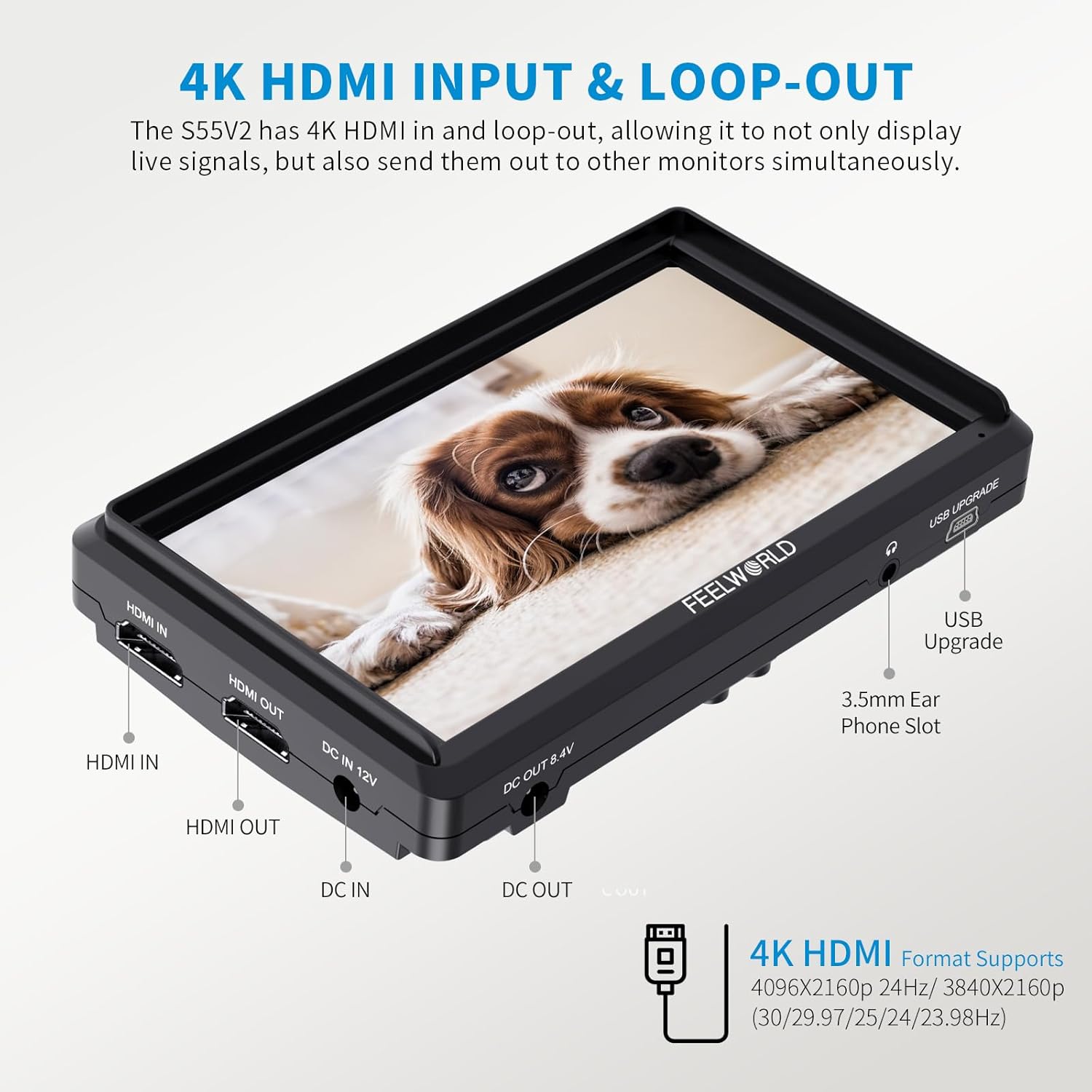
Image: Diagram showing the FEELWORLD S55 monitor powering a camera via its 8.4V DC output using a dummy battery adapter cable.

Image: Comparison of compatible NP-F series batteries (NP-F550, NP-F750, NP-F970) with their dimensions, capacity, and estimated running times for the S55 monitor.
5.3 Connecting to a Camera
Connect your camera to the monitor using the provided Micro HDMI cable. Insert the Micro HDMI end into your camera's HDMI output and the standard HDMI end into the monitor's HDMI IN port. The monitor supports 4K HDMI input and loop-out, allowing you to connect to other monitors simultaneously.
6. Operating Instructions
6.1 Basic Operation
Press and hold the power button to turn the monitor on or off. Use the menu buttons on the top of the monitor to navigate through settings and activate various assist functions.
6.2 Advanced Video Assist Functions
The S55 monitor is equipped with a suite of professional video assist functions to aid in precise shooting:
- Custom LUTs: Load up to 32 custom 3D LUTs via the USB port for real-time preview of filming looks.
- Focus Assist (Peaking): Highlights in-focus areas with a selectable color (red, green, blue, white) for quick and accurate focus confirmation.
- False Color: Displays different exposure levels as distinct colors, helping you achieve correct exposure.
- Zebra Exposure: Indicates overexposed areas with zebra stripes.
- Waveform: Provides a graphical representation of the video signal's luminance and chrominance levels.
- Histogram: Shows the distribution of tones in your image, from shadows to highlights.
- Nine Grid: Assists with composition using a rule-of-thirds overlay.
- Embedded Audio: Displays audio levels on screen.
- Pixel-to-Pixel: Displays the image at its native resolution without scaling.
- Image Flip: Flips the image horizontally, vertically, or both.
- Anamorphic Mode: De-squeezes anamorphic footage for proper viewing.
- Image Freeze: Freezes the current frame for detailed analysis.
- Zoom-in: Magnifies a portion of the image for critical focus.

Image: Overview of the FEELWORLD S55 monitor's advanced features, including histogram, peaking filter, false colors, exposure, nine grid, and embedded audio.

Image: Illustration of the FEELWORLD S55 monitor's support for custom 3D LUTs, showing a "Before Loading" and "After Loading" comparison of a scene.
6.3 Official Product Video
Video: An official video from FEELWORLD explaining seven reasons to choose their monitors, including adjustable viewing angles, focus assist, false color, camera power output, headphone jack, sturdy build for stabilizers, and multi-monitor connectivity.
7. Maintenance
- Cleaning: Use a soft, dry, lint-free cloth to clean the monitor screen and body. For stubborn marks, slightly dampen the cloth with water. Do not use alcohol, benzene, thinners, or other volatile solvents.
- Storage: When not in use, store the monitor in a cool, dry place, away from direct sunlight and extreme temperatures. If storing for an extended period, remove the battery.
- Handling: Handle the monitor with care to avoid dropping or impacting it, which could damage internal components or the screen.
8. Troubleshooting
| Problem | Possible Cause | Solution |
|---|---|---|
| No image on screen | No power; HDMI cable not connected or faulty; incorrect input selected. | Check power connection/battery; ensure HDMI cable is securely connected; verify camera HDMI output settings; select correct input on monitor. |
| Image flickering or unstable | Loose HDMI connection; incompatible resolution/frame rate; power fluctuations. | Reconnect HDMI cable; adjust camera output resolution/frame rate; ensure stable power supply. |
| No audio from headphone jack | Audio not embedded in HDMI signal; headphone issue; monitor audio settings. | Ensure camera is sending audio via HDMI; test with different headphones; check monitor audio settings. |
| Monitor not powering camera | Incorrect dummy battery; insufficient monitor battery charge. | Ensure correct dummy battery for your camera; charge monitor battery fully. |
9. Specifications
| Feature | Detail |
|---|---|
| Display Size | 6 inches |
| Resolution | 1920x1080 (Full HD) |
| Panel Type | IPS |
| Aspect Ratio | 16:9 |
| Brightness | 500cd/m² |
| Contrast Ratio | 1000:1 |
| Viewing Angle | 160° (H/V) |
| Input Ports | HDMI IN, DC IN 12V |
| Output Ports | HDMI OUT, DC OUT 8.4V, 3.5mm Headphone Jack |
| Power Consumption | ≤8W |
| Power Supply | DC 7~24V or NP-F series battery |
| Unit Dimensions | Approx. 7.32 x 5.12 x 3.43 inches (Package Dimensions) |
| Unit Weight | Approx. 1.26 pounds (Item Weight) |
| Model Number | FW572-US |
10. Warranty and Support
FEELWORLD provides a 1-year warranty for this product, dedicated to quality and stability. For technical support, troubleshooting assistance, or warranty claims, please visit the official FEELWORLD store or contact their customer service directly. You can find more information and resources on the FEELWORLD Official Store on Amazon.
Ask a question about this manual
Ask about setup, troubleshooting, compatibility, parts, safety, or missing instructions. Manuals+ will review the question and use this page’s manual context to help answer it.