
1. Introduction
This manual provides detailed instructions for the safe and effective use of your Godox TT350P TTL Wireless Camera Flash Speedlite. The TT350P is a compact and versatile flash unit designed for Pentax cameras, offering advanced features such as TTL autoflash, 1/8000s High-Speed Sync (HSS), and wireless control capabilities. Please read this manual thoroughly before using the product to ensure optimal performance and to prevent damage.
The package includes: 1 x TT350P mini flash, 1 x mini stand, 1 x protective bag, and 1 set of 12 piece color gel kit.
2. Safety Information
- Do not disassemble or modify the flash unit. Internal high-voltage circuits are present.
- Keep the unit dry. Do not expose to rain or moisture.
- Do not touch the flash tube after firing to avoid burns.
- Use only recommended AA Ni-MH rechargeable batteries.
- Avoid direct eye exposure to the flash, especially at close range, as it may impair vision.
- Keep out of reach of children.
3. Product Overview
The Godox TT350P is a compact flash unit featuring a clear LCD display and intuitive controls for various flash modes and settings.

Image 1: The Godox TT350P flash unit shown with its protective bag, mini stand, and a set of color gels.

Image 2: The TT350P flash unit highlighting its compatibility with Pentax cameras and TTL autoflash functionality.

Image 3: The compact design of the TT350P flash, shown held in a hand, emphasizing its portability and 2.4G wireless transmission capability.
Key Features:
- Guide Number: GN36 (m ISO 100, @105mm)
- Flash Modes: TTL, Manual (M), Multi, S1/S2
- High-Speed Sync (HSS): Up to 1/8000s (for Pentax cameras only)
- Zoom Range: 24-105mm (Auto/Manual)
- Wireless Function: 2.4G wireless transmission, Master and Slave capabilities
- Power Source: 2 x AA batteries
- Recycle Time: Approx. 0.1-2.2 seconds
- Full Power Flashes: Approx. 210 (with 2500mAh Ni-MH batteries)
4. Setup
4.1 Battery Installation
- Open the battery compartment cover on the side of the flash unit.
- Insert two AA batteries, ensuring correct polarity (+/-). Ni-MH rechargeable batteries are recommended for optimal performance and environmental considerations.
- Close the battery compartment cover securely.
4.2 Mounting on Camera
- Slide the flash unit's hot shoe onto your camera's hot shoe mount.
- Rotate the locking ring on the flash unit clockwise until it is securely fastened to the camera.
4.3 Powering On/Off
Press and hold the power button (ON/OFF) for a few seconds to turn the flash unit on or off.

Image 4: The TT350P flash mounted on a Pentax camera, illustrating battery insertion and the USB port for firmware upgrades. Compatible camera models are listed below the image.
4.4 Compatible Camera Models
- PENTAX 645Z
- PENTAX K-3II
- PENTAX K-1
- PENTAX KP
- PENTAX K-50
- PENTAX K-S2
- PENTAX K70
5. Operating Modes
The TT350P offers various flash modes to suit different photographic needs.
5.1 TTL Autoflash Mode
In TTL mode, the flash automatically fires a pre-flash to measure the light reflected from the subject and sets the flash output for optimal exposure. This mode simplifies flash photography by automating exposure control.
5.2 Manual Flash (M) Mode
In M mode, you manually set the flash output power from 1/1 (full power) to 1/128 in 1/3 stop increments. This mode provides precise control over flash intensity.
5.3 Multi Flash (Stroboscopic) Mode
Multi flash mode allows the flash to fire multiple times during a single exposure, creating stroboscopic effects. You can set the number of flashes, flash frequency (Hz), and flash output.
5.4 High-Speed Sync (HSS)
HSS allows the flash to synchronize with shutter speeds faster than the camera's normal sync speed (up to 1/8000s). This is useful for freezing fast motion or using wide apertures in bright conditions.
5.5 Flash Exposure Compensation (FEC)
FEC allows you to adjust the flash output in TTL mode to fine-tune exposure. Adjustments can be made in 1/3 stop increments.
5.6 Rear Curtain Sync
In rear curtain sync, the flash fires just before the second curtain closes. This creates a natural-looking trail of light behind moving subjects when using slow shutter speeds.

Image 6: Visual representation of the TT350P's full TTL functions, including High-Speed Sync (HSS), Front and Rear Curtain Sync, Multi Flash, and Flash Exposure Compensation (FEC).
5.7 Zooming (Auto/Manual)
The flash head can zoom from 24mm to 105mm. In auto mode, the flash zoom matches the lens focal length. In manual mode, you can set the zoom position manually.
5.8 Wireless Master/Slave Functions
The TT350P can function as both a master unit and a slave unit in a 2.4G wireless system.
- As a Master Unit: The TT350P can control other Godox flashes such as AD600, AD600M, AD360II-C, AD360II-N, AD200, V850II, and TT600 speedlites.
- As a Slave Unit: The TT350P can be controlled by wireless triggers like X2T-P, Xpro-P, or other Godox flashes like V850II and TT600 speedlites.
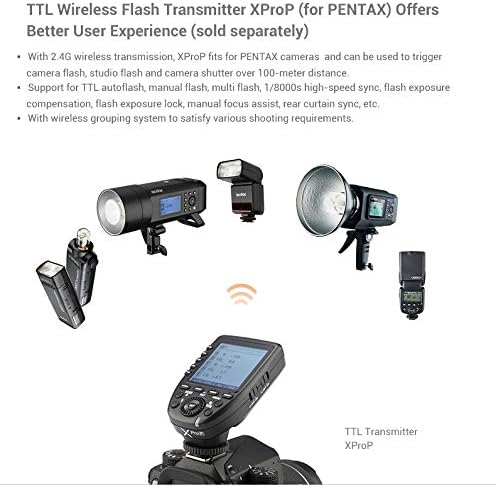
Image 5: The Godox XProP TTL Wireless Flash Transmitter (sold separately) demonstrating its ability to trigger various Godox flash units over 100 meters, enhancing the user experience with wireless grouping.
5.9 Custom Functions (C.Fn)
The flash unit includes custom function settings that allow you to personalize various parameters to suit your shooting style. Refer to the flash unit's display for specific C.Fn options and their adjustments.
6. Maintenance
6.1 Cleaning
- Use a soft, dry cloth to clean the flash unit.
- For stubborn dirt, use a cloth lightly dampened with water or a mild cleaning solution, then wipe dry immediately.
- Do not use strong detergents or solvents.
6.2 Storage
- Remove batteries if the flash will not be used for an extended period.
- Store the unit in a cool, dry place, away from direct sunlight and excessive humidity.
- Use the provided protective bag for storage and transport.
6.3 Firmware Upgrade
The TT350P supports USB firmware upgrades. Connect the flash unit to a computer using a USB cable and follow the instructions provided on the official Godox website for the latest firmware and upgrade procedures.
7. Troubleshooting
| Problem | Possible Cause | Solution |
|---|---|---|
| Flash does not fire. | Low battery, incorrect mode, flash not securely mounted, camera settings. | Check battery level and replace if necessary. Ensure flash is in the correct mode (TTL/M). Re-mount flash securely. Verify camera flash settings. |
| Flash output is too dark/bright. | Incorrect FEC, manual power setting, subject distance. | Adjust FEC in TTL mode. Adjust manual power setting in M mode. Ensure subject is within flash range. |
| Wireless function not working. | Incorrect channel/group, distance, interference. | Ensure master and slave units are set to the same channel and group. Reduce distance between units. Avoid obstacles. |
| Overheating warning. | Rapid consecutive flashes. | Allow the flash to cool down. Reduce the frequency of flashes. |
8. Specifications
- Guide Number: GN36 (m ISO 100, @105mm)
- Power Output: 22 steps (1/1-1/128)
- Flash Modes: TTL, M, Multi, S1/S2
- High-Speed Sync: 1/8000s (Pentax only)
- Zoom Range: 24-105mm (Auto/Manual)
- Recycle Time: Approx. 0.1-2.2 seconds
- Full Power Flashes: Approx. 210 (with 2500mAh Ni-MH batteries)
- Wireless Connectivity: 2.4G Wireless
- Power Source: 2 x AA batteries
- Item Weight: 12.5 ounces
- Package Dimensions: 6.57 x 3.42 x 2.71 inches
- Compatible Mountings: Hot Shoe Mount
9. Warranty & Support
9.1 Warranty Information
Godox products typically come with a limited manufacturer's warranty. Please refer to the warranty card included with your product or visit the official Godox website for specific warranty terms and conditions applicable to your region. Retain your proof of purchase for warranty claims.
9.2 Customer Support
For technical assistance, troubleshooting, or service inquiries, please contact Godox customer support through their official website or the retailer from whom you purchased the product. Provide your product model number (TT350P) and a detailed description of the issue for efficient support.