
Introduction
This manual provides detailed instructions for the safe installation, operation, and maintenance of your Kichler Imari 65-inch Ceiling Fan with Integrated LED Light. Please read all instructions carefully before beginning installation and retain this manual for future reference.
The Kichler Imari ceiling fan features a 65-inch blade span, a propeller-inspired three-blade design, and an integrated LED light source providing 2,300 lumens of output. It is constructed of steel and suitable for damp locations.
Safety Information
- Always disconnect power at the circuit breaker before installation or servicing.
- Ensure all electrical connections comply with local codes and ordinances.
- Consult a qualified electrician if you are unsure about wiring procedures.
- The fan must be mounted to a ceiling joist or an outlet box marked "Acceptable for Fan Support of 35 lbs (15.9 kg) or less."
- Maintain a minimum clearance of 7 feet from the floor to the fan blades.
- Do not insert objects into the path of the fan blades.
Package Contents
Verify that all components are present before beginning installation:
- Ceiling Fan Assembly
- Mounting Hardware Kit
- 6-inch Downrod
- Wall Control Unit
- Instruction Manual
Setup and Installation
Proper installation is crucial for the safe and efficient operation of your ceiling fan. If you are not comfortable performing electrical work, please contact a licensed electrician.
1. Prepare the Mounting Location
- Turn off power at the main circuit breaker.
- Ensure the existing outlet box is securely fastened to a building structure and is rated for fan support.
- For sloped ceilings, a 60-degree slope adapter kit may be required for angles greater than 30 degrees.
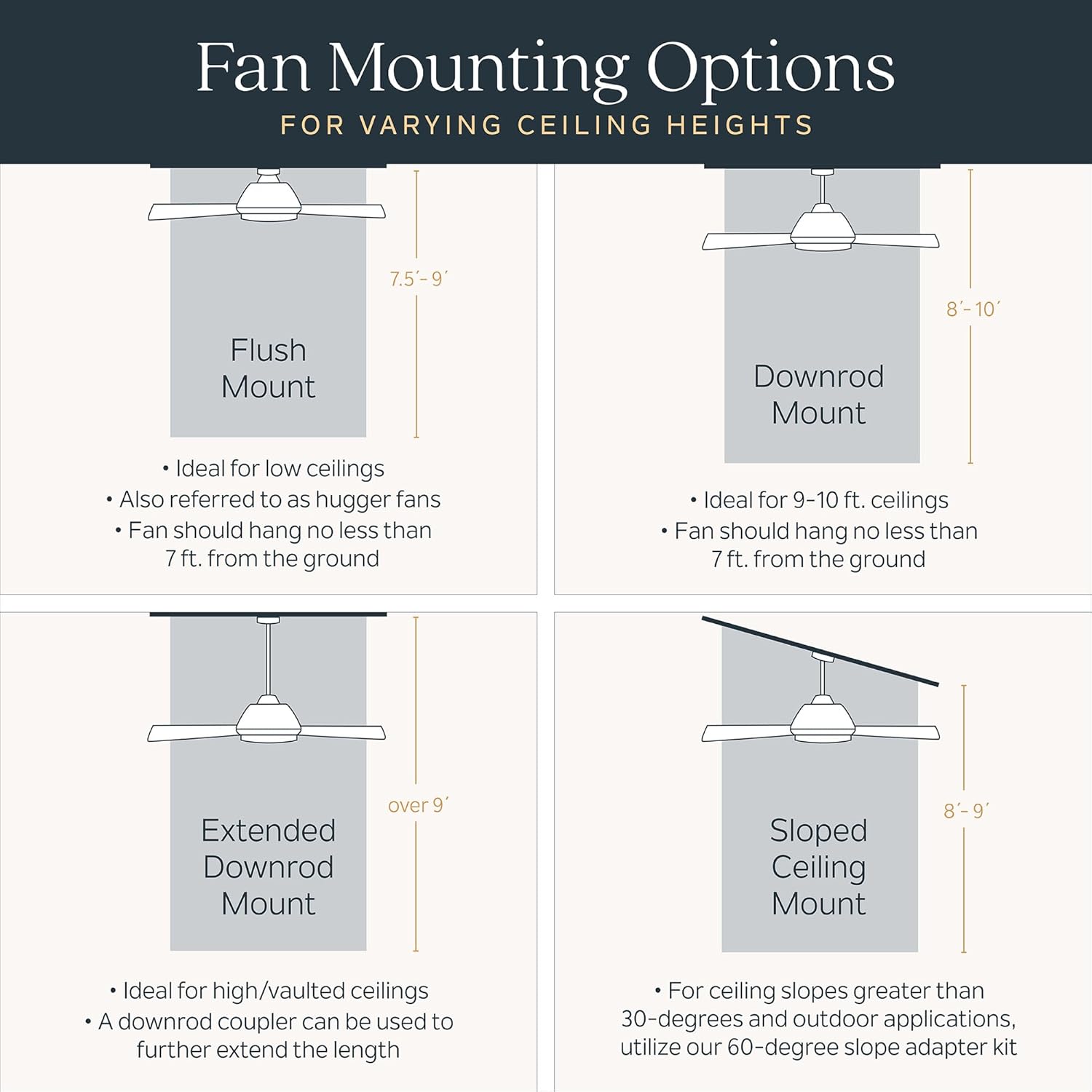
Image: Illustration of different ceiling fan mounting options, including flush mount, standard downrod, extended downrod, and sloped ceiling mount.
2. Assemble the Fan
- Attach the downrod to the motor housing. The Imari fan includes a 6-inch downrod.
- Carefully route the electrical wires through the downrod.
- Secure the canopy to the downrod.

Image: Dimensional drawing of the Kichler Imari 65-inch fan, indicating its 65-inch diameter, 14.5-inch height, and 6.67-inch canopy diameter.
3. Mount the Fan
- Install the mounting bracket to the outlet box using the provided hardware.
- Lift the fan assembly and hang it from the mounting bracket.
- Make all necessary electrical connections according to the wiring diagram in the full instruction manual.
- Secure the canopy to the mounting bracket, ensuring all wires are tucked safely inside.

Image: The Kichler Imari 65-inch ceiling fan with LED light, showcasing its polished nickel finish, sculpted walnut blades, and integrated LED diffuser.
4. Install the Wall Control
- The fan includes a wall control for operation. Follow the specific wiring instructions provided with the wall control unit.
- Ensure proper synchronization between the fan and the wall control for full functionality.

Image: Overview of the Kichler Imari 65-inch fan's features, including its damp rating, indoor/outdoor suitability, DC motor with 6 speeds and reverse function, integrated LED, and the included wall control.
Operating Instructions
Your Kichler Imari ceiling fan is operated via the included wall control unit. This unit allows you to control fan speed, direction, and light functions.
Fan Speed Control
- The fan features 6 speed settings. Use the designated buttons on the wall control to increase or decrease fan speed.
- For optimal air circulation, select a speed appropriate for the room size and desired airflow.
Fan Direction (Reversible Function)
- The fan has a reversible function to optimize air movement for different seasons.
- In warm weather, set the fan to rotate counter-clockwise to create a downdraft, producing a cooling effect.
- In cool weather, set the fan to rotate clockwise to create an updraft, circulating warm air near the ceiling.
- Refer to the wall control instructions for specific button presses to change fan direction.
LED Light Operation
- The integrated LED light can be turned on/off and dimmed using the wall control.
- Press the light button to toggle the light on or off.
- Hold the light button to adjust the brightness level. The light will dim or brighten gradually.

Image: Information regarding the integrated LED light, confirming no bulbs are required and that the light is dimmable with compatible wall dimmers.
Maintenance
Regular maintenance helps ensure the longevity and optimal performance of your Kichler Imari ceiling fan.
- Cleaning: To clean the fan, wipe with a soft, damp cloth. Do not use abrasive cleaners or solvents, as these can damage the finish or electrical components.
- Blade Cleaning: Dust the blades regularly to prevent buildup, which can affect fan balance and performance.
- Tightening Fasteners: Periodically check all screws and fasteners on the fan and mounting hardware to ensure they are secure. Loose connections can cause noise or wobbling.
- No Lubrication Required: The fan motor is permanently lubricated and does not require oiling.
Troubleshooting
If you experience issues with your Kichler Imari ceiling fan, refer to the following common problems and solutions:
| Problem | Possible Cause | Solution |
|---|---|---|
| Fan does not start | No power to the fan; loose wire connections; incorrect wall control wiring. | Check circuit breaker. Ensure all wiring connections are secure. Verify wall control wiring per instructions. |
| Fan makes clicking noise | Loose screws on fan blades or motor housing; unbalanced blades; obstruction. | Tighten all screws. Check for any obstructions. Ensure blades are balanced (a balancing kit may be needed). |
| Light does not work or flickers | Loose wire connection to light kit; wall control issue; LED driver malfunction. | Check light kit wiring. Ensure wall control is functioning correctly. Contact customer support if LED driver is suspected. |
| Fan wobbles excessively | Loose mounting bracket; unbalanced blades; incorrect downrod length for ceiling height. | Ensure mounting bracket is secure. Balance blades. Verify downrod length is appropriate for ceiling height (e.g., 4ft downrod on 14ft ceiling might cause wobble). |
| Wall control issues (e.g., fan speed changes randomly, light won't turn on/off) | Synchronization issue between fan and wall control; faulty wall control unit. | Refer to the wall control instructions for re-synchronization steps. If issues persist, contact customer support for a replacement wall control. |
Specifications
| Brand | Kichler |
| Model Name | Imari |
| Model Number | 300365PN |
| Color | Polished Nickel |
| Product Dimensions | 65"D x 65"W x 14.5"H |
| Item Weight | 26.4 pounds |
| Material | Alloy Steel |
| Blade Material | Alloy Steel |
| Number of Blades | 3 |
| Light Type | Integrated LED (3000K, 2300 lumens output) |
| Power Source | Corded Electric |
| Voltage | 120 volts |
| Wattage | 23 watts |
| Number of Speeds | 6 (DC Motor) |
| Air Flow Capacity | 9548 cfm (on high) |
| Control Method | Remote (Wall Control) |
| Indoor/Outdoor Usage | Indoor (Damp Rated) |
| Certification | UL Listed |

Image: Guide for selecting the correct ceiling fan size based on room area, recommending a 56-70 inch blade sweep for rooms between 150-300 square feet.

Image: Explanation of ceiling fan airflow (CFM) and considerations for indoor and outdoor installations, including minimum blade height and tips for outdoor use.
Warranty Information
Kichler provides the following limited warranty for the Imari 65" Ceiling Fan (Model 300365PN):
- Body: 1 year limited warranty.
- LED Component: 5 years limited warranty.
- Motor: 3 years limited warranty.
Please retain your proof of purchase for warranty claims. For full warranty terms and conditions, visit the official Kichler website or contact customer support.
Customer Support
For further assistance, technical support, or to inquire about replacement parts, please contact Kichler Customer Service:
- Website: www.kichler.com
- Phone: Refer to the Kichler website for regional contact numbers.
- Online Support: Visit the support section on the Kichler website for FAQs and troubleshooting guides.
When contacting support, please have your model number (300365PN) and purchase date available.
Product Video
Watch the official Kichler Imari Collection video for an overview of the fan's design and features.
Video: Official Kichler Imari Collection video showcasing the fan's aesthetic and functional aspects.


