Introduction
This manual provides detailed instructions for the safe and efficient use of the Domus Line ST30/12 30W 12V Power Supply. Please read this manual thoroughly before installation and operation to ensure proper functionality and to prevent damage or injury. This power supply is designed for use with compatible lighting panels, including the TITAN series (maximum 5 panels), PASSEPARTOUT, SMALL, and DATE series.
Safety Instructions
- Ensure the power supply is disconnected from the mains before any installation, maintenance, or troubleshooting.
- This product is designed for indoor use only (IP20 rating). Do not expose it to moisture, water, or extreme temperatures.
- Do not open the power supply casing. There are no user-serviceable parts inside.
- Ensure proper ventilation around the unit to prevent overheating.
- Connect only compatible 12V DC devices within the specified load range (1-30W).
- Installation should be performed by a qualified professional if you are unsure about electrical connections.
Setup and Installation
Follow these steps for proper installation of your Domus Line ST30/12 power supply:
- Unpack the Power Supply: Carefully remove the ST30/12 power supply from its packaging. Inspect for any visible damage.
- Mounting (Optional): Position the power supply in a dry, well-ventilated area. Ensure it is not covered or enclosed in a way that restricts airflow.
- Connect Output Devices: The power supply features a 500 mm output cable with a 12-way distributor and MiniPlug connectors. Connect your compatible 12V DC lighting panels (e.g., TITAN, PASSEPARTOUT, SMALL, DATE series) to the MiniPlug ports on the distributor. Ensure the total load of connected devices does not exceed 30W.
- Connect to Mains Power: The power supply has a 2000 mm input cable. Plug the input cable into a standard 220-240Vac electrical outlet.
- Verify Operation: Once connected, the lighting panels should illuminate. If not, refer to the Troubleshooting section.
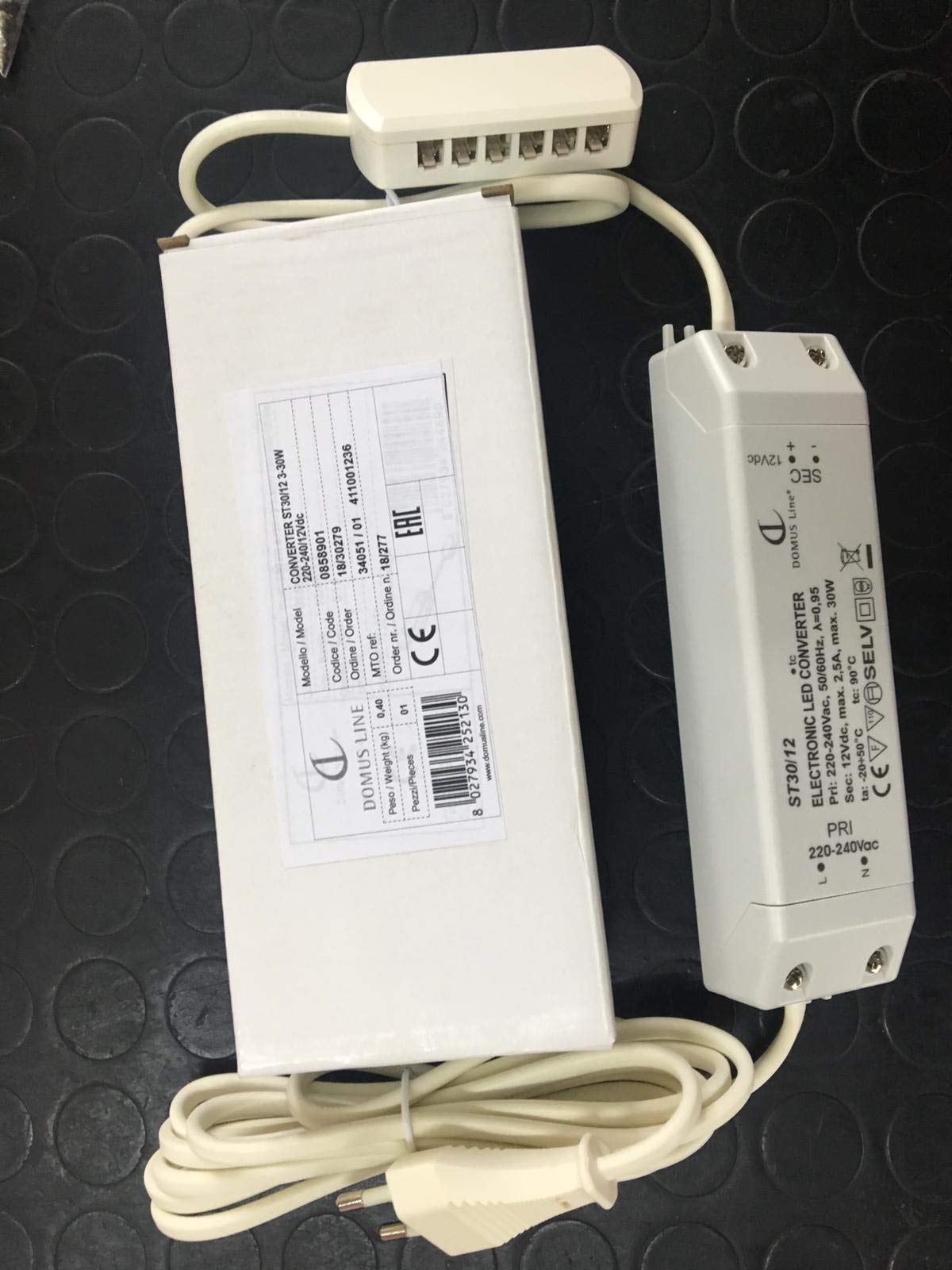
Figure 1: Domus Line ST30/12 Power Supply. This image shows the compact design of the power supply unit, including its input and output cables with MiniPlug connectors, ready for connection to compatible 12V DC lighting systems.
Operating Instructions
The Domus Line ST30/12 power supply operates automatically once connected to a power source and compatible 12V DC devices. It converts the incoming AC voltage to a stable 12V DC output for your lighting applications.
- Ensure all connections are secure before applying power.
- The power supply is designed for continuous operation within its specified load limits.
- To turn off the connected devices, disconnect the power supply from the mains outlet.
Maintenance
The Domus Line ST30/12 power supply requires minimal maintenance.
- Cleaning: Disconnect the power supply from the mains before cleaning. Use a soft, dry cloth to wipe the exterior. Do not use liquid cleaners or abrasive materials.
- Inspection: Periodically check the cables and connectors for any signs of wear or damage. If any damage is found, discontinue use and replace the unit.
- Ventilation: Ensure that the ventilation openings are not blocked by dust or debris.
Troubleshooting
If you encounter issues with your Domus Line ST30/12 power supply, refer to the following common problems and solutions:
| Problem | Possible Cause | Solution |
|---|---|---|
| No power to connected devices. |
|
|
| Devices flicker or dim. |
|
|
| Power supply feels hot. |
|
|
If the problem persists after trying these solutions, please contact customer support.
Specifications
| Brand: | Domus Line |
| Model: | ST30/12 |
| Input Voltage: | 220-240Vac |
| Output Voltage: | 12V DC |
| Output Power: | 30 Watts |
| Load Range: | 1 - 30 Watts (Note: Product description mentioned 1-15W, but title and other specs indicate 30W output. Use 1-30W as the operational range.) |
| Input Cable Length: | 2000 mm |
| Output Cable Length: | 500 mm with 12-way distributor |
| Connector Type: | MiniPlug |
| Insulation Degree: | II |
| Protection Index: | IP20 (Indoor use only) |
| Recommended Panels: | TITAN series (max 5 panels), PASSEPARTOUT, SMALL, DATE |
Warranty and Support
For warranty information or technical support, please contact your retailer or the manufacturer directly. Keep your purchase receipt as proof of purchase.
Manufacturer: Domus Line
Note: Availability of spare parts and software updates is not specified by the manufacturer.


