
1. Introduction
This manual provides essential instructions for the safe and effective use of your Beautyrest Heated Plush Electric Blanket. Designed with Secure Comfort Technology, this blanket offers 20 heat levels, a 10-hour auto shut-off, and is made from ultra-soft microlight plush fabric for enhanced comfort. Please read all instructions carefully before use and retain this manual for future reference.

Image 1.1: Beautyrest Heated Plush Electric Blanket, King size, in black, laid out on a bed with two controllers visible.
2. Important Safety Instructions
To reduce the risk of burns, electric shock, fire, or injury, this product must be used in accordance with the following instructions:
- Do not use with infants, invalids, or anyone insensitive to heat.
- Do not use on an unconscious or incapacitated person.
- Do not use with damaged cords or plugs.
- Do not use with pins or other metallic objects.
- Do not use if wet.
- Do not use with a generator, power converter, or inverter.
- This product is UL certified and independently tested to provide the highest safety standards, featuring low EMF with flexible wires for comfort and enhanced durability.
- Always unplug the blanket when not in use.
3. Product Overview
3.1 Key Features
- 100% Microlight Plush fabric.
- Secure Comfort Technology designed to virtually eliminate Electromagnetic Field (EMF) emissions.
- 20 Heat settings for customized temperature control (85 - 105℉).
- 1-hour Pre-Heat feature.
- Adjustable auto shut-off timer from 1 to 10 hours.
- Machine washable for easy care.
- UL certified for safety.
3.2 Components
- 1 Heated Blanket (King size: 90 in x 100 in)
- 2 Controllers (for King and Queen sizes; Twin and Full sizes come with one controller)
- Power Cords
3.3 Dimensions and Material
- Size: King (90 in x 100 in)
- Material: 100% Microlight Plush Polyester
- Color: Black

Image 3.1: An illustration detailing the King size blanket dimensions as 90 inches by 100 inches.
4. Setup Guide
4.1 Unpacking
Carefully remove the heated blanket and controllers from the packaging. Unfold the blanket completely and lay it flat on your bed. Ensure there are no kinks or creases in the heating wires.
4.2 Connecting the Controller(s)
Locate the connector ports at the bottom of the blanket. For King size blankets, there are two ports, one for each controller. Firmly plug each controller's cord into its respective port until it clicks securely into place. Then, plug the power cord(s) into a 110V-120V @ 60Hz electrical outlet. Ensure the cords are not pinched or covered by the blanket.

Image 4.1: A hand connecting the controller cable to the blanket's power inlet.
Video 4.1: An overview of the Beautyrest Heated Throw & Blanket, demonstrating its features and setup.
5. Operating Instructions
5.1 Powering On/Off
Press the power button on the controller to turn the blanket on or off. The digital display will illuminate when powered on.
5.2 Adjusting Heat Settings
Use the up and down arrow buttons on the controller to select your desired heat level from 1 to 20. The selected heat level will be displayed on the screen. For King and Queen sizes, each side of the blanket can be controlled independently using its dedicated controller.
5.3 Auto Shut-Off Timer
Press the timer button to set the auto shut-off duration from 1 to 10 hours. The blanket will automatically turn off after the set time has elapsed, providing safety and energy efficiency.
5.4 Pre-Heat Feature
Activate the 1-hour pre-heat feature to quickly warm the blanket before use. After one hour, the blanket will automatically adjust to your last selected heat setting.

Image 5.1: A detailed view of the blanket's controller, highlighting the heat setting and timer buttons.
Video 5.1: A demonstration of the Beautyrest Electric Blanket controller and its 20 heat level settings.
6. Maintenance
6.1 Washing Instructions
Your Beautyrest Heated Plush Electric Blanket is machine washable. Always disconnect the controllers and power cords before washing. Wash on a delicate cycle with cold water and minimal detergent. Remove immediately after the spin cycle to prevent damage.
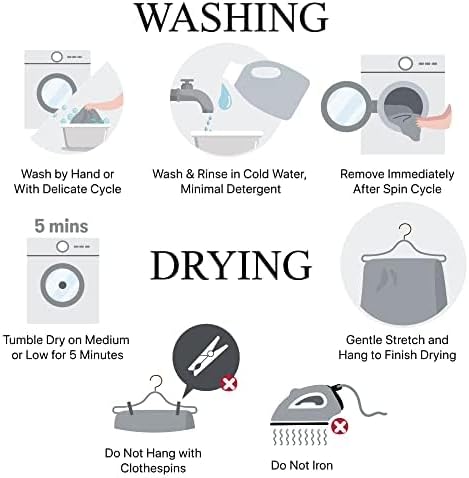
Image 6.1: Visual guide for washing and drying the electric blanket, emphasizing machine wash, cold water, and hang drying.
6.2 Drying Instructions
For best results and to prolong the life of your blanket, hang dry. If using a dryer, tumble dry on medium or low heat for no more than 5 minutes. Gently stretch the blanket to its original shape and hang to finish drying. Do not use clothespins directly on the blanket or iron the blanket.
Video 6.1: Instructions on how to care for and wash a heated blanket.
6.3 Storage
When storing the blanket, avoid excessive folding or twisting of the heating wires. Do not place heavy objects on top of the blanket, as this can damage the internal wiring. Store in a cool, dry place.
7. Troubleshooting Guide
| Issue | Solution |
|---|---|
| Controller light blinking | Unplug and reconnect the controller, ensuring it is properly connected. If the issue persists, contact customer support. |
| Blanket not heating well | Ensure the blanket is powered on and set to the maximum heat level. Allow sufficient time for it to heat up. |
| Only parts of the blanket are getting warm | This is usually caused by bunched or pinched heating elements. Lay the blanket flat, untucked, and free from heavy objects. Straighten the heating wires as needed to restore function. If any portion of the wire is twisted on itself, manually twist it back. |
8. Product Specifications
| Specification | Detail |
|---|---|
| Model Name | Heated Plush |
| Model Number | BR54-0910 |
| Size | King (90 in x 100 in) |
| Material | 100% Microlight Plush Polyester |
| Color | Black |
| Heat Settings | 20 Levels |
| Auto Shut-Off | 1-10 Hours |
| Special Feature | Low EMF, Lightweight, Machine Washable |
| Power Supply | 110V-120V @ 60Hz (Max 160W) |
| Manufacturer | JLA Home Inc |
| UPC | 086569084934 |
9. Warranty and Support
9.1 Manufacturer's Warranty
This Beautyrest Heated Plush Electric Blanket is backed by a 5-year manufacturer's warranty. Please retain your proof of purchase for warranty claims.
9.2 Customer Support
For any questions, troubleshooting assistance, or warranty inquiries, please contact JLA Home Inc. customer support. Refer to the contact information provided with your product packaging or visit the official Beautyrest website for support details.


