1. Introduction
This manual provides essential information for the proper installation, operation, and maintenance of your Traxxas 2250 Digital High-Torque 330 Coreless Metal Gear Waterproof Servo. Designed for demanding remote control vehicle applications, this servo offers precise control and durability in various conditions. Please read this manual thoroughly before use to ensure optimal performance and longevity of your product.
2. Safety Information
Always observe the following safety precautions to prevent damage to the servo, your vehicle, or personal injury:
- Ensure all power is disconnected from the vehicle before installing or removing the servo.
- Verify correct polarity when connecting the servo to the receiver or electronic speed control (ESC). Incorrect wiring can cause damage.
- Avoid exposing the servo to extreme temperatures or direct impact.
- Do not attempt to disassemble the servo beyond routine maintenance. Unauthorized disassembly voids the warranty.
- Keep small parts away from children.
3. Package Contents
The Traxxas 2250 Digital High-Torque Waterproof Servo package includes:
- One (1) Traxxas 2250 Digital High-Torque Waterproof Servo
- As described (additional accessories such as servo horns, mounting hardware may be included depending on the specific kit)
4. Setup and Installation
Follow these steps for proper installation of your Traxxas 2250 servo:
- Mounting the Servo: Securely mount the servo into the designated servo tray or mounting location on your RC vehicle chassis using appropriate screws. Ensure the servo is firmly seated to prevent movement during operation.
- Connecting to Receiver/ESC: Connect the servo's three-wire connector (typically brown/black for ground, red for positive, orange/white/yellow for signal) to the corresponding channel on your receiver. Refer to your vehicle's manual for specific channel assignments (e.g., Channel 1 for steering, Channel 2 for throttle).
- Attaching the Servo Horn: With the servo centered (power on, transmitter and receiver linked, trim set to neutral), attach the appropriate servo horn to the servo output shaft. Ensure the horn is aligned correctly for your application (e.g., steering linkage straight). Secure the horn with the provided screw.
- Linkage Adjustment: Adjust the linkage rods to ensure smooth, unrestricted movement of the controlled component (e.g., steering arms, throttle linkage) without binding.

Figure 1: Internal view of the Traxxas 2250 servo, highlighting the durable metal gears and coreless motor design.
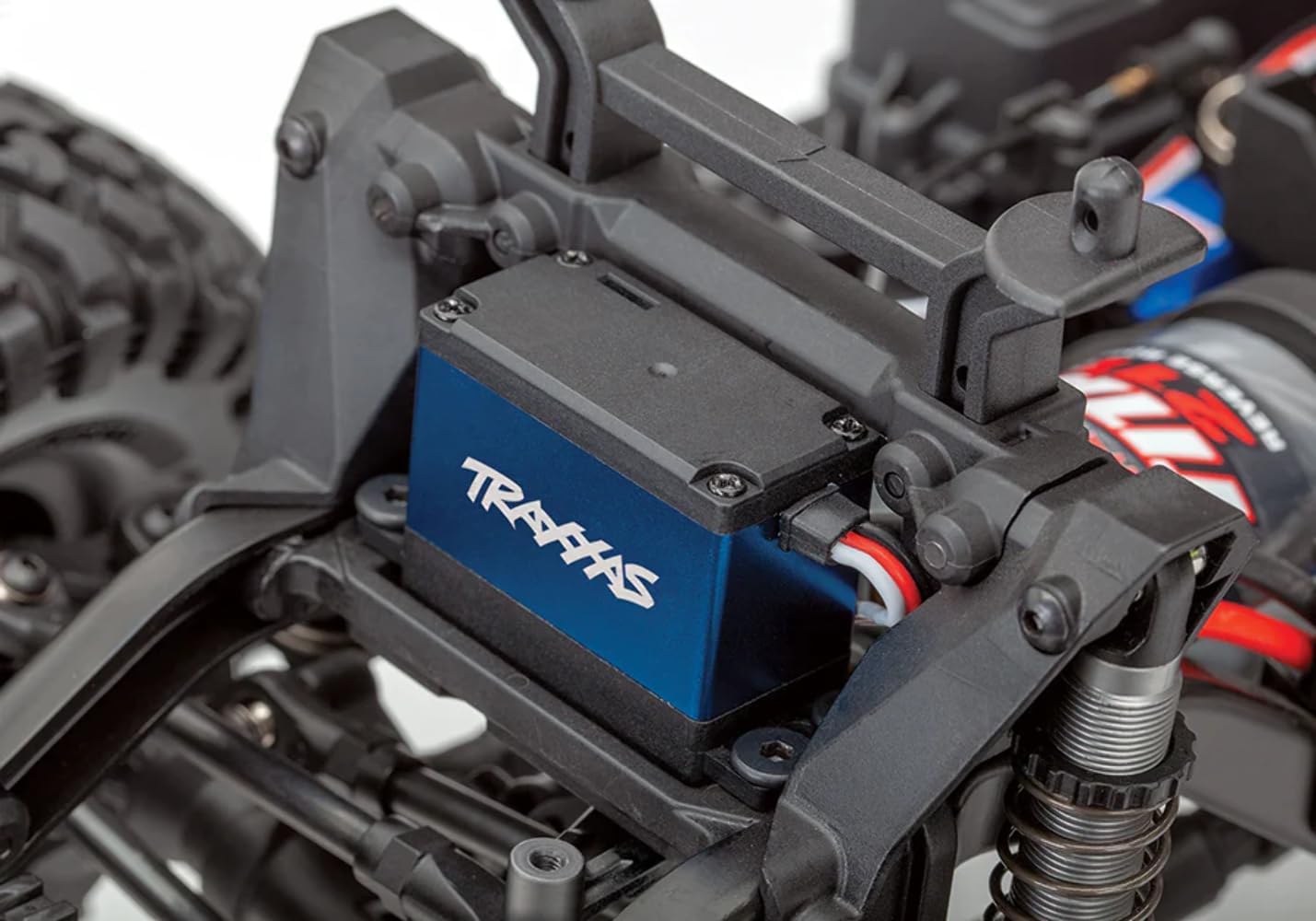
Figure 2: The Traxxas 2250 servo installed within an RC vehicle chassis, demonstrating its compact fit and wiring connections.
5. Operating Instructions
The Traxxas 2250 is a digital high-torque servo designed for precise and responsive control. Its coreless motor provides quick acceleration and smooth operation, while metal gears ensure durability under stress. The waterproof design allows for operation in wet conditions, but always ensure other electronic components are also waterproof or adequately protected.
- Power On Sequence: Always turn on your transmitter first, then your RC vehicle. When powering off, turn off the vehicle first, then the transmitter.
- Centering and Trims: After installation, verify the servo's neutral position using your transmitter's trim adjustments. Fine-tune for straight tracking or desired neutral point.
- End Point Adjustments (EPA): If your transmitter supports EPA, set the limits to prevent the servo from over-traveling and binding the steering or throttle linkages. This protects the servo from unnecessary strain.
- Waterproof Operation: The servo is sealed against water intrusion. However, prolonged submersion or high-pressure water jets are not recommended. After operating in wet conditions, allow the servo to air dry and inspect for any debris.
Product Videos
Video 1: Demonstration of the Traxxas 2250 servo's operational speed and precision.
Video 2: Overview of the Traxxas 2250 servo's features and capabilities in an RC application.
Video 3: Short clip showcasing the robust construction and waterproof nature of the servo.
Video 4: Quick demonstration of the servo's response time and torque output.
6. Maintenance
Regular maintenance ensures the longevity and consistent performance of your servo.
- Cleaning: Periodically clean the exterior of the servo to remove dirt, dust, and debris. Use a soft brush or compressed air. Avoid using harsh chemicals.
- Gear Inspection: Due to the metal gears, wear is minimal, but it is good practice to occasionally inspect the servo gears for any signs of damage or excessive play. If necessary, replacement gear sets may be available from Traxxas.
- Waterproofing Check: After operating in wet conditions, ensure the servo case remains sealed. If you notice any cracks or damage to the case, the waterproofing may be compromised.
- Wiring Inspection: Check the servo wires for any cuts, fraying, or loose connections. Damaged wires can lead to intermittent operation or complete failure.
7. Troubleshooting
If you encounter issues with your Traxxas 2250 servo, refer to the following common problems and solutions:
| Problem | Possible Cause | Solution |
|---|---|---|
| Servo does not move | No power, incorrect connection, faulty receiver/ESC, damaged servo. | Check power supply to receiver/ESC. Verify servo connection to receiver. Test with a different servo or receiver/ESC if available. |
| Erratic or jerky movement | Interference, loose connection, low battery voltage, binding linkage. | Check for radio interference. Secure all connections. Ensure battery is fully charged. Inspect linkages for binding and adjust if necessary. |
| Weak or slow response | Low battery voltage, excessive load/binding, incorrect EPA settings. | Charge battery. Reduce mechanical load on the servo. Adjust EPA settings to prevent over-travel. |
| Servo makes noise but doesn't move | Stripped gears, internal damage, severe binding. | Inspect gears for damage. Check linkages for severe binding. If gears are stripped, replacement is necessary. |
8. Specifications
| Feature | Specification |
|---|---|
| Brand | Traxxas |
| Model Number | TRA2250 |
| Material | As Pictured (Mixed Metal and Plastic Construction) |
| Color | Black |
| Item Weight | 0.14 Pounds |
| Construction Type | Mixed (Metal and Plastic) |
| UPC | 020334225009 |
| Recommended Uses | Remote Control Vehicle |
| Item Dimensions (LxWxH) | 2.75 x 1.75 x 3.75 inches |
| Package Dimensions (LxWxH) | 3.74 x 2.72 x 1.26 inches |
| Package Weight | 0.13 Kilograms |
9. Warranty Information
Traxxas products are manufactured to high standards. For specific warranty terms and conditions, please refer to the official Traxxas website or contact their customer support directly. Keep your proof of purchase for any warranty claims.
10. Support
For further assistance, technical support, or to purchase replacement parts, please visit the official Traxxas website:
You may also contact Traxxas customer service through the contact information provided on their website.


