
Introduction
The TUNAI Wand is an aptX Low Latency Bluetooth transmitter designed to wirelessly stream audio from your TV, home stereo, PC, or game console to up to two Bluetooth headphones simultaneously. It features multiple audio input options and aims to provide a synchronized audio-visual experience with minimal delay.
Safety Information
- Handle batteries with care. This device does not contain a rechargeable battery and requires external power via Micro USB.
- Avoid using near other wireless devices to prevent potential interference.
- Keep the device in a dry, cool place to ensure optimal performance and longevity.
- Do not attempt to disassemble or modify the device. This may void the warranty and cause damage.
Package Contents

Image: Components included in the TUNAI Wand package.
- TUNAI Wand Bluetooth Transmitter Unit
- Magnet Sticker (for mounting)
- 3.5mm Male to RCA Male Cable
- USB Charging Cable (Micro USB)
Product Overview
Device Components
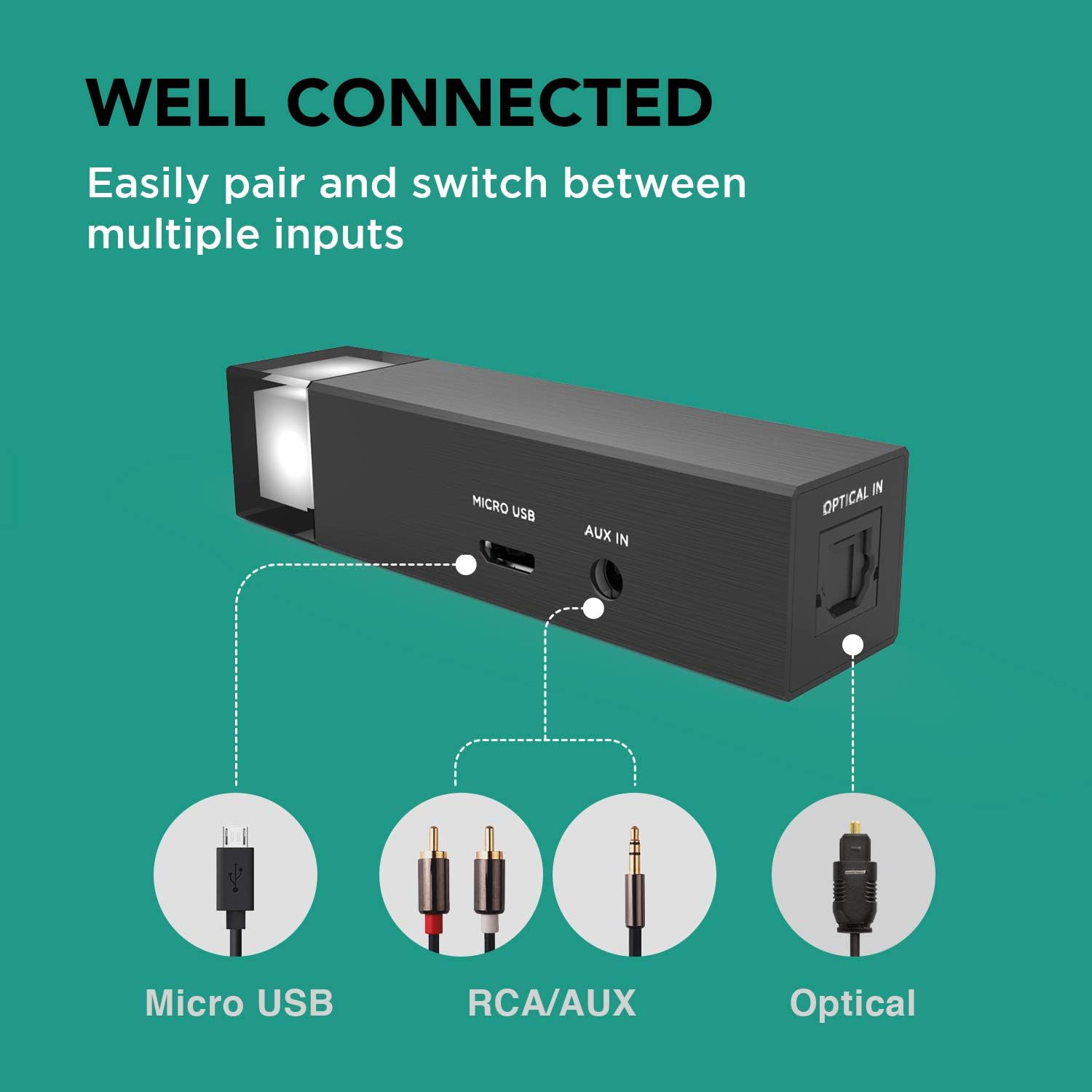
Image: Rear view of the TUNAI Wand showing input ports.
- LED Indicator: Displays current input mode and pairing status.
- Micro USB Port: For power supply and USB audio input.
- AUX IN Port: 3.5mm audio input for analog sources.
- OPTICAL IN Port: Digital audio input for optical sources (SPDIF).
- Multi-function Button: Used for pairing, switching inputs, and other controls.
Key Features
- aptX Low Latency: Ensures minimal audio delay for a synchronized audio-visual experience, ideal for TV, movies, and gaming.
- Dual Headphone Connection: Connects to two Bluetooth headphones simultaneously, allowing shared listening.
- Multiple Audio Inputs: Supports AUX (3.5mm), USB Audio, and Optical (SPDIF) inputs for broad compatibility with various devices.
- Long Operating Range: Provides an extended Bluetooth range, allowing freedom of movement while listening.

Image: User enjoying TV audio with aptX Low Latency via TUNAI Wand.

Image: Two individuals sharing audio using the TUNAI Wand.

Image: Input options for the TUNAI Wand.

Image: Illustration of the TUNAI Wand's long range capability.
Setup
1. Powering the Device
Connect the TUNAI Wand to a power source using the provided Micro USB cable. The device does not have an internal battery and requires continuous power.
2. Connecting to an Audio Source
Choose one of the following input methods based on your audio source:
AUX Input (3.5mm)
Use the 3.5mm to RCA cable (or a standard 3.5mm audio cable) to connect the Wand's AUX IN port to your audio source's 3.5mm audio output or RCA audio output.
USB Audio Input
Connect the Wand's Micro USB port to a USB port on your PC or game console. The device will be recognized as an audio output device.
Optical Input (SPDIF)
Connect an optical audio cable (not included) from your audio source's optical output to the Wand's OPTICAL IN port.
3. Pairing Bluetooth Headphones
- Ensure your Bluetooth headphones are in pairing mode. Refer to your headphone's manual for instructions.
- Press and hold the multi-function button on the TUNAI Wand until the LED indicator flashes rapidly, indicating it is in pairing mode.
- Place the headphones close to the Wand. They should automatically connect. The LED indicator will change to a solid color (specific to the input mode) once connected.
Operating Instructions
Switching Audio Inputs
Briefly press the multi-function button to cycle through the available audio inputs (AUX, USB, Optical). The LED indicator color will change to reflect the active input:
- Gray/White: Analog (AUX)
- Blue: Optical
- Orange/Yellow: Micro USB
Connecting a Second Headphone
After the first headphone is connected:
- Put the second Bluetooth headphone into pairing mode.
- Double-press the multi-function button on the TUNAI Wand. The LED will flash rapidly again.
- The Wand will search for and connect to the second headphone. Once connected, both headphones will receive audio simultaneously.
Troubleshooting
- No audio output:
- Ensure the Wand is powered on and the LED indicator is lit.
- Verify that the correct audio input is selected (check LED color).
- Confirm that your headphones are properly paired and connected.
- Check the volume levels on both your audio source and headphones.
- For optical input, ensure your TV/source audio output is set to PCM/Stereo, not Bitstream/Dolby Digital.
- Audio delay (lip-sync issues):
- Ensure both your headphones and the Wand support aptX Low Latency. If either device does not, some delay may be present.
- Try re-pairing the headphones.
- Cannot pair headphones:
- Make sure the Wand is in pairing mode (rapidly flashing LED).
- Ensure your headphones are in pairing mode and not connected to another device.
- Move headphones closer to the Wand.
- Restart both the Wand and your headphones.
- Intermittent connection or short range:
- Reduce physical obstacles between the Wand and your headphones.
- Avoid strong Wi-Fi routers or other 2.4GHz wireless devices that may cause interference.
- Ensure the Wand is not placed inside a metal cabinet or enclosure.
Specifications
| Feature | Specification |
|---|---|
| Brand | TUNAI |
| Model Name | TUNAI Wand |
| Connectivity Technology | Auxiliary, Bluetooth, USB |
| Bluetooth Version | Bluetooth 5.0 |
| Supported Standards | aptX Low Latency |
| Audio Inputs | 3.5mm AUX, Micro USB, Optical (SPDIF) |
| Audio Output Type | Bluetooth |
| Power Source | Corded Electric (5V DC via Micro USB) |
| Material | Metal |
| Color | Black |
| Number of Channels | 2 (Stereo) |
| Compatible Devices | TV, Home Stereo, PC, Game Consoles (e.g., Desktop) |
Care and Maintenance
- Clean the device with a soft, dry cloth. Do not use liquid cleaners or aerosols.
- Avoid exposing the device to extreme temperatures, humidity, or direct sunlight.
- Do not drop or subject the device to strong impacts.
- Store the device in a safe place when not in use.
Warranty and Support
For warranty information and technical support, please refer to the official TUNAI website or contact their customer service. Specific warranty terms may vary by region and retailer.
Official Product Video
Video: An overview of the TUNAI Wand Long Range AptX Low Latency Bluetooth Transmitter, demonstrating its features and use cases.