
1. Introduction
The GÜDE GAB 12V-15A-BOOST is an intelligent, microprocessor-controlled battery charger designed for all common 12V vehicle battery types. It features a battery-friendly 6-step charging process, a BOOST function for quick charging, and a maintenance charging function to prevent deep discharge over extended periods. This manual provides essential information for the safe and efficient operation of your battery charger.
2. Safety Instructions
Read all safety warnings and instructions carefully before using this product. Failure to follow these instructions may result in electric shock, fire, or serious injury.
- Ventilation: Ensure adequate ventilation when charging batteries. Batteries can produce explosive gases.
- Eye and Skin Protection: Always wear appropriate eye protection and protective clothing when working with batteries. Battery acid is corrosive.
- Electrical Safety: Do not expose the charger to rain or wet conditions. Never operate the charger with damaged cables or clamps.
- Connection Sequence: Connect the battery clamps to the battery terminals before connecting the charger to the mains power. Disconnect in reverse order.
- Reverse Polarity Protection: The charger is equipped with reverse polarity protection, but always ensure correct connection (red to positive, black to negative).
- Children and Unauthorized Persons: Keep the charger and battery out of reach of children and individuals unfamiliar with its operation.
- Intended Use: Use the charger only for charging 12V batteries as specified in this manual. Do not use it for non-rechargeable batteries.
3. Setup
- Unpacking: Carefully remove the battery charger and all accessories from the packaging. Inspect for any damage.
- Battery Preparation: Ensure the battery terminals are clean and free of corrosion. If charging a wet cell battery, check the electrolyte level and top up with distilled water if necessary (refer to battery manufacturer's instructions).
- Connecting to Battery:
- Connect the red (+) charging clamp to the positive (+) battery terminal.
- Connect the black (-) charging clamp to the negative (-) battery terminal.
If the battery is connected in the vehicle, connect the negative clamp to the vehicle chassis away from the battery and fuel line, if the negative terminal is connected to the chassis. Consult your vehicle's manual for specific instructions.

Image: Insulated battery clamps. Connect the red clamp to the positive terminal and the black clamp to the negative terminal.
- Connecting to Power: Plug the charger's mains power cable into a standard 230V AC outlet. The charger will power on, and the LED display will activate.
The charger can also be connected via the 12V cigarette lighter adapter for certain applications. Ensure the vehicle's ignition is off when using this method, unless specified otherwise by the vehicle manufacturer.
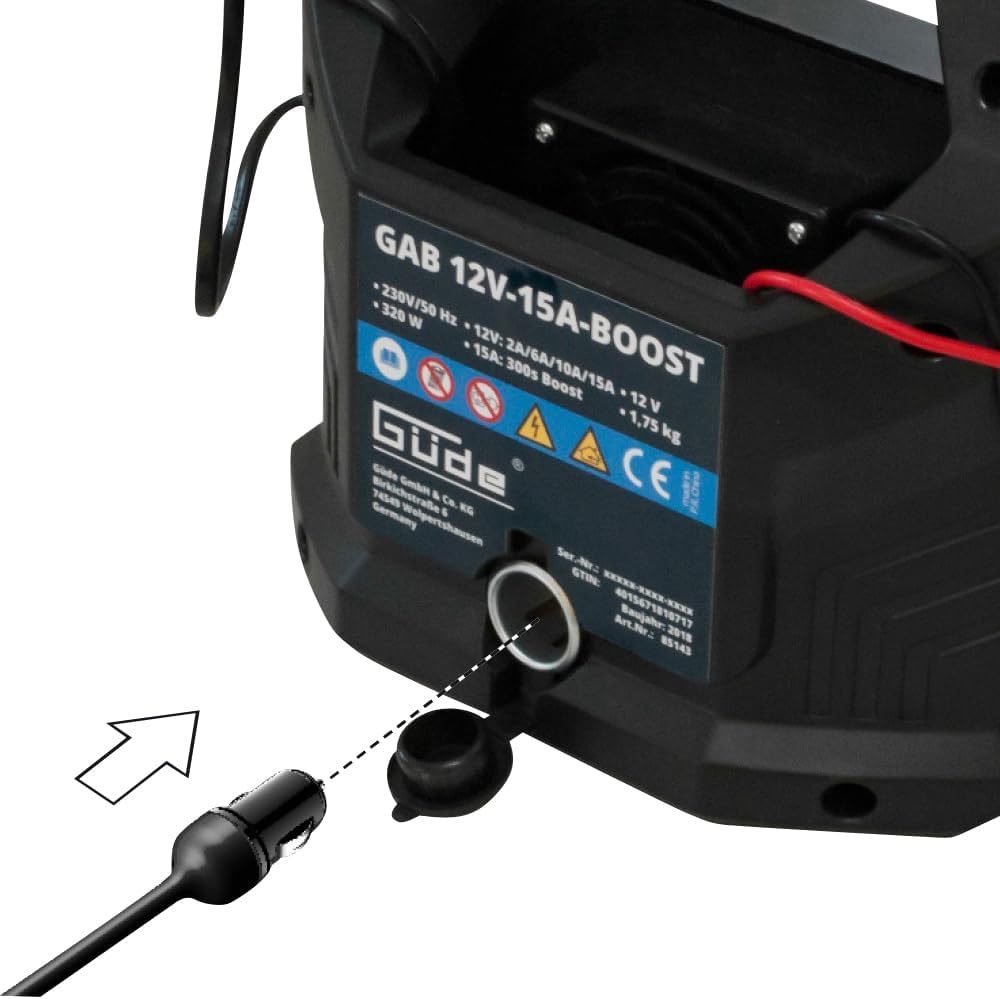
Image: 12V cigarette lighter adapter connection point on the charger.
4. Operating Instructions
The GÜDE GAB 12V-15A-BOOST charger features intelligent, microprocessor-controlled charging. Once connected, it automatically detects the battery voltage and type (for common 12V types) and initiates the appropriate charging process.

Image: Front view of the charger showing the LED display and control buttons.
4.1. LED Display and Controls
- LED Display: Shows charging status, voltage, current, and selected mode.
- On/Off Button: Powers the charger on or off.
- Volt Button: Cycles through voltage display modes.
- Amp Button: Cycles through current display modes.
- Mode Selection Button (Car/Motorcycle icon): Allows selection of charging modes suitable for different battery types and capacities.
4.2. Charging Process
- Connect: Ensure the charger is correctly connected to the battery and then to the mains power as described in Section 3.
- Automatic Detection: The charger will automatically detect the battery type (PB, GEL, AGM, MF, WET) and its current voltage.
- Mode Selection: Use the mode selection button to choose the appropriate charging program if automatic detection is not sufficient or if you wish to override it. The charger offers a 6-step charging process optimized for battery health.
- Charging: The charger will begin charging. The LED display will show the charging progress.
- Automatic Cut-off: Once the battery is fully charged, the charger will automatically switch to a maintenance charging mode to prevent overcharging and keep the battery at optimal capacity.
4.3. BOOST Function
The BOOST function provides a quick charge of 15A for 300 seconds (5 minutes) to assist with starting a deeply discharged battery. This function acts as a starting aid.
- To activate BOOST, ensure the charger is connected and powered on.
- Press the dedicated BOOST button (if available, or follow specific instructions on the device for activation).
- After 300 seconds, the charger will revert to its standard charging program.
4.4. Maintenance Charging
The charger's maintenance function allows for gentle, long-term charging, protecting batteries from deep discharge during periods of inactivity (e.g., seasonal vehicle storage). The charger will maintain the battery at an optimal charge level for months.
5. Maintenance
Regular maintenance ensures the longevity and optimal performance of your GÜDE battery charger.
- Cleaning: Disconnect the charger from mains power and the battery before cleaning. Wipe the casing with a dry, soft cloth. Do not use harsh chemicals or abrasive cleaners.
- Cable and Clamp Inspection: Periodically inspect the charging cables and clamps for any signs of damage, wear, or corrosion. Replace damaged components immediately.
- Storage: Store the charger in a dry, cool place, away from direct sunlight and extreme temperatures. Ensure cables are neatly coiled and not kinked.
6. Troubleshooting
If you encounter issues with your GÜDE GAB 12V-15A-BOOST charger, refer to the following common problems and solutions:
| Problem | Possible Cause | Solution |
|---|---|---|
| Charger does not turn on. | No mains power; damaged power cable. | Check power outlet and cable connections. Ensure the On/Off button is pressed. |
| Charger shows an error message or does not charge. | Incorrect battery connection (reverse polarity); battery is severely damaged or not 12V; short circuit. | Check battery clamp connections (red to +, black to -). Ensure the battery is a 12V type. Disconnect and reconnect the charger. If the error persists, the battery may be faulty. |
| Charging is slow or incomplete. | Battery capacity is very high; battery is old or sulfated; incorrect mode selected. | Ensure the correct charging mode is selected for your battery type and capacity. Allow more time for charging large batteries. Consider having an old battery tested. |
| Charger gets hot during operation. | Normal operation; poor ventilation. | Some heat generation is normal. Ensure the charger is in a well-ventilated area and its cooling vents are not blocked. If overheating is excessive, disconnect immediately and contact support. |
7. Technical Specifications
| Feature | Specification |
|---|---|
| Model | 1888041 |
| Input Voltage | 230 V AC |
| Frequency | 50 Hz |
| Output Voltage | 12 V DC |
| Mains Power | 320 W |
| Charging Current (effective) | 2 / 6 / 10 / 15 A |
| BOOST Function | 15 A for 300 seconds |
| Battery Capacity | 2 – 400 Ah |
| Supported Battery Types | PB (Lead-Acid), GEL, AGM, MF (Maintenance-Free), WET (Wet Cell) |
| Dimensions (L x W x H) | 218 mm x 147 mm x 222 mm |
| Net Weight | 1.5 kg |
| Gross Weight | 1.75 kg |
| Safety Compliance | CE |
8. Warranty
GÜDE products are designed for durability and performance. For specific warranty terms and conditions, please refer to the documentation provided at the time of purchase or contact your retailer. GÜDE maintains a service center with spare parts available for all products, including older models, and offers repair services.
9. Support
Should you require assistance with your GÜDE GAB 12V-15A-BOOST battery charger, please contact GÜDE's internal service center. Trained specialists are available to provide support via telephone for any issues you may encounter with your device.
For contact information, please visit the official GÜDE website or refer to your product packaging.


