
Kesoto M-616
PAL/NTSC TV Format System Converter Adapter User Manual
Brand: Kesoto | Model: M-616
1. Product Overview
The Kesoto M-616 PAL/NTSC TV Format System Converter Adapter is designed to facilitate the use of single standard video equipment across different standard TV/video source regions. This device allows for seamless conversion between PAL and NTSC video signals, ensuring compatibility between your video sources and display devices.
It is particularly useful for connecting devices such as DVD players, VCRs, game consoles (PS2, PS3), and set-top boxes to televisions or projectors that operate on a different video standard.

Figure 1: Top view of the Kesoto M-616 Converter.
2. Package Contents
Please verify that all items are present in your package:
- 1x PAL NTSC Converter (Model M-616)
- 1x USB Cable for power
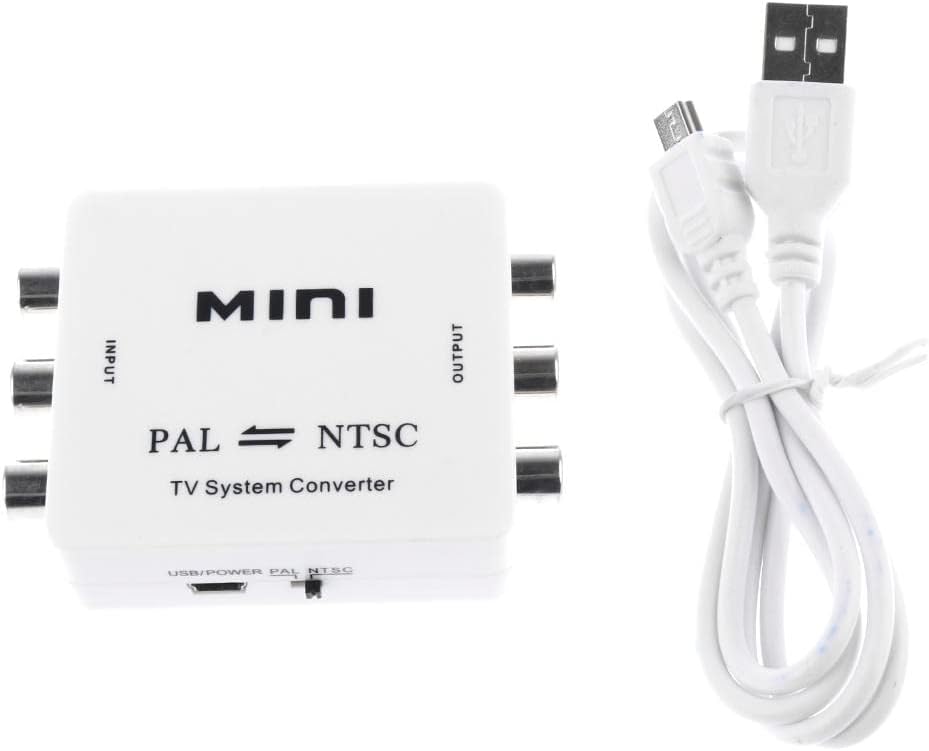
Figure 2: Converter and included USB Cable.
3. Product Features
- Bi-directional conversion: Supports both PAL to NTSC and NTSC to PAL conversion.
- AV input: Connects to DVD, VCR, PS2, PS3 game consoles, set-top boxes, and other equipment with AV output.
- AV output: Connects to TV, projector, and other display devices with AV input.
- Enables single standard video equipment to be used in different standard TV/video source areas.
- Compact and portable design.
4. Setup and Connections
Follow these steps to connect your Kesoto M-616 converter:
- Connect Video Source to Input:
Identify the AV output ports (typically yellow for video, white for left audio, red for right audio) on your video source device (e.g., DVD player, game console). Connect RCA cables from these ports to the corresponding INPUT ports on the M-616 converter.
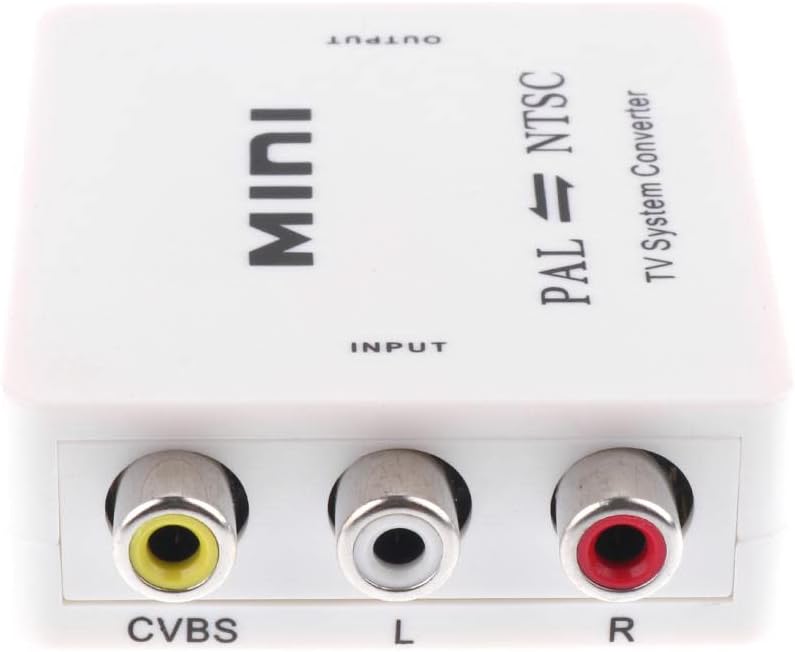
Figure 3: Input ports (CVBS, L, R).
- Connect Converter to Display Device:
Identify the AV input ports on your television, projector, or other display device. Connect RCA cables from the OUTPUT ports on the M-616 converter to the corresponding input ports on your display device.

Figure 4: Output ports (CVBS, L, R).
- Connect Power:
Connect the included USB cable to the converter's USB power port and plug the other end into a standard USB power adapter (not included) or a USB port on your TV/computer for power.
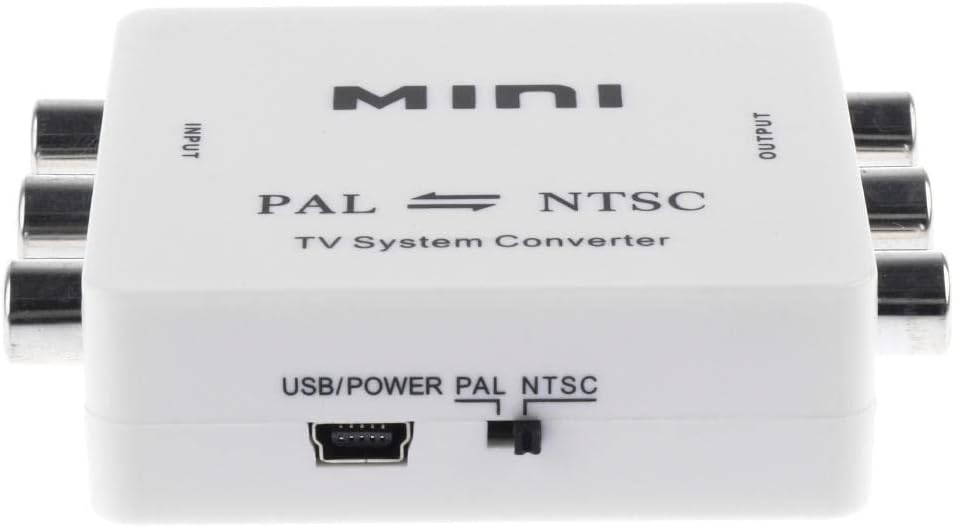
Figure 5: USB Power Port and PAL/NTSC Switch.
- Select Output Standard:
Locate the PAL/NTSC switch on the side of the converter. Slide the switch to select the desired output video standard (PAL or NTSC) that matches your display device's supported format.
5. Operating Instructions
Once all connections are made and the power is supplied, the converter will automatically begin processing the video signal. Ensure your display device is set to the correct AV input channel.
The M-616 converter is designed to convert video signals only. It does not support the conversion of program signals (e.g., broadcast TV channels directly). It processes the composite video (CVBS) and stereo audio (L/R) signals.
For optimal performance, ensure that the input video signal is stable and clear. The converter will adapt the incoming signal to the selected output standard (PAL or NTSC) based on the switch setting.
6. Maintenance
To ensure the longevity and proper functioning of your Kesoto M-616 converter, please follow these maintenance guidelines:
- Cleaning: Use a soft, dry cloth to clean the exterior of the converter. Do not use liquid cleaners or aerosols, as they may damage the device.
- Storage: Store the converter in a cool, dry place away from direct sunlight and extreme temperatures.
- Handling: Avoid dropping or subjecting the converter to strong impacts.
- Ventilation: Ensure the device is placed in an area with adequate ventilation to prevent overheating.
7. Troubleshooting
| Problem | Possible Cause | Solution |
|---|---|---|
| No video or audio output. |
|
|
| Distorted or poor quality video. |
|
|
| Converter not working with broadcast TV channels. |
|
|
8. Specifications
| Model Number | M-616 |
| Material | Plastic |
| Dimensions (L x W x H) | 7 x 5.4 x 2 cm (approximately) |
| Input Interface | 1 x Video (CVBS), 1 x Audio Left (L), 1 x Audio Right (R) - RCA |
| Output Interface | 1 x Video (CVBS), 1 x Audio Left (L), 1 x Audio Right (R) - RCA |
| Power Supply | USB Powered (via included USB cable) |
| Compatible Devices | Gaming Consoles, DVD Players, VCRs, Set-top Boxes |
| Specific Uses | Projector, TV |
| Color | White |
9. Warranty and Support
For information regarding the product warranty, please refer to the documentation provided at the time of purchase or contact your retailer. Specific warranty terms and conditions may vary.
Should you encounter any issues not covered in this manual or require further assistance, please contact Kesoto customer support through their official website or the retailer from whom you purchased the product.
Ask a question about this manual
Ask about setup, troubleshooting, compatibility, parts, safety, or missing instructions. Manuals+ will review the question and use this page’s manual context to help answer it.