
1. Introduction
Thank you for choosing the Feelworld S55 V3 5.5-inch DSLR Camera Field Monitor. This manual provides essential information for setting up, operating, and maintaining your monitor. Please read it thoroughly before use to ensure optimal performance and longevity of the device.
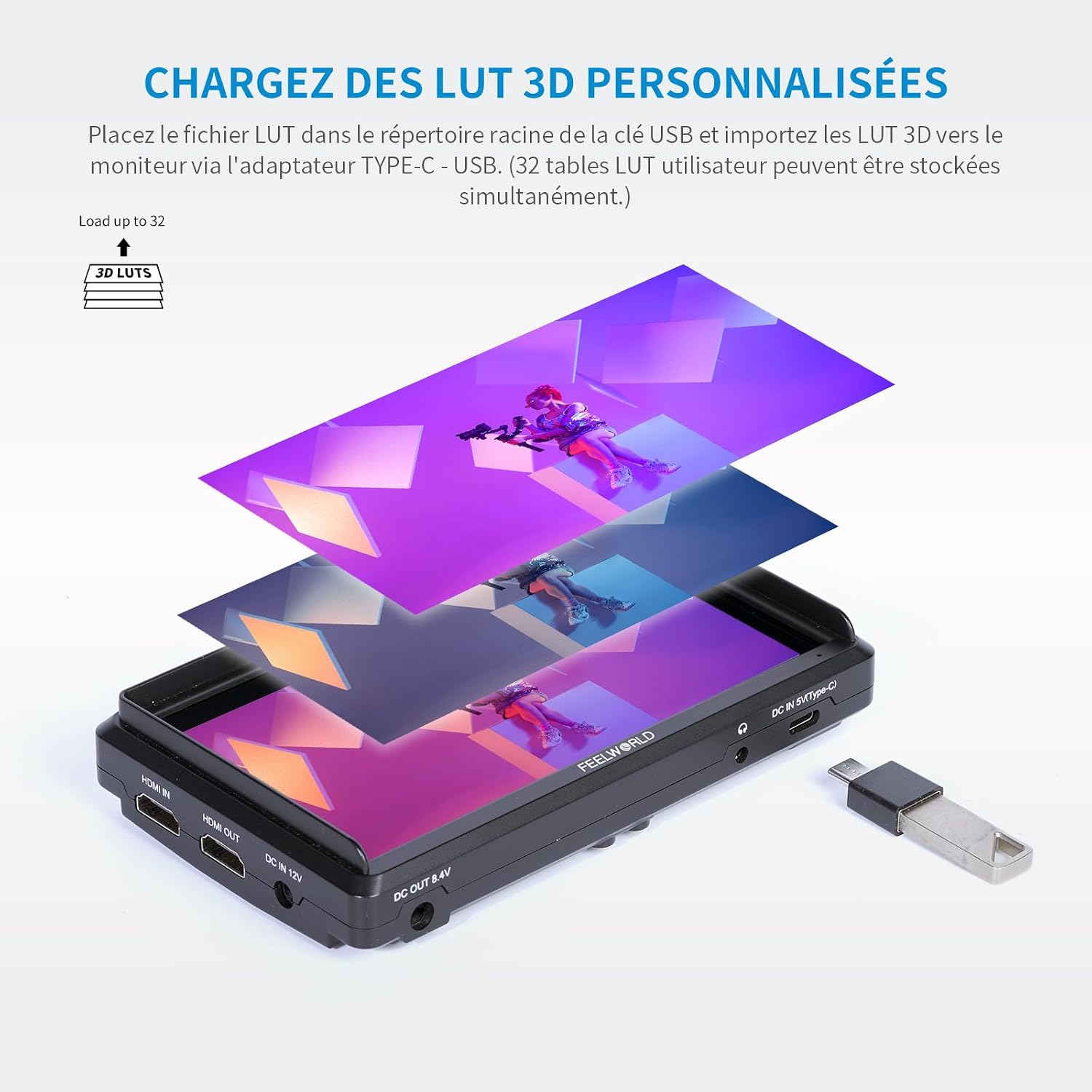
Figure 1.1: Front view of the Feelworld S55 V3 monitor.
2. Product Overview
2.1 Key Features
- Clear 5.5-inch Full HD Display: Features a 1920x1080 native resolution, 450nit brightness, and a 1000:1 contrast ratio for vivid and accurate image reproduction.
- Advanced Color Control: Supports REC.709 3D LUT Log and user 3D LUT uploads (up to 32) for precise color calibration and custom looks.
- Versatile 4K HDMI Connectivity: Equipped with 4K HDMI input and output ports for live signal display and simultaneous output to other monitors.
- Lightweight and Portable Design: Weighs approximately 190 grams, making it ideal for outdoor and handheld applications. Compatible with gimbals and lightweight camera systems.
- Flexible Power Solution: Supports NP-F series batteries (F550 included), Canon LP-E6 batteries (not included), 12V DC input, and 5V Type-C input. Includes a DC power output port to power your camera.
- Professional Video Assist Functions: Includes Histogram, Peaking Filter, False Colors, Exposure, Nine Grid, Embedded Audio, Pixel-to-Pixel, Check Field, Image Flip, Anamorphic Mode, Image Freeze, and Zoom-in.
2.2 Package Contents
The standard package includes the following items:
- Feelworld S55 V3 Monitor
- Micro HDMI Cable
- F550 Battery
- Storage Bag
- Sunshade
- Tilt Arm Mounting Support
- User Manual

Figure 2.1: Included accessories with the S55 V3 monitor.
2.3 Monitor Layout
Familiarize yourself with the ports and buttons on your S55 V3 monitor:
- Top Panel: Control buttons for menu navigation and function shortcuts.
- Left Side: HDMI Input, HDMI Output, DC IN 12V, DC OUT 8.4V, 3.5mm Ear Phone Slot.
- Right Side: Type-C Input (for power).
- Rear: Battery plate for NP-F series or LP-E6 batteries.

Figure 2.2: Side view showing HDMI and power ports.

Figure 2.3: Top control buttons and menu interface.
3. Setup
3.1 Powering the Monitor
The S55 V3 offers multiple power options:
- NP-F Battery: Attach a compatible NP-F series battery (e.g., F550, F750, F970) to the battery plate on the rear of the monitor. An F550 battery is included.
- LP-E6 Battery: The multipurpose battery plate also supports Canon LP-E6 batteries (not included).
- DC 12V Input: Connect the included 12V/1.5A power adapter to the DC IN 12V port.
- Type-C Input: For convenient power, connect a 5V/2A mobile phone charger or power bank to the Type-C port.
- DC Output (8.4V): Use the DC OUT 8.4V port with an optional dummy battery cable to power your DSLR or mirrorless camera directly from the monitor's battery.

Figure 3.1: Flexible power solutions for the monitor.
3.2 Mounting the Monitor
The S55 V3 can be mounted in several ways:
- Camera Hot Shoe: Use the included tilt arm to mount the monitor directly onto your camera's hot shoe or cold shoe mount.
- Gimbal/Stabilizer: The lightweight design and compact size make it suitable for mounting on gimbals or stabilizers using standard mounting points.
- Tripod/Rig: The monitor features 1/4-inch screw threads for attachment to tripods, magic arms, or camera rigs.
Figure 3.2: Monitor mounted on a camera, demonstrating DC output to power the camera.
3.3 Connecting to a Camera
Connect your camera to the monitor using an HDMI cable:
- Ensure both the monitor and camera are powered off.
- Connect one end of the HDMI cable (e.g., Micro HDMI to HDMI) to your camera's HDMI output port.
- Connect the other end of the HDMI cable to the HDMI IN port on the S55 V3 monitor.
- If you need to output the signal to another monitor, connect a second HDMI cable from the HDMI OUT port on the S55 V3 to the input of the secondary monitor.
- Power on your camera, then power on the S55 V3 monitor. The camera's video feed should appear on the monitor.
4. Operating Instructions
4.1 Basic Operation
- Power On/Off: Press and hold the power button (usually located on the top right) for a few seconds to turn the monitor on or off.
- Menu Navigation: Use the 'MENU' button to access the main menu. Use the arrow buttons (left/right) to navigate through options and 'F1/V' or 'F2/Λ' to confirm or adjust settings.
- Function Buttons (F1, F2, F3): These are customizable shortcut buttons. You can assign frequently used functions (e.g., Peaking, False Color, Histogram) to these buttons via the menu.
4.2 Advanced Features
The S55 V3 includes a suite of professional video assist functions:

Figure 4.1: Professional video assist features display.
- Histogram: Displays the tonal distribution of your image, helping to prevent clipping in highlights and shadows.
- Peaking Focus: Highlights sharp edges in your image, assisting with precise manual focusing.
- False Colors: Uses color overlays to represent different exposure levels, aiding in accurate exposure setting.
- Exposure (Zebras): Displays zebra patterns over areas exceeding a set exposure threshold.
- Nine Grid: Provides a compositional guide for framing your shots.
- Embedded Audio: Displays audio levels on screen.
- Pixel-to-Pixel: Shows the image at its native resolution without scaling.
- Check Field: Displays a single color channel (Red, Green, Blue, or Mono) for color calibration.
- Image Flip: Flips the image horizontally or vertically, useful for various mounting orientations.
- Anamorphic Mode: De-squeezes anamorphic footage for proper viewing.
- Image Freeze: Freezes the current frame on the screen.
- Zoom-in: Magnifies a portion of the image for critical focus.
4.3 Color Calibration and 3D LUTs
The S55 V3 supports professional color calibration:
- REC.709 Standard: The monitor is factory calibrated to the REC.709 standard for accurate color reproduction.
- 3D LUT Support: You can upload up to 32 custom 3D LUTs (Look Up Tables) to the monitor. This allows you to preview your footage with specific color grades or log conversions in real-time.
To load 3D LUTs:
- Save your .cube LUT files to the root directory of a USB flash drive.
- Connect the USB drive to the monitor via a Type-C to USB adapter.
- Navigate to the LUT menu option and select 'Import LUT'. Follow the on-screen instructions to load your desired LUTs.

Figure 4.2: Loading custom 3D LUTs via USB.

Figure 4.3: Professional color calibration display.
5. Maintenance
5.1 Cleaning
- Screen: Use a soft, lint-free cloth specifically designed for electronics screens. For stubborn smudges, lightly dampen the cloth with a screen cleaning solution (avoid harsh chemicals or alcohol).
- Body: Wipe the monitor body with a soft, dry cloth. Do not use liquid cleaners directly on the monitor.
5.2 Storage
- When not in use, store the monitor in its protective storage bag or a padded case to prevent scratches and damage.
- Remove batteries if storing for extended periods to prevent leakage.
- Store in a cool, dry place away from direct sunlight and extreme temperatures.
6. Troubleshooting
If you encounter issues with your Feelworld S55 V3 monitor, refer to the following common problems and solutions:
| Problem | Possible Cause | Solution |
|---|---|---|
| Monitor does not power on. | Low or dead battery; power cable not connected; faulty power source. | Charge or replace the battery. Ensure power cables are securely connected. Try a different power source. |
| No video signal. | HDMI cable loose or faulty; incorrect input selected; camera not outputting video; incompatible resolution. | Check HDMI cable connections. Ensure the camera is powered on and outputting video. Verify camera's HDMI output settings. Try a different HDMI cable. |
| Image is distorted or incorrect colors. | Incorrect color settings; active LUT applied; faulty HDMI cable. | Reset monitor color settings to default. Disable any active LUTs. Try a different HDMI cable. |
| Buttons are unresponsive. | Firmware issue; temporary glitch. | Power cycle the monitor (turn off and on). If the issue persists, check the Feelworld website for firmware updates. |
If the problem persists after trying these solutions, please contact Feelworld customer support.
7. Specifications
| Feature | Detail |
|---|---|
| Brand | FEELWORLD |
| Model | S55 V3 (FW572-EU) |
| Screen Size | 5.5 inches |
| Resolution | 1920 x 1080 (Full HD) |
| Brightness | 450 cd/m² |
| Contrast Ratio | 1000:1 |
| Viewing Angle | IPS (Wide Viewing Angle) |
| Input Ports | 1 x HDMI, 1 x DC IN (12V), 1 x Type-C (5V) |
| Output Ports | 1 x HDMI, 1 x DC OUT (8.4V), 1 x 3.5mm Headphone Jack |
| Power Compatibility | NP-F series batteries (F550 included), Canon LP-E6 batteries (not included), DC 12V, Type-C 5V |
| Weight | Approx. 190 grams (monitor only) |
| Product Dimensions (L x W x H) | 14.8 x 1.86 x 8.2 cm |
| Package Dimensions (L x W x H) | 20.9 x 15.8 x 10.4 cm |
| Color | Black |
| Water Resistance | Not waterproof |
| Release Date | January 23, 2019 |
8. Warranty
The Feelworld S55 V3 monitor comes with a 1-year manufacturer's warranty. This warranty covers defects in materials and workmanship under normal use. It does not cover damage caused by misuse, accidents, unauthorized modifications, or improper maintenance. Please retain your proof of purchase for warranty claims.
9. Support
For technical assistance, troubleshooting, or warranty inquiries, please contact Feelworld customer support through their official website or the retailer where you purchased the product. You may also find additional resources, FAQs, and firmware updates on the official Feelworld support page.
Official Website: www.feelworld.cn


