
Introduction
The Logitech Rally Mic Pod Hub is designed to enhance microphone placement flexibility in conference room environments. It serves as an alternative to daisy-chaining multiple mic pods directly, offering three connections for various configurations of mic pods or additional hubs. This design facilitates cleaner cable management and optimized microphone positioning for meeting participants.
What's in the Box
- Logitech Rally Mic Pod Hub
Setup
The Rally Mic Pod Hub allows for flexible microphone deployment. Follow these steps for installation:
- Positioning the Hub: Determine the optimal location for the Mic Pod Hub, typically under the conference table, to minimize visible cabling.
- Connecting Mic Pods: Connect up to three Rally Mic Pods or additional Mic Pod Hubs to the available ports on the main Mic Pod Hub. Use the provided cables to ensure secure connections.
- Cable Management: Utilize under-table mounting hardware (if applicable) and grommets to route cables discreetly, maintaining a clean and organized conference table surface.
- System Integration: Connect the Mic Pod Hub system to your Logitech Rally conference system according to the main system's instructions. The hub itself is USB powered and integrates with the Rally system via USB.
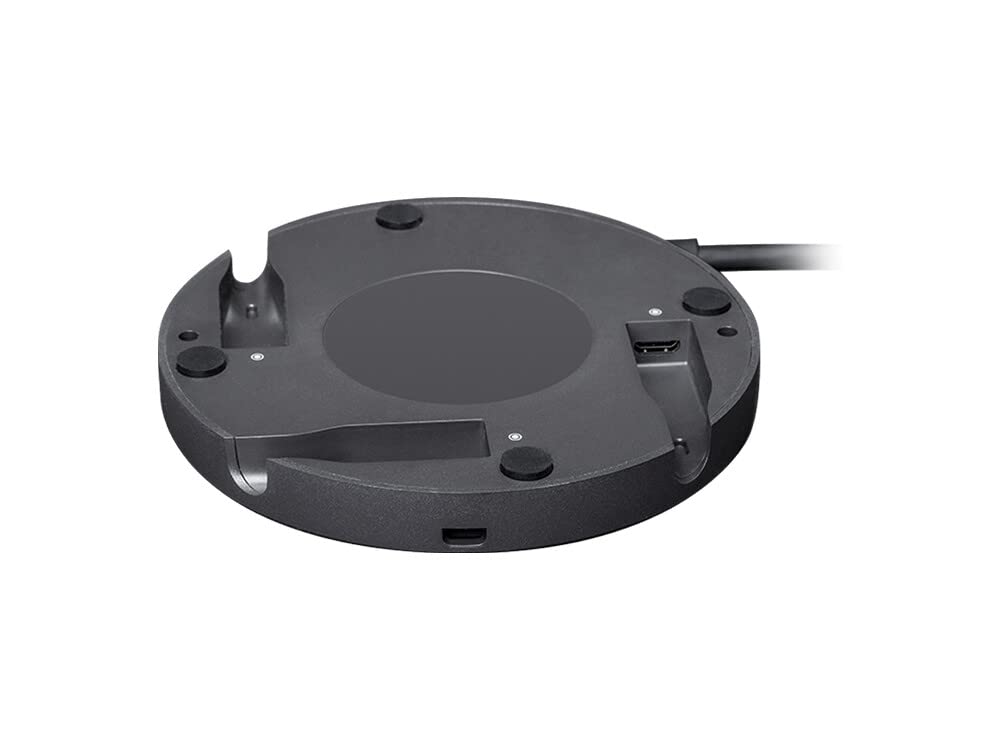
Image: A user interacting with a Logitech Rally Mic Pod on a conference table. The Mic Pod Hub facilitates the connection of such mic pods, allowing for flexible placement and cable management.
Operating
The Rally Mic Pod Hub itself is a passive connectivity device and does not require direct user operation. Its function is to facilitate the connection and communication of Rally Mic Pods with the main Rally system. Operation of the connected mic pods, such as muting, is performed directly on the mic pods themselves.
- Mic Pod Functionality: Each connected Rally Mic Pod features a mute button and indicator light. Press the button to mute or unmute the microphone.
- RightSound™ Technology: The Rally system, in conjunction with the mic pods, utilizes RightSound™ technology for automatic recalibration of the mic matrix, ensuring consistent echo cancellation, noise suppression, and beamforming performance.
Maintenance
The Logitech Rally Mic Pod Hub requires minimal maintenance. Adhere to the following guidelines:
- Cleaning: Use a soft, dry cloth to clean the exterior of the hub. Avoid abrasive cleaners or solvents.
- Cable Integrity: Periodically inspect all connected cables for any signs of wear or damage. Replace damaged cables immediately to ensure optimal performance.
- Environmental Conditions: Ensure the hub is operated within recommended temperature and humidity ranges to prevent damage.
Troubleshooting
If you encounter issues with your Rally Mic Pod Hub, consider the following troubleshooting steps:
- No Audio from Mic Pods:
- Verify all cables connecting the mic pods to the hub, and the hub to the Rally system, are securely seated.
- Ensure the mic pods are not muted (check the indicator light on the mic pod).
- Confirm the Rally system is properly configured and recognized the connected mic pods.
- Intermittent Audio:
- Check for loose cable connections.
- Ensure there are no sources of electromagnetic interference near the cables or hub.
- Hub Not Recognized:
- Ensure the hub is correctly connected to the Rally system and receiving power (USB powered).
- Refer to the Logitech Rally system's manual for specific connectivity requirements and troubleshooting.
If problems persist, contact Logitech Support for further assistance.
Specifications
| Feature | Detail |
|---|---|
| Brand | Logitech |
| Model Name | Rally Mic Pod Hub |
| Model Number | 939-001647 |
| Connectivity Technology | Proprietary (for Mic Pods), USB (for system integration/power) |
| Connector Type | Proprietary for Mic Pods, USB for system |
| Color | Black |
| Item Dimensions | 4 x 4 x 0.6 inches (10.16 x 10.16 x 1.52 cm) |
| Item Weight | 240 Grams (0.53 lbs) |
| Enclosure Material | Metal |
| Recommended Uses | Conference rooms, meeting rooms |
| Warranty | 2-Year Limited Hardware Warranty |
Warranty Information
This Logitech Rally Mic Pod Hub is covered by a 2-Year Limited Hardware Warranty. This warranty covers defects in materials and workmanship under normal use. For full terms and conditions, please refer to the official Logitech warranty documentation or visit the Logitech support website.
Support
For technical assistance, product information, or warranty claims, please visit the official Logitech support website:
You may also find helpful resources, FAQs, and driver downloads on their website.


