
1. Introduction
The ELKRON MMZ01 is an inertial sensor designed to detect vibrations and movements, typically used as a component in security and alarm systems. It features durable, thick gold-plated contacts for reliable performance. This manual provides essential information for the proper installation, operation, and maintenance of your MMZ01 sensor.
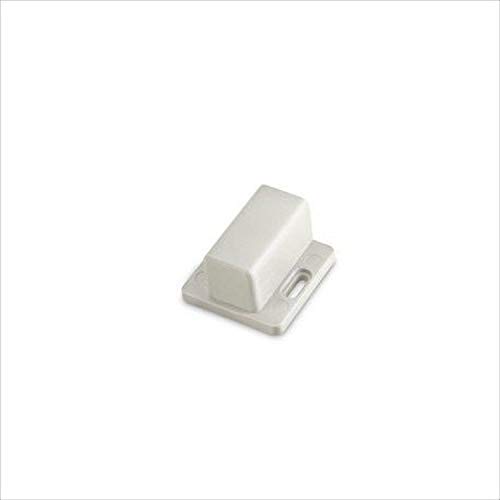
Figure 1: Front view of the ELKRON MMZ01 Inertial Sensor. This image shows the compact design of the sensor, highlighting its robust casing and the general appearance of the device.
2. Setup and Installation
Proper installation is crucial for the optimal performance of the MMZ01 inertial sensor. Ensure the sensor is mounted on a stable surface that is likely to transmit vibrations effectively.
2.1 Mounting Options
The MMZ01 sensor offers flexible mounting solutions:
- Screw Mounting: For a permanent and secure installation, use appropriate screws to fix the sensor to the desired surface. Ensure the screws are tightened sufficiently to prevent movement of the sensor itself, which could affect detection accuracy.
- Double-Sided Adhesive Mounting: For less permanent installations or surfaces where drilling is not feasible, high-quality double-sided adhesive can be used. Ensure the surface is clean, dry, and smooth before applying the adhesive for maximum adhesion.
2.2 Placement Considerations
- Mount the sensor on surfaces prone to vibration during an intrusion attempt, such as windows, doors, or walls.
- Avoid mounting on surfaces that experience constant, non-threatening vibrations (e.g., near heavy machinery or high-traffic areas) to prevent false alarms.
- Ensure the sensor is securely attached to maximize its sensitivity to vibrations.
2.3 Power and Connectivity
The MMZ01 sensor does not require batteries. It is designed to be wired into a compatible alarm or security system. Connect the sensor's contacts to the appropriate input terminals of your security panel according to the panel's instructions. Ensure all connections are secure and properly insulated.
3. Operating Instructions
The ELKRON MMZ01 inertial sensor operates by detecting vibrations or impacts on the surface it is mounted to. When a vibration exceeding a pre-set threshold is detected, the sensor's internal contacts change state, triggering an alarm signal to the connected security system.
3.1 Sensor Functionality
- The sensor is always active when connected to a powered security system.
- It is designed to detect attempts to force entry, break glass, or other physical disturbances.
- The sensitivity of the sensor is typically adjusted via the security system's control panel or through internal jumpers/potentiometers on the sensor itself (refer to specific model documentation if available for adjustment options).
3.2 Integration with Security System
Once installed and wired, the MMZ01 becomes part of your security system's detection zones. When the system is armed, any significant vibration detected by the MMZ01 will activate the alarm. Consult your security system's manual for details on configuring zones and alarm responses.
4. Maintenance
Regular maintenance ensures the longevity and reliable operation of your ELKRON MMZ01 inertial sensor.
- Cleaning: Periodically wipe the sensor's exterior with a soft, dry cloth to remove dust and dirt. Do not use abrasive cleaners or solvents, as these can damage the casing or internal components.
- Connection Check: Annually, inspect the wiring connections to ensure they are secure and free from corrosion. Loose connections can lead to intermittent operation or false alarms.
- Mounting Integrity: Verify that the sensor remains firmly attached to its mounting surface. A loose sensor may not detect vibrations effectively or could generate false alarms.
- Functionality Test: Test the sensor's functionality periodically by gently tapping the protected surface (e.g., window pane, door frame) while the security system is armed (in test mode, if available) to ensure it triggers an alarm.
5. Troubleshooting
If you experience issues with your MMZ01 inertial sensor, refer to the following troubleshooting steps:
- Sensor Not Triggering:
- Check all wiring connections to ensure they are secure and correctly terminated.
- Verify that the sensor is firmly mounted to the surface. A loose sensor may not pick up vibrations.
- Ensure the security system zone connected to the sensor is armed and functioning correctly.
- If adjustable, check the sensor's sensitivity settings. It might be set too low.
- False Alarms:
- Check for external sources of vibration near the sensor (e.g., heavy traffic, construction, loose objects).
- Ensure the sensor is securely mounted and not vibrating due to its own loose attachment.
- If adjustable, reduce the sensor's sensitivity setting.
- Intermittent Operation:
- Inspect wiring for any damage, fraying, or loose connections.
- Ensure the power supply to the security system is stable.
If problems persist after following these steps, contact your security system installer or ELKRON customer support.
6. Specifications
| Feature | Detail |
|---|---|
| Model | MMZ01 |
| Brand | ELKRON |
| Type | Inertial Sensor |
| Contacts | Gold-plated, thick |
| Mounting Options | Screw or Double-sided Adhesive |
| Dimensions (H x W x D) | 34 x 34 x 21 mm |
| Batteries Required | No |
| Batteries Included | No |
7. Warranty and Support
7.1 Warranty Information
Specific warranty details for the ELKRON MMZ01 inertial sensor are typically provided at the point of purchase or by the manufacturer. Please retain your proof of purchase. For detailed warranty terms and conditions, refer to the documentation provided with your security system or contact ELKRON directly.
7.2 Technical Support
For technical assistance, installation queries, or troubleshooting beyond the scope of this manual, please contact your authorized ELKRON dealer or the installer of your security system. You may also visit the official ELKRON website for support resources and contact information.