
Introduction
The Soundmaster UR230WE is a versatile FM-PLL alarm clock designed to enhance your daily routine with its multi-functional features. It combines a digital radio with 10 preset stations, a multicolor LED night light, dual alarm capabilities, and a unique sunrise simulation. This manual provides comprehensive instructions for setting up, operating, and maintaining your UR230WE to ensure optimal performance and user satisfaction.
Safety Instructions
- Read all instructions carefully before using the device.
- Keep this manual for future reference.
- Do not expose the device to rain, moisture, or extreme temperatures.
- Avoid placing the device near heat sources or in direct sunlight.
- Ensure proper ventilation around the device.
- Use only the provided power adapter.
- Do not attempt to disassemble or repair the device yourself. Refer all servicing to qualified personnel.
- Keep out of reach of children.
Package Contents
Please check that all items listed below are included in your package:
- Soundmaster UR230WE Alarm Clock
- AC Power Adapter
- User Manual (this document)
Note: A 1 x CR2032 backup battery is required but not included in the package.
Product Overview
Front View and Display

Figure 1: Front view of the Soundmaster UR230WE, showing the cylindrical design and the clear LED time display at the base.
Top Panel Controls

Figure 2: Top view illustrating the arrangement of control buttons for various functions such as alarm settings, radio tuning, and light control.
LED Light Features
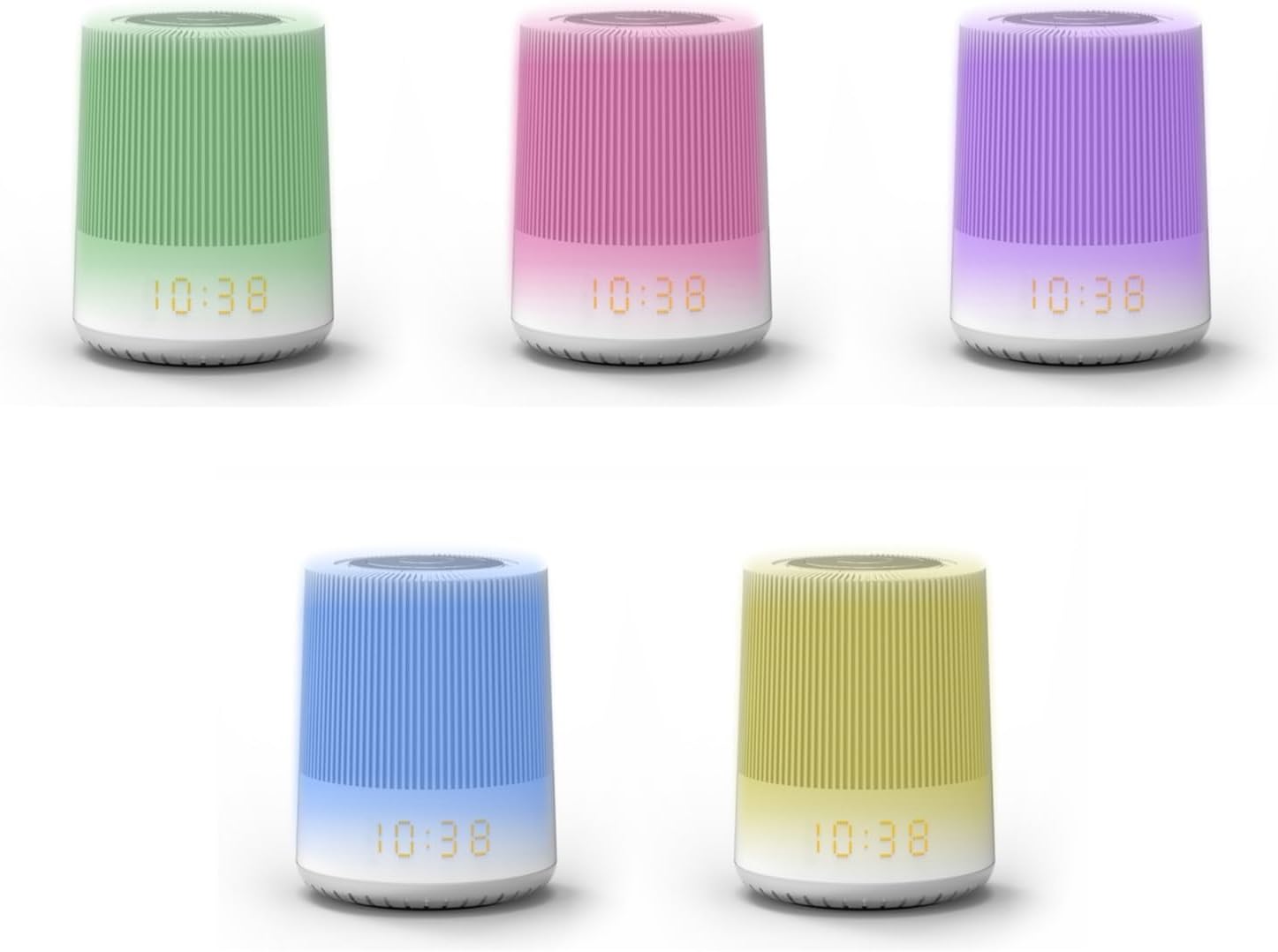
Figure 3: The UR230WE showcasing its multicolor LED night light capabilities, with examples of different ambient light colors.
Key Components:
- LED Display: Clear digital time display with 3-level dimmer.
- Control Buttons: Located on the top panel for easy access to settings, radio, alarm, and light functions.
- LED Light Panel: The main body of the device illuminates with selectable colors and adjustable brightness.
- Integrated Speaker: For radio playback, alarm sounds, and natural sounds.
- Power Input: Located at the rear/bottom for the AC adapter.
- Battery Compartment: For CR2032 backup battery (not included).
Setup
- Power Connection:
Connect the provided AC power adapter to the DC input port on the device and then plug it into a standard wall outlet. The display will light up.
- Backup Battery Installation (Optional but Recommended):
Locate the battery compartment at the bottom of the unit. Open the cover and insert one CR2032 battery (not included), ensuring correct polarity (+/-). This battery preserves time and alarm settings during power outages.
- Initial Time Setting:
Upon first power-up or after a power outage without backup battery, the time may need to be set. Refer to the "Setting Time and Date" section in the Operating chapter for detailed instructions.
Operating Instructions
Setting Time and Date
- Press and hold the TIME SET button. The hour digits will flash.
- Use the +/- buttons to adjust the hour.
- Press TIME SET again to confirm the hour and move to minutes.
- Use the +/- buttons to adjust the minutes.
- Press TIME SET to save the time.
- (If applicable) Follow similar steps to set the date if the model supports it.
Radio FM-PLL Operation
- Turning On/Off: Press the RADIO button to turn the FM radio on or off.
- Automatic Scan and Preset: Press and hold the SCAN button to automatically scan and save available FM stations (up to 10 presets).
- Manual Tuning: Use the +/- buttons to manually tune to a specific frequency.
- Recalling Presets: Press the PRESET button repeatedly to cycle through saved stations.
- Volume Control: Use the VOLUME +/- buttons to adjust the radio volume.
LED Night Light and Mood Lamp
- Turning On/Off: Press the LIGHT button to turn the LED light on or off.
- Changing Colors: With the light on, press the LIGHT button repeatedly to cycle through different colors (e.g., white, green, pink, purple, blue, yellow) or a color-changing mode.
- Adjusting Brightness: Press and hold the LIGHT button, then use the +/- buttons to adjust the brightness level. Release the button when desired brightness is reached.
- White Reading Lamp: A dedicated white light setting is available for reading.
Alarm Functions (Dual Alarm)
- Setting Alarm 1/2:
- Press the ALARM 1 or ALARM 2 button. The alarm time will flash.
- Use the +/- buttons to set the desired alarm hour.
- Press the respective ALARM button again to confirm the hour and set minutes.
- Use the +/- buttons to set the desired alarm minutes.
- Press the ALARM button again to select the wake-up source (Radio, Nature Sounds, Buzzer).
- Press the ALARM button one last time to save and activate the alarm. An alarm icon will appear on the display.
- Weekend Function: Activate weekend mode to disable alarms on Saturdays and Sundays. Refer to specific button on device or combination.
- Snooze Function: When the alarm sounds, press the SNOOZE button (often a large button on top) to temporarily silence the alarm for a few minutes. The alarm will sound again after the snooze period.
- Stopping Alarm: To turn off the alarm for the day, press any button other than SNOOZE. The alarm icon will remain, indicating it will sound again the next day.
- Disabling Alarm Permanently: Press the respective ALARM 1 or ALARM 2 button repeatedly until the alarm icon disappears from the display.
Sunrise Simulation
The sunrise simulation feature gradually increases the light intensity before your set alarm time, mimicking a natural sunrise to help you wake up more gently. This feature is typically activated when setting an alarm with a light wake-up option.
Natural Sounds
The UR230WE includes 6 different natural sounds that can be used as a wake-up sound or for relaxation. Select these sounds during the alarm setting process or by pressing a dedicated NATURE SOUNDS button if available.
Sleep Timer
The sleep timer allows you to fall asleep to radio or natural sounds, which will automatically turn off after a set period. Press the SLEEP button repeatedly to cycle through available sleep timer durations (e.g., 15, 30, 60, 90 minutes, OFF).
Display Dimmer
Adjust the brightness of the LED time display using the DIMMER button or by pressing and holding the LIGHT button and using the +/- buttons. There are typically 3 levels of brightness.
Maintenance
- Cleaning: Wipe the device with a soft, dry cloth. Do not use abrasive cleaners or solvents.
- Battery Replacement: If the backup battery is installed and the time/settings are not retained during a power outage, replace the CR2032 battery. Ensure correct polarity.
- Storage: If storing the device for an extended period, disconnect it from power and remove the backup battery. Store in a cool, dry place.
Troubleshooting
| Problem | Possible Cause | Solution |
|---|---|---|
| Device does not power on. | Power adapter not connected or faulty outlet. | Ensure the power adapter is securely connected to the device and a working power outlet. Try a different outlet. |
| Display is dim or off. | Dimmer setting is too low or display is off. | Adjust the display brightness using the DIMMER button. |
| Radio reception is poor. | Weak signal or interference. | Adjust the position of the device. Avoid placing near other electronic devices that may cause interference. Try manual tuning. |
| Alarm does not sound. | Alarm not activated, set incorrectly, or weekend mode is on. | Verify alarm settings (time, source, activation). Check if weekend mode is enabled. Ensure volume is not set to zero for radio/nature sound alarms. |
| Time/settings reset after power outage. | Backup battery is missing or depleted. | Install a new CR2032 backup battery or replace the existing one. |
| Difficulty with setting functions (e.g., alarm, color). | Complex button combinations or sequence. | Refer to the "Operating Instructions" section for precise steps. Practice the sequence a few times. |
Specifications
| Feature | Specification |
|---|---|
| Brand | Soundmaster |
| Model Number | UR230 |
| Product Dimensions (L x W x H) | 10 x 10 x 14.5 cm |
| Item Weight | 115 grams |
| Material | Plastic |
| Voltage | 3 Volts |
| Display Type | Digital LED (Monochromatic) |
| Radio Tuner Type | Digital FM-PLL |
| Preset Stations | 10 |
| Alarm Type | Dual Alarm (Radio, Nature Sounds, Buzzer) |
| Backup Battery | 1 x CR2032 (not included) |
| Special Features | Portable, LED Night Light (Multicolor, Adjustable Brightness), Sunrise Simulation, Sleep Timer, Snooze Function, Weekend Mode |
Warranty and Support
For warranty information and customer support, please refer to the warranty card included with your purchase or contact Soundmaster customer service directly. Information regarding the availability of spare parts is currently unavailable.
For further assistance or technical inquiries, please visit the official Soundmaster website or contact their support channels.


