
1. Introduction
This manual provides essential information for the safe and effective operation of your VOLTCRAFT Digital Insulation Tester ET-200. Please read these instructions thoroughly before using the device and retain them for future reference. The ET-200 is designed for measuring insulation resistance, DC/AC voltage, and standard resistance.

Image 1.1: The VOLTCRAFT Digital Insulation Tester ET-200. This image shows the front view of the device, highlighting its display and control buttons.
2. Safety Information
Always observe the following safety precautions to prevent electric shock, injury, or damage to the device:
- Do not use the device if it appears damaged or is operating abnormally.
- Ensure test leads are in good condition and properly connected before each use.
- Do not apply voltage exceeding the maximum rated input of 600V CAT IV.
- Always disconnect power to the circuit under test before making connections for insulation resistance measurements.
- Wear appropriate personal protective equipment (PPE), such as insulated gloves and safety glasses.
- The red warning light indicates high voltage presence during measurement. Exercise extreme caution.
3. Delivery Content
Verify that all items listed below are present in the packaging:
- VOLTCRAFT Digital Insulation Tester ET-200
- 6 Mignon batteries (AA, LR6)
- 2 Safety measuring leads
- 2 Safety test probes with CAT III/CAT IV cover caps
- 2 Safety alligator clips
- Storage bag
- Operating instructions (this manual)
4. Setup
4.1. Battery Installation
- Ensure the device is powered off.
- Locate the battery compartment cover on the rear of the device.
- Use a screwdriver to open the battery compartment.
- Insert 6 AA batteries, observing the correct polarity (+/-) as indicated inside the compartment.
- Replace the battery compartment cover and secure it with the screw.
4.2. Connecting Test Leads
Connect the safety measuring leads to the appropriate input jacks on the tester. Ensure a secure connection.
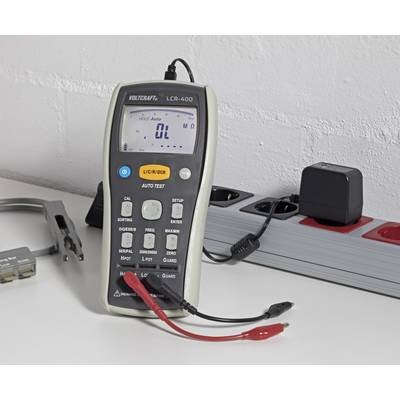
Image 4.1: The ET-200 with test leads connected. This image illustrates how to properly connect the measuring leads to the device's input terminals.
5. Operating Instructions
5.1. Powering On/Off
Press the POWER button to turn the device on or off.
5.2. Selecting Measurement Mode and Test Voltage
Use the mode selection buttons to choose between Insulation Resistance, Voltage (AC/DC), or Resistance measurement. For insulation resistance, select the desired test voltage (50V, 100V, 250V, 500V, or 1000V) using the dedicated voltage selection buttons.
5.3. Performing Insulation Resistance Measurement
- Ensure the circuit under test is de-energized and safely discharged.
- Connect the test leads to the circuit points where insulation resistance is to be measured.
- Select the appropriate test voltage.
- Press and hold the TEST button to initiate the measurement. The red warning light will illuminate.
- Read the insulation resistance value on the display.
- Release the TEST button to stop the measurement and safely discharge the circuit.
5.4. Data Hold Function
Press the HOLD button to freeze the current reading on the display. Press again to release.
5.5. Lock Function for Continuous Measurement
For continuous insulation resistance measurement, press the LOCK button after initiating a test. The measurement will continue until the LOCK button is pressed again or the TEST button is released.
5.6. Polarization Index (PI) and Dielectric Absorption Ratio (DAR) Calculation
The ET-200 can calculate PI and DAR. Refer to the on-screen prompts or specific menu options to initiate these tests. These functions require continuous measurement over a set period.
5.7. Setting Test Time
The device allows presetting the test duration for continuous measurements. Access this setting through the menu to define the desired test time.
5.8. Comparison Function (Pass/Fail)
Set a threshold value for insulation resistance. The comparison function will indicate a pass or fail result based on the measured value against the set threshold.
6. Maintenance
6.1. Cleaning
Wipe the device with a dry, soft cloth. Do not use abrasive cleaners or solvents. Ensure no moisture enters the device.
6.2. Battery Replacement
Replace batteries when the low battery indicator appears on the display. Follow the battery installation steps in Section 4.1. Remove batteries if the device will not be used for an extended period to prevent leakage.
6.3. Storage
Store the device in its storage bag in a cool, dry place, away from direct sunlight and extreme temperatures.
7. Troubleshooting
| Problem | Possible Cause | Solution |
|---|---|---|
| Device does not power on. | Dead or incorrectly installed batteries. | Check battery polarity; replace batteries. |
| No reading or unstable reading. | Loose test lead connection; open circuit; test leads damaged. | Ensure leads are securely connected; check circuit continuity; replace damaged leads. |
| Incorrect measurement values. | Incorrect mode selected; external interference. | Verify correct measurement mode and test voltage; move away from strong electromagnetic fields. |
| Red warning light stays on after test. | Circuit not fully discharged. | Ensure the device has completed its discharge cycle. Do not touch test leads until light is off. |
8. Technical Specifications
- Test Voltages: 50V, 100V, 250V, 500V, 1000V
- Insulation Resistance Measurement: Up to 20 GΩ
- Resistance Measurement: 0.01 Ω - 20 kΩ
- DC/AC Voltage Measurement: Up to 600V (CAT IV)
- Power Source: 6 x AA batteries
- Item Weight: Approximately 640 Grams (1.41 pounds)
- Dimensions (L x W x H): 8.86 x 4.06 x 2.32 inches
- Operating Temperature: Refer to product label for specific range
- Safety Rating: CAT IV 600V
9. Warranty and Support
For warranty information, technical support, or service inquiries, please refer to the warranty card included with your product or visit the official Voltcraft website. Keep your purchase receipt as proof of purchase.
Manufacturer: CEI Conrad Electronic International (HK) Ltd.


