
Introduction
Thank you for choosing the kwmobile Foldable LED Desk Lamp. This manual provides essential information for the safe and efficient use of your new lamp. Please read these instructions carefully before use and retain them for future reference.

Image: The kwmobile Foldable LED Desk Lamp, showcasing its sleek, minimalist design and extended form, ready for use on a desk.
Package Contents
Please check the package for the following items:
- 1 x kwmobile Foldable LED Desk Lamp
- 1 x Micro-USB Charging Cable (1 meter)
- 1 x Self-adhesive Wall Bracket
- 1 x Carrying Case/Bag
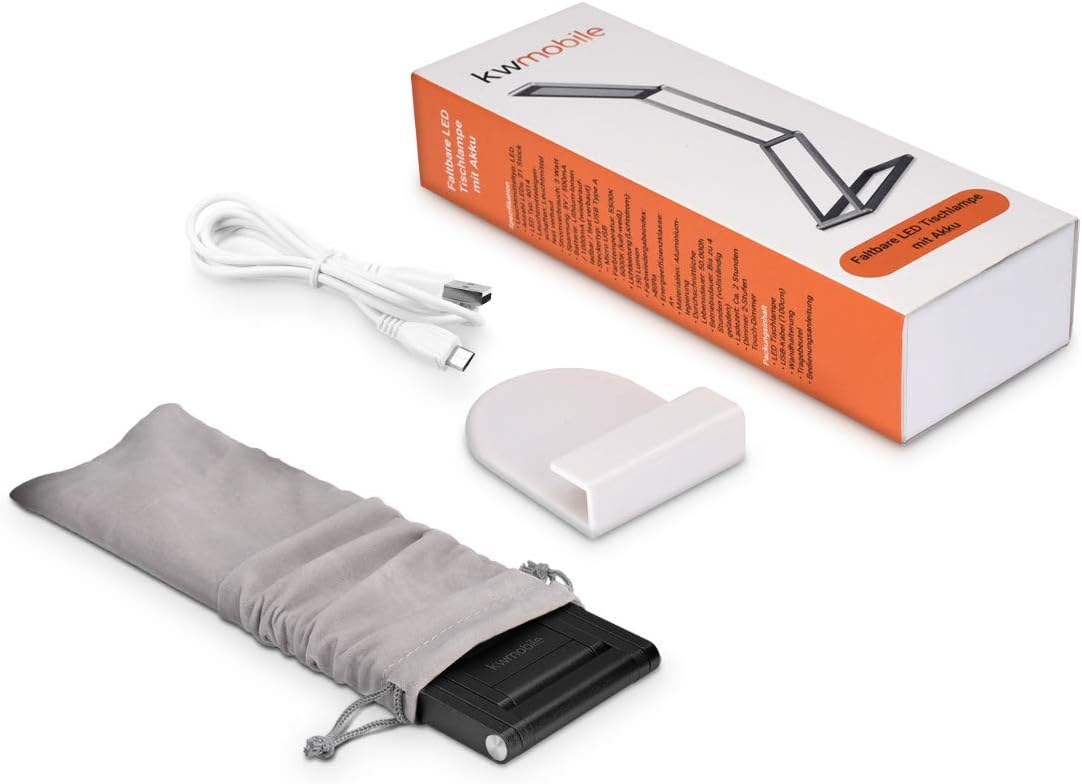
Image: All components included with the kwmobile Foldable LED Desk Lamp: the lamp itself, a USB charging cable, a wall mount, and a soft carrying pouch.
Product Overview
The kwmobile Foldable LED Desk Lamp features a compact, adjustable design with integrated controls for ease of use.
- Touch Dimmer: Located on the top of the lamp for power and brightness adjustment.
- Micro USB Charging Port: For recharging the internal battery.
- 360° Rotating Hinges: Allow for versatile positioning and folding.

Image: A detailed view of the lamp, pointing out the touch-sensitive dimmer control on the top and the Micro USB charging port on the side.
Setup
Initial Charging
Before first use, fully charge the lamp. Connect the supplied Micro-USB cable to the lamp's charging port and to a compatible USB power source (e.g., wall adapter, computer USB port, power bank). A full charge typically takes 2 to 3 hours.
Positioning the Lamp
The lamp features 360° rotating hinges, allowing for various configurations. Gently adjust the lamp arms to achieve your desired angle and height. The stable base supports multiple positions for reading, studying, or general illumination.

Image: A collage showing the kwmobile lamp in several different folded and extended positions, illustrating its flexible design.
Operating Instructions
Power On/Off and Brightness Adjustment
- To turn the lamp ON, gently tap the touch dimmer located on the top of the lamp.
- To cycle through the 3 brightness settings (low, medium, high), tap the touch dimmer repeatedly.
- To turn the lamp OFF, tap the touch dimmer after the highest brightness setting.
Folding and Adjusting Angles
The lamp's design allows it to be folded flat for portability or adjusted to various angles for optimal lighting. Carefully manipulate the hinged sections to achieve the desired orientation. Avoid excessive force to prevent damage to the hinges.
Wall Mounting
The included self-adhesive wall bracket allows for wall-mounted use. Ensure the chosen surface is clean and dry before attaching the bracket. Once the bracket is securely in place, the lamp can be hung from it, providing an alternative lighting solution.
Video: This video demonstrates the kwmobile Foldable LED Desk Lamp's adjustable angles, 3-level touch dimmer, and rechargeable feature, showing its versatility in various settings like a desk or wall-mounted as a reading light.
Charging
The lamp is powered by a built-in rechargeable battery. When the light dims or does not turn on, it indicates a low battery. Connect the Micro-USB cable to the lamp and a USB power source. The lamp can operate for up to 3 hours on a full charge, depending on the brightness setting used. It requires 2 to 3 hours for a complete charge.
Maintenance
Cleaning
To clean the lamp, ensure it is turned off and disconnected from any power source. Wipe the surface with a soft, dry cloth. Do not use abrasive cleaners or solvents, as these may damage the finish.
Storage
When not in use, fold the lamp into its compact form and store it in the provided carrying case/bag to protect it from dust and damage. Store in a cool, dry place.
Troubleshooting
- Lamp does not turn on: Ensure the battery is charged. Connect the lamp to a power source using the USB cable.
- Light is dim: The battery may be low. Recharge the lamp.
- Lamp does not hold position: Ensure the hinges are properly aligned and not overly loose. While designed for flexibility, extreme angles or heavy vibrations may affect stability.
- Charging issue: Verify the USB cable and power source are functioning correctly. Try a different cable or adapter if necessary.
Specifications
| Feature | Detail |
|---|---|
| Brand | kwmobile |
| Model Number | 40590.01 |
| Light Source Type | LED |
| Brightness | 150 Lumens |
| Color Temperature | 6000 Kelvin |
| Wattage | 2.2 Watts |
| Power Source | Battery Powered (1 Lithium Metal battery included) |
| Voltage | 5 Volts |
| Charging Time | 2-3 hours |
| Operating Time (full charge) | Up to 3 hours |
| Control Method | Touch (3 brightness settings) |
| Material | Aluminum (Base), Plastic (Shade) |
| Product Dimensions (folded) | 20 x 6.6 x 1 cm (7.87"H x 2.6"W x 0.39"D) |
| Item Weight | 395 Grams (13.9 ounces) |
| Special Feature | Dimmable, Foldable, Portable, Cordless |
| Indoor/Outdoor Usage | Indoor |

Image: A diagram illustrating the compact dimensions of the kwmobile lamp when folded, with measurements in centimeters.
Warranty and Support
For warranty information or technical support, please refer to the kwmobile official website or contact their customer service directly. Keep your purchase receipt as proof of purchase.