Introduction
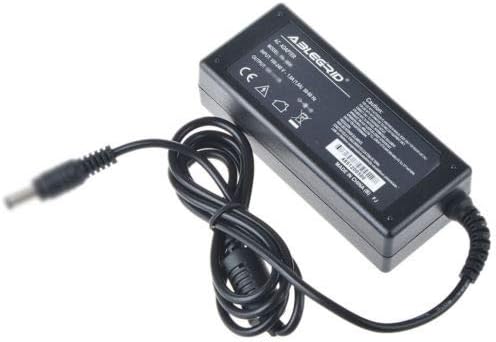
This manual provides essential instructions for the safe and efficient use of your GreatPowerDirect Generic AC Adapter, model GPD080926-11218. This adapter is designed to provide power to compatible devices, specifically the Lepy LP-2024A+ Hi-Fi Stereo Class-T Digital Amplifier. Please read this manual thoroughly before use and retain it for future reference.
Safety Information
To ensure safe operation and prevent damage, observe the following precautions:
- Use only with devices that match the adapter's voltage and current specifications.
- Do not expose the adapter to water, moisture, or extreme temperatures.
- Avoid dropping or subjecting the adapter to strong impacts.
- Do not attempt to open or modify the adapter. There are no user-serviceable parts inside.
- Ensure the power outlet is easily accessible and unplug the adapter during electrical storms or when unused for long periods.
- Keep out of reach of children.
Package Contents
Verify that all items are present in the package:
- 1 x GreatPowerDirect AC Adapter (Model: GPD080926-11218)
- 1 x AC Power Cord (for connecting to wall outlet)

Setup
Follow these steps to connect your AC adapter:
- Connect the AC Power Cord: Insert the female end of the AC power cord firmly into the input port on the AC adapter unit.
- Connect to Device: Plug the barrel connector output cable from the AC adapter into the DC input jack of your Lepy LP-2024A+ Hi-Fi Stereo Class-T Digital Amplifier. Ensure a secure connection.
- Connect to Power Outlet: Plug the male end of the AC power cord into a standard, grounded electrical wall outlet.
- Verify Power: Once connected, your amplifier should receive power. Refer to your amplifier's manual for specific power indicator lights or startup procedures.
Operating
The AC adapter operates automatically once connected to a power source and a compatible device. It converts the AC wall current to the appropriate DC voltage required by your Lepy LP-2024A+ amplifier.
- Ensure the adapter is always connected to a stable power source.
- Do not overload the adapter by connecting it to devices requiring more power than its specified output.
- Disconnect the adapter from the wall outlet when not in use for extended periods to conserve energy and for safety.
Maintenance
Proper care will extend the life of your AC adapter:
- Cleaning: Disconnect the adapter from all power sources before cleaning. Use a soft, dry cloth to wipe the exterior. Do not use liquid cleaners or solvents.
- Storage: Store the adapter in a cool, dry place away from direct sunlight and extreme temperatures. Avoid tightly coiling the cables to prevent damage.
- Inspection: Periodically inspect the cables and connectors for any signs of wear, fraying, or damage. If damage is observed, discontinue use immediately.
Troubleshooting
If you encounter issues with your AC adapter, refer to the following common problems and solutions:
| Problem | Possible Cause | Solution |
|---|---|---|
| No power to device |
|
|
| Adapter feels hot |
|
|
| Intermittent power |
|
|
Specifications
Technical specifications for the GreatPowerDirect AC Adapter (Model: GPD080926-11218):
- Model Number: GPD080926-11218
- Brand: GreatPowerDirect
- Input: 100-240V AC, 50/60Hz (Typical for universal AC adapters; specific values not provided in product data)
- Output: (Specific output voltage/current not provided in product data; refer to adapter label for exact values)
- Connector Type: Barrel connector
- Power Source: Corded Electric
- Item Weight: 8 ounces
- Certifications: CE
Note: For precise input/output specifications, please refer to the label on the adapter unit itself.

Warranty and Support
This product is covered by a standard manufacturer's warranty. For specific warranty terms and conditions, please refer to the documentation provided with your purchase or contact GreatPowerDirect customer support. If you experience any issues not covered in the troubleshooting section, please reach out to the seller or manufacturer for assistance.


