
1. Introduction
The SAMVIX GLASBA 64GB Kosher MP3 Player is a compact and versatile device designed for portable audio playback. It features Bluetooth connectivity, a vibrant display, and a range of useful functions to enhance your listening experience.
Key Features:
- Compact Design: Easy to carry, ideal for on-the-go use.
- 1.8-inch LCD Color Display: Clear visibility, even in bright conditions.
- Long Battery Life: Up to 40 hours of playback on a full charge with the built-in lithium-ion battery.
- Alarm and Recording: Exclusive vibrating alarm function and one-button recording.
- Clip-on Design: Convenient for sports and active lifestyles.
- Bluetooth Connectivity: Connects wirelessly to compatible headphones or earbuds.
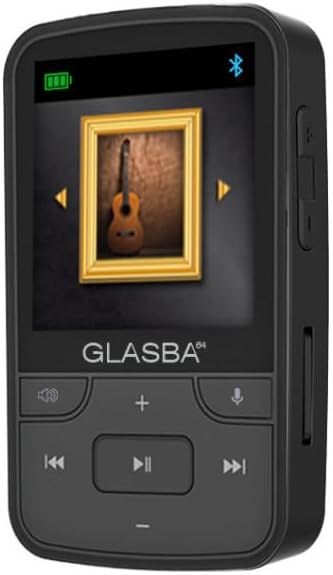
This image shows the front view of the SAMVIX GLASBA 64GB MP3 Player, highlighting its compact size and button layout.
2. Setup
2.1. Charging the Device
Before first use, fully charge your SAMVIX GLASBA MP3 Player. Use the provided USB-C cable to connect the device to a computer or a compatible USB wall adapter. The battery indicator on the screen will show charging progress.
2.2. Memory and File Transfer
The device comes with 64GB of internal storage. You can transfer your audio files (MP3, WMA, WAV, APE, FLAC, OGG, AAC) directly to the player. To transfer files:
- Connect the MP3 player to your computer using the supplied USB-C cable.
- The device will appear as a removable disk drive on your computer.
- Drag and drop your desired audio files into the appropriate folders on the MP3 player.
- Once files are transferred, safely eject the device from your computer before disconnecting the cable.

This image displays the MP3 player alongside its packaging, illustrating the product's presentation.
3. Operating the Device
3.1. Power On/Off
- To Power On: Press and hold the Power button (located on the side) until the screen illuminates.
- To Power Off: Press and hold the Power button until the device shuts down.
3.2. Navigation and Controls
The device features a 1.8-inch LCD screen and physical buttons for navigation:
- Directional Buttons: Use the arrow buttons (Up, Down, Left, Right) to navigate through menus and options.
- Play/Pause Button: The central button is used to select options and control playback.
- Volume Buttons: Located on the side of the device, use these to adjust the audio volume.
- Menu/Back Button: Used to return to the previous screen or access context menus.
3.3. Music Playback
- From the main menu, select "Music".
- Browse your music by All Songs, Artists, Albums, Genres, or Playlists.
- Select a song to begin playback.
- During playback, you can use the directional buttons to skip tracks or fast-forward/rewind.
- To enable Shuffle or Repeat modes, access the playback options menu (usually by pressing a dedicated menu button during playback).
3.4. Bluetooth Connectivity
- From the main menu, select "Bluetooth".
- Turn Bluetooth "On".
- The device will search for nearby Bluetooth audio devices.
- Select your desired device from the list to pair.
3.5. FM Radio
Plug in wired headphones (not included) to act as an antenna. From the main menu, select "FM Radio" to scan for and listen to radio stations.
3.6. Recorder
The device features a one-button recording function. From the main menu, select "Recorder" to access recording options and start a voice recording.
3.7. Additional Functions
The SAMVIX GLASBA includes a Pedometer to track your steps, a Stopwatch for timing activities, and an Alarm function with vibration to remind you of important times. Access these features from the main menu.

This image highlights the player's compact form factor and the integrated clip, making it suitable for active use.
4. Maintenance
- Keep the device dry. Avoid exposure to moisture or liquids.
- Clean the device with a soft, dry cloth. Do not use abrasive cleaners or solvents.
- Avoid extreme temperatures. Do not expose the device to direct sunlight or very cold environments.
- Handle with care to prevent drops or impacts.
5. Troubleshooting
Device does not power on:
- Ensure the battery is charged. Connect the device to a power source and allow it to charge for at least 30 minutes.
- Press and hold the Power button for several seconds.
Cannot transfer files:
- Ensure the USB cable is securely connected to both the device and the computer.
- Try a different USB port on your computer.
- Verify that the device is recognized by your computer's operating system.
Bluetooth device not pairing:
- Ensure Bluetooth is enabled on both the MP3 player and the target audio device.
- Place the devices close to each other during pairing.
- Check if the target audio device is in pairing mode.
6. Specifications
| Feature | Detail |
|---|---|
| Model Name | GLASBA |
| Item Model Number | SAMVIX-GLASBA64 |
| Memory Storage Capacity | 64 GB |
| Screen Size | 1.8 Inches |
| Display Technology | LCD |
| Connectivity Technology | Bluetooth |
| Supported Audio Standards | AAC, APE, FLAC, MP3, OGG, WAV, WMA |
| Battery Life | Up to 40 Hours |
| Color | Black |
| Product Dimensions (Package) | 8.4 x 6.4 x 4.8 inches |
| Item Weight (Package) | 7 ounces |
| Manufacturer | Samvix |
7. Warranty and Support
For warranty information and customer support, please refer to the documentation included with your purchase or visit the official SAMVIX website. Keep your proof of purchase for any warranty claims.

