
1. Product Overview
The Topec 3-in-1 Heavy Duty Staple Gun is a versatile manual tool designed for various fastening tasks. It accommodates D-type, U-type, and T-type staples, making it suitable for upholstery, material repair, carpentry, decoration, furniture, and DIY projects. Constructed from all-steel with a chrome finish, it offers durability and rust resistance for long-term use.

Figure 1: Topec 3-in-1 Heavy Duty Staple Gun with included staples.
2. Product Components

Figure 2: Key components of the Topec Staple Gun, including non-slip handle, pressure setting knob, dead bolt, crush pad, quick-view window, metal drive channel switch, handle lock, and staple remover.
- Non-slip Handle: Ergonomically designed for comfortable and secure grip.
- Pressure Setting Knob: Adjusts the driving force for staples.
- Dead Bolt: Secures the loading rod.
- Crush Pad: Provides stability during operation.
- Quick-view Window: Allows monitoring of staple levels.
- Metal Drive Channel Switch: Used for opening the drive channel to clear jams.
- Handle Lock: Secures the handle when not in use.
- Staple Remover: Integrated tool for removing staples.
3. Setup and Loading Staples
The Topec staple gun supports three types of staples: D-type (narrow crown), U-type (round staple), and T-type (brad nail). Ensure you use the correct staple type for your application.

Figure 3: Supported staple types and their dimensions.
- Press the Staple Load Mouth: Locate the staple load mouth at the rear of the gun. Press it firmly.
- Release and Remove the Loading Rod: While holding the mouth, release the loading rod and pull it out completely.
- Insert Staples:
- For D-type staples, place them with the crown facing up into the central channel.
- For U-type staples, place them with the rounded top facing up into the central channel.
- For T-type staples, insert them into either side channel, ensuring the flat top is facing up.
- Replace the Loading Rod: Carefully re-insert the loading rod into the channel and push it forward until it locks securely.
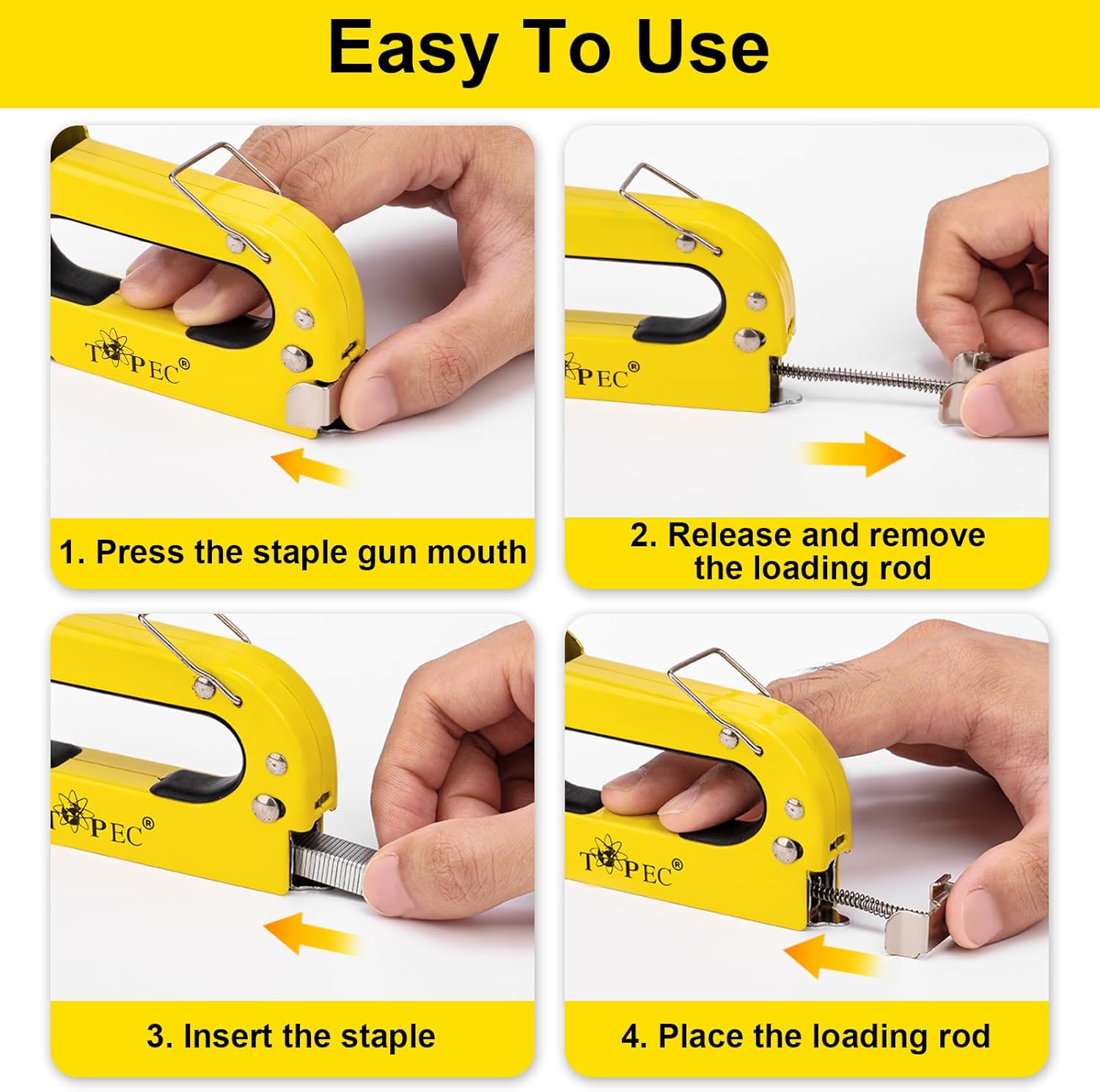
Figure 4: Step-by-step guide for loading staples.
Video: How to Load and Use the Topec Staple Gun
Video 1: Demonstrates the loading process for different staple types and basic operation.
4. Operating Instructions
- Position the Staple Gun: Place the front of the staple gun firmly against the material where you wish to fasten a staple.
- Depress the Handle: Squeeze the handle firmly and completely to drive the staple into the material.
- Adjust Driving Force (Power Adjustment):
The pressure setting knob located at the top rear of the staple gun allows you to adjust the driving force. Turn the knob clockwise for more force (for harder materials) and counter-clockwise for less force (for softer materials or to prevent over-penetration).

Figure 5: Adjusting the pressure setting knob to control staple driving force.
Common Applications:

Figure 6: Examples of the staple gun's wide range of applications.
5. Maintenance and Troubleshooting (Clearing Jams)
Occasionally, a staple gun may jam. The Topec staple gun is designed for easy jam clearing.
- Remove the Loading Rod: Follow steps 1 and 2 from the "Setup and Loading Staples" section to remove the loading rod.
- Open the Metal Drive Channel: Locate the metal drive channel switch (refer to Figure 2). Hold the switch and pull down the metal drive channel to open it.
- Check for Jammed Staples: Inspect the open drive channel for any bent or jammed staples. Carefully remove them using pliers or a similar tool.
- Restore the Drive Channel: Push the metal drive channel back into place until it clicks securely. Re-insert the loading rod and load new staples as described in the "Setup and Loading Staples" section.
6. Specifications
| Feature | Detail |
|---|---|
| Brand | Topec |
| Model Number | T8002-01 |
| Material | Carbon Steel |
| Item Weight | 1.41 pounds |
| Product Dimensions | 8.6 x 2.4 x 8.6 inches |
| Number of Fasteners (Included) | 600 (D-type), 600 (U-type), 600 (T-type) - Total 1800 |
| Staple Types Supported | D-type (Narrow Crown), U-type (Round Staple), T-type (Brad Nail) |
| Adjustable Driving Force | Yes, via pressure setting knob |
7. Safety Information
- Always wear eye protection when using this tool.
- Do not aim the stapler toward any person or animal.
- Keep out of reach of children.
- Ensure the material being stapled is stable and secure before operation.
- Do not attempt to modify the tool.
8. Warranty and Support
The Topec Upholstery Staple Gun features all-steel construction and a chrome finish designed for durability and rust resistance, ensuring it lasts for years. For any questions or issues regarding the product, please contact Topec customer service. They aim to resolve problems promptly.
For further assistance, visit the Topec Store on Amazon.