
Introduction
This manual provides essential information for the installation, operation, and maintenance of your SpeedFun FURIOUS Ebike Tuning Kit. This kit is designed to remove the speed limitation on eBikes equipped with Fazua motors, allowing for enhanced performance.
Please read this manual thoroughly before installation to ensure correct setup and safe operation.
Product Overview

Image: The SpeedFun FURIOUS tuning module, featuring a compact black casing with two integrated cables for connection to the ebike's sensor system.
The SpeedFun FURIOUS Tuning Kit is a compact electronic module designed to be easily integrated into your Fazua eBike system. It works by modifying the speed signal, effectively bypassing the factory-set speed limiter without altering the motor's original power output.
Installation Guide
Before beginning installation, ensure your eBike is turned off and the battery is removed for safety. It is recommended to consult a professional bicycle mechanic if you are unsure about any steps.
Locate the Speed Sensor:
Identify the speed sensor cable on your Fazua eBike. This is typically located near the rear wheel or within the motor housing. Refer to your eBike's original manual for precise location if needed.
Disconnect the Original Speed Sensor Cable:
Carefully disconnect the existing speed sensor cable from its connection point. Note the orientation of the connectors.
Connect the SpeedFun Module:
Connect the SpeedFun FURIOUS module inline with the speed sensor cable. The module has two connectors: one connects to the eBike's speed sensor, and the other connects to the eBike's wiring harness where the original sensor was connected.

Image: The SpeedFun module with its two cables, shown alongside a separate black casing, illustrating the components involved in the installation.
Ensure connections are firm and secure. The connectors are designed to fit only one way.
Secure the Module:
Once connected, find a secure and protected location for the SpeedFun module. Use zip ties or the provided casing (if applicable) to secure the module and excess cabling, preventing it from interfering with moving parts or being exposed to damage.
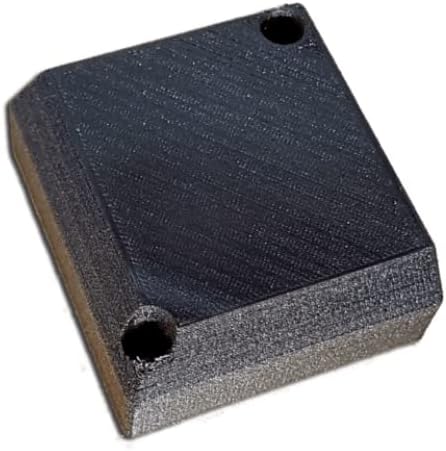
Image: A close-up view of the compact black casing for the SpeedFun module, designed for discreet and secure mounting on the ebike frame.
Reinstall Battery and Test:
Reinstall the eBike battery and turn on the system. Test the eBike's functionality, including the speed display. The tuning kit operates automatically once installed.
Operating Instructions
The SpeedFun FURIOUS Tuning Kit is designed for automatic operation. Once correctly installed, it will begin to function immediately upon the eBike being powered on.
- The kit works by modifying the speed signal sent to the eBike's display and motor controller, effectively removing the factory speed limit.
- Your eBike's display will show approximately half of the actual speed when exceeding the original speed limit. This is normal behavior for tuning kits that modify the speed signal.
- The motor assistance will continue beyond the original speed limit, up to the physical capabilities of the motor and rider.
- No user interaction or button presses are required for the kit to function after installation.
Maintenance
The SpeedFun FURIOUS Tuning Kit requires minimal maintenance. Follow these guidelines to ensure longevity:
- Periodically check all connections to ensure they remain secure and free from corrosion.
- Keep the module and its connections clean and dry. Avoid exposing it to excessive moisture or dirt.
- Inspect the cables for any signs of wear, fraying, or damage. Replace if necessary.
- Ensure the module remains securely fastened to prevent vibrations or impacts during riding.
Troubleshooting
If you encounter issues with your SpeedFun FURIOUS Tuning Kit, consider the following:
Kit Not Functioning / No Speed Indication:
- Check all connections: Ensure the SpeedFun module is correctly and securely connected inline with the speed sensor cable.
- Verify eBike power: Ensure the eBike battery is charged and properly installed.
- Inspect cables: Look for any visible damage to the module's cables or connectors.
Incorrect Speed Display (e.g., showing 0 km/h or half speed at all times):
- Half speed display is normal when exceeding the original speed limit. If it shows half speed even below the original limit, recheck connections.
- Ensure the speed sensor magnet is correctly aligned with the sensor on the wheel.
Motor Error Codes:
- If your eBike displays error codes after installation, first disconnect the SpeedFun module and reconnect the original speed sensor cable. If the error persists, the issue is likely with the eBike itself. If the error disappears, contact SpeedFun support.
For persistent issues, please contact SpeedFun customer support.
Specifications
| Feature | Detail |
|---|---|
| Brand | SpeedFun (Manufacturer) |
| Model Number | SF |
| Compatibility | All eBikes with Fazua motor |
| Color | Black |
| Display Type (Associated) | LCD, LED (eBike's display) |
| Sensor Type (Associated) | Speed Sensor (modifies signal) |
| Connectivity Technology | Wired (Inline connection) |
| Item Package Dimensions | 6.5 x 4.84 x 1.46 inches |
| Package Weight | 0.1 Kilograms |
| UPC | 765951938061 |
Warranty and Support
For warranty information or technical support regarding your SpeedFun FURIOUS Ebike Tuning Kit, please contact the manufacturer directly or the retailer from whom you purchased the product.
Manufacturer: SpeedFun
For further assistance, refer to the contact information provided with your purchase or visit the official SpeedFun website.
