
F&D A521X-cr
F&D A521X 2.1 Channel Multimedia Bluetooth Speakers User Manual
Model: A521X-cr | Brand: F&D (Refurbished by Amazon Renewed)
1. Introduction
Thank you for choosing the F&D A521X 2.1 Channel Multimedia Bluetooth Speakers. This system is designed to deliver impressive audio quality with its robust subwoofer and satellite speakers. Featuring versatile connectivity options including Bluetooth, USB, and FM radio, it provides a comprehensive audio solution for your home entertainment needs. This manual will guide you through the setup, operation, and maintenance of your speaker system.

Image: The F&D A521X 2.1 Channel Multimedia Bluetooth Speaker system, showcasing the central subwoofer, two satellite speakers, and the remote control.
1.1 What's in the Box?
- One Main Unit (Subwoofer)
- Two Satellite Speakers
- One Remote Control
- One Installation Guide
- One Warranty Card
- Two Audio Input Cables
2. Setup Guide
2.1 Unpacking
Carefully remove all components from the packaging. Ensure all items listed in the "What's in the Box?" section are present and undamaged. Keep the original packaging for future transport or service needs.
2.2 Connecting the Speakers
- Place the subwoofer on a stable surface, preferably on the floor for optimal bass performance.
- Position the two satellite speakers on either side of your listening area, ensuring they are at an appropriate distance for stereo sound.
- Connect the satellite speakers to the corresponding output ports on the rear of the subwoofer. Ensure a secure connection.

Image: A close-up view of the two satellite speakers, highlighting their 4-inch full-range drivers.
2.3 Power Connection
Connect the power cord from the subwoofer to a standard electrical outlet. The system features an automatic voltage regulator for a wide operating voltage range.
3. Operating Instructions
3.1 Basic Controls
The F&D A521X features convenient side panel controls on the subwoofer for easy access to volume and bass adjustments. Rotate the knobs to increase or decrease the respective levels.
3.2 Bluetooth Mode
- Turn on the speaker system.
- Press the 'Mode' button on the subwoofer or remote control until "Bluetooth" mode is selected. The display will indicate Bluetooth pairing readiness.
- On your compatible device (smartphone, tablet), enable Bluetooth and search for available devices.
- Select "F&D A521X" from the list to pair. Once paired, you will hear a confirmation sound, and you can begin playing audio wirelessly.
3.3 USB Playback
The speaker system is equipped with a USB port for playing media directly from a USB drive. It supports MP3 and WMA dual formats decoding.
- Insert your USB drive into the USB port on the side of the subwoofer.
- The system will automatically switch to USB mode and begin playing compatible audio files. If not, press the 'Mode' button to select USB.
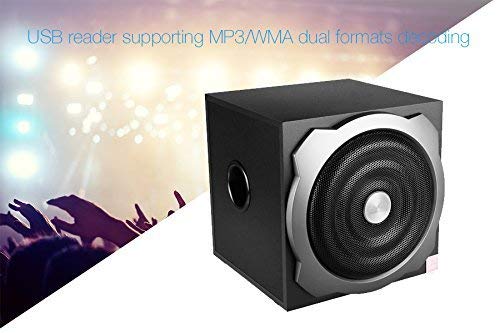
Image: The F&D A521X subwoofer with a USB drive inserted into its port, illustrating the USB playback capability.
3.4 FM Radio
The A521X features an uninterrupted digital FM radio working on PLL technology, with storage for up to 100 stations.
- Press the 'Mode' button to switch to FM radio mode.
- Use the tuning buttons on the remote control or subwoofer to scan for and save FM stations.
- You can directly select desired stations using the numeric keys on the remote control.
3.5 Multi-Input Sources
The speaker system supports various input sources, including USB and Bluetooth, allowing for flexible connectivity with different devices.
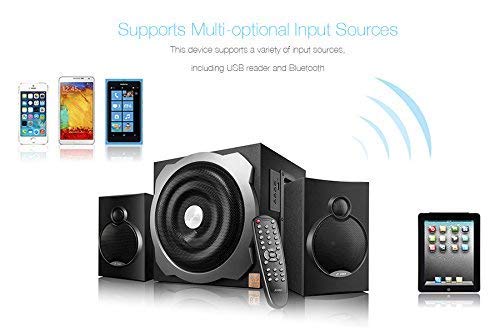
Image: The F&D A521X speaker system shown with various compatible devices such as smartphones and tablets, demonstrating its multi-optional input source support.
4. Care and Maintenance
- Cleaning: Use a soft, dry cloth to clean the surfaces of the speakers. Do not use liquid cleaners or aerosol sprays, as they may damage the finish or internal components.
- Placement: Place the speakers on a stable, flat surface to prevent accidental falls. Avoid placing them in direct sunlight, near heat sources, or in areas with high humidity.
- Ventilation: Ensure adequate ventilation around the subwoofer to prevent overheating. Do not block any ventilation openings.
- Power Off: Always turn off the speaker system when not in use for extended periods.
5. Troubleshooting
If you encounter any issues with your F&D A521X speaker system, please refer to the table below for common problems and their solutions.
| Problem | Possible Cause | Solution |
|---|---|---|
| No power | Power cord not connected; Power outlet not working | Ensure power cord is securely plugged in; Try a different power outlet |
| No sound | Volume too low; Incorrect input mode; Satellite speakers not connected | Increase volume; Select correct input mode (Bluetooth, USB, FM); Check satellite speaker connections |
| Bluetooth not connecting | Speaker not in pairing mode; Device Bluetooth off; Too far from speaker | Ensure speaker is in Bluetooth pairing mode; Turn on Bluetooth on your device; Move device closer to speaker (Bluetooth 4.0 version) |
| USB not playing | USB drive not inserted correctly; Unsupported file format; Corrupted files | Re-insert USB drive; Ensure files are MP3/WMA; Try a different USB drive or files |
| Poor FM reception | Weak signal; Antenna not extended | Adjust antenna position; Try repositioning the speaker system |
6. Technical Specifications
| Feature | Detail |
|---|---|
| Model Name | A521X |
| Speaker Type | Subwoofer with Satellite Speakers |
| Surround Sound Channel Configuration | 2.1 |
| Material | Wooden Subwoofer |
| Colour | Black |
| Subwoofer Driver | 6.5" Bass Driver |
| Satellite Driver | 4" Full Range Driver |
| Output Power (RMS) | 52 W (Subwoofer: 20W, Satellites: 16W x 2) |
| Connectivity Technology | Bluetooth 4.0, USB, Audio Input Cables |
| USB Support | MP3/WMA dual formats decoding |
| FM Radio | PLL technology, 100 station storage |
| Power Features | Automatic voltage regulator, High efficient energy saving design |
| Compatible Devices | Smartphone, Tablet, Music Players |
| Item Weight | 5.4 Kilograms |
| Product Dimensions (LxWxH) | 42.9 x 29.6 x 42.9 cm |
7. Warranty and Support
7.1 Warranty Information
This Amazon Renewed product comes with a 6-month seller or brand warranty. Please refer to the warranty card included in the box for specific terms and conditions. Keep your purchase receipt as proof of purchase for warranty claims.
7.2 Customer Support
For any technical assistance, troubleshooting beyond this manual, or warranty claims, please contact the seller or the F&D customer support as per the details provided on your warranty card or product packaging. You may also refer to the Amazon Renewed program details for support related to refurbished products.
Related documentsA521X-cr


Ask a question about this manual
Ask about setup, troubleshooting, compatibility, parts, safety, or missing instructions. Manuals+ will review the question and use this page’s manual context to help answer it.