
1. Introduction
This manual provides essential information for the safe and efficient operation of your Zerone 10.8V-12V Lithium Battery Charger. This charger is designed for use with 10.8V to 12V Lithium-Ion batteries, offering quick and reliable charging. Please read this manual thoroughly before first use and retain it for future reference.

Image 1: The Zerone 10.8V-12V Lithium Battery Charger, showing its compact design and universal compatibility label.
2. Safety Instructions
Always observe the following safety precautions to reduce the risk of electric shock, fire, or serious injury:
- Read all instructions: Before using the charger, read all instructions and cautionary markings on the charger, battery, and product using the battery.
- Indoor use only: Do not expose the charger to rain or wet conditions.
- Proper voltage: Ensure the power supply voltage matches the voltage specified on the charger's rating plate.
- Avoid damage: Do not operate the charger if it has received a sharp blow, been dropped, or otherwise damaged. Take it to a qualified service person.
- Ventilation: Do not block any ventilation openings. Ensure adequate airflow around the charger during operation.
- Unplug when not in use: Always unplug the charger from the power outlet before attempting any maintenance or cleaning, and when not in use.
- Use specified batteries: Only charge batteries specifically designed for this charger. Charging other battery types may cause them to burst, leading to personal injury and damage.
- Do not short-circuit: Never short-circuit the battery terminals.
- Keep away from children: This appliance is not intended for use by persons (including children) with reduced physical, sensory or mental capabilities, or lack of experience and knowledge, unless they have been given supervision or instruction concerning use of the appliance by a person responsible for their safety.
3. Package Contents
Verify that all items are present and in good condition:
- 1 x Zerone 10.8V-12V Lithium Battery Charger
- 1 x User Manual
4. Product Features
The Zerone 10.8V-12V Lithium Battery Charger offers the following key features:
- Universal Compatibility: Specifically designed for 10.8V to 12V Lithium-Ion batteries.
- LED Indicator: Built-in LED display provides intuitive monitoring of battery status.
- Smart Charging Management: Utilizes a 'first in, first charged' system and protects against overload.
- Quick Charging: Capable of charging a 12V Lithium-Ion 1.5Ah battery in approximately 50 minutes.
- Wide Model Compatibility: Compatible with models such as DC10WD, DC10SB, DC10WC, BL1015, BL1016, BL1021B, and BL1041B.

Image 2: The charger displaying its compatibility with various battery models, including DC10WD, DC10SB, DC10WC, BL1015, BL1016, BL1021B, and BL1041B.
5. Setup
Follow these steps to set up your battery charger:
- Unpack the Charger: Carefully remove the charger and all components from the packaging.
- Connect to Power: Plug the charger's power cord into a standard 100V-260V AC electrical outlet. The charger's LED indicator will flash green once to confirm power connection.
- Prepare Battery: Ensure the battery to be charged is clean and free from debris.
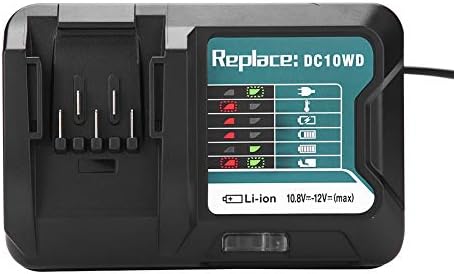
Image 3: The Zerone charger with its integrated power cord, ready for connection to an electrical outlet.
6. Operating Instructions
To charge a battery:
- Insert Battery: Align the battery with the charger's slot and slide it in until it clicks securely into place.
- Monitor Charging: The LED indicator will show the charging status. Refer to the "LED Indicator Guide" section for detailed explanations of the light patterns.
- Charging Complete: Once the battery is fully charged, the LED indicator will show a solid green light.
- Remove Battery: Press the release button on the battery (if applicable) and slide it out of the charger.
- Unplug Charger: Disconnect the charger from the power outlet when not in use.

Image 4: The Zerone charger with a compatible lithium-ion battery inserted, ready for charging.
7. LED Indicator Guide
The charger features an LED display to communicate the battery's status:
| Indicator Light | Status |
|---|---|
| Green Flashing | Charger is plugged in and ready. |
| Red Flashing | Battery is in cooling mode. Charging will begin once the battery temperature is within the optimal range. |
| Red Sustained Light | Battery is currently charging (0-100%). |
| Green Sustained Light | Charging is completed. The battery is fully charged. |
| Red and Green Flashing | Indicates a defective battery pack or charger. |

Image 5: A close-up view of the charger's LED indicator panel, detailing the meaning of each light pattern for battery status.
8. Maintenance
Proper maintenance ensures the longevity and performance of your charger:
- Cleaning: Disconnect the charger from the power supply before cleaning. Use a dry, soft cloth to wipe the exterior of the charger. Do not use water or chemical cleaners.
- Storage: Store the charger in a dry, cool place, away from direct sunlight and moisture.
- Inspect Regularly: Periodically inspect the charger and its cord for any signs of damage. If damage is found, discontinue use and seek professional repair.
9. Troubleshooting
If you encounter issues with your charger, refer to the following common problems and solutions:
- Charger not powering on:
- Ensure the power cord is securely plugged into both the charger and a working electrical outlet.
- Check the power outlet with another device to confirm it is functional.
- Battery not charging (Red Flashing LED):
- The battery may be too hot or too cold. Allow the battery to reach room temperature before attempting to charge again. Charging will automatically resume once the temperature is optimal.
- Battery not charging (Red and Green Flashing LED):
- This indicates a defective battery or charger. Try charging a different, known-good battery. If the issue persists, the charger may be faulty. If only the original battery causes this, the battery is likely defective.
- Slow charging:
- Ensure the battery is fully seated in the charger.
- Verify that the battery is compatible with this charger.
If these steps do not resolve the issue, please contact customer support.
10. Specifications
| Specification | Detail |
|---|---|
| Model Number | Zeronegfvetp6dn8-01 |
| Input Voltage | 100V-260V AC, 50-60Hz |
| Output Voltage | 10.8V-12V (DC) |
| Product Dimensions | 4.72 x 1.97 x 5.91 inches |
| Item Weight | 11.6 ounces (0.33 Kilograms) |
| Manufacturer | Zerone |
| Compatible Battery Types | 10.8V-12V Lithium-Ion (e.g., BL1015, BL1016, BL1021B, BL1041B) |
| Compatible Charger Models | DC10WD, DC10SB, DC10WC |

Image 6: The bottom view of the Zerone charger, showing its input/output specifications and model number.
11. Warranty and Support
For warranty information or technical support, please refer to the documentation provided with your purchase or contact Zerone customer service through the retailer where the product was purchased. Keep your purchase receipt as proof of purchase.